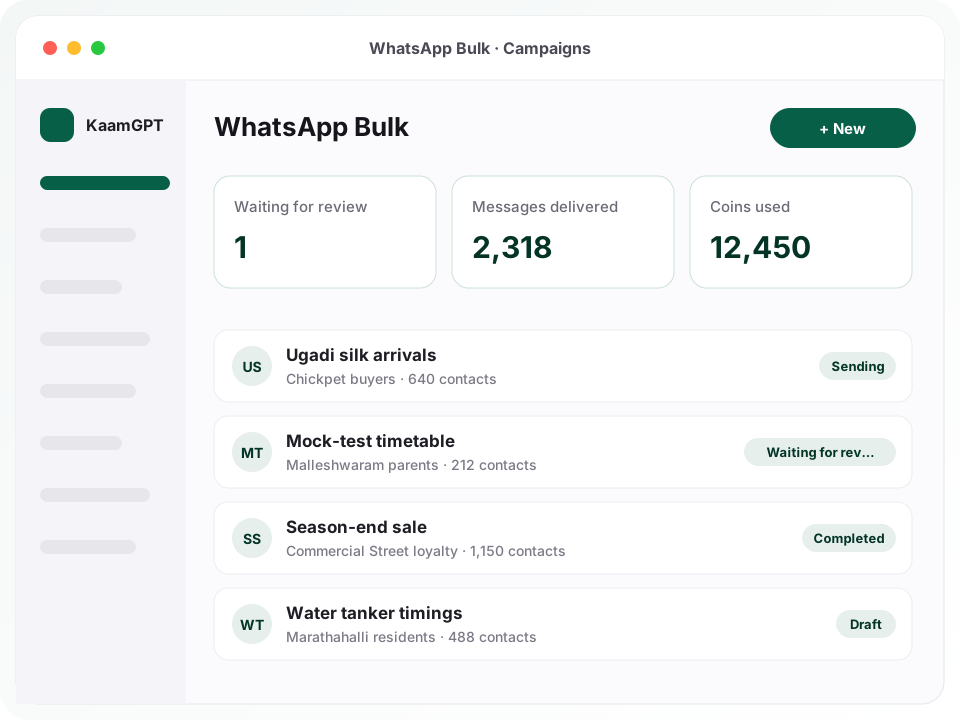
If you are searching for the best bulk WhatsApp message service in Bengaluru, first decide something simple: do you want to own the sending, or only the message? KaamGPT WhatsApp Bulk is built for the second answer. You write the campaign, pick who receives it and see its cost in wallet coins, then press Submit. There is no phone to pair, no QR code to scan and no Meta developer account to open.
What happens after Submit is deliberate. A person on the KaamGPT side reviews every campaign before a single message leaves, and approved campaigns go out at an uneven, unhurried rhythm rather than in one burst. That makes Bulk a fit for announcements, new-stock alerts, class timetables and event reminders to people who signed up to hear from you. It is not meant for one-time passwords or live support chats. The app itself lives at WhatsApp Bulk on KaamGPT.
- ₹0to open WhatsApp Bulk on the Free plan; each send is paid from the wallet
- 0WhatsApp numbers to pair, verify or register before your first campaign
- 4message shapes: text, file with caption, up to 3 buttons, photo carousel
- 1human review on every campaign before anything is sent
Which Bengaluru businesses run no-number WhatsApp campaigns, and how?
Sample situations, not customer stories, based on the sort of businesses that ask about Bulk.
A silk-saree wholesaler in the lanes of Chickpet
- The situation
- Retail buyers from Tumakuru, Mysuru and Hubballi order by phone. Their numbers live in a ledger and on two staff handsets, and new-stock photos go out by hand, one forwarded chat at a time, in the weeks before every festival.
- How KaamGPT fits
- The buyer numbers are imported once from a CSV and tagged silk or cotton. Before Ugadi, a carousel with a photo on every card goes to the silk tag, with a call button under the message. The recipient range splits the list across two mornings.
- What changes
- Buyers can swipe through the new arrivals in a single message, the staff get their afternoons back, and the owner can see how much of the list was reached.
A coaching centre near Sampige Road, Malleshwaram
- The situation
- Parents need the mock-test timetable, fee reminders and holiday notices. A teacher's personal phone has been doing the job, and parents who never saved that number miss the broadcasts entirely.
- How KaamGPT fits
- The timetable goes out as a PDF with a caption that greets each parent with {{name}}. Two teachers hold the create permission and draft freely; only the principal holds submit, so nothing reaches parents until she presses it.
- What changes
- Every notice now sits in the institute's campaign history rather than in a teacher's chats, and the principal decides what the wallet is spent on.
A co-living operator with three buildings in Marathahalli
- The situation
- Residents change every few months. Notices about water tanker timings, planned power maintenance and rent dates were posted in building groups that many residents had muted or quietly left.
- How KaamGPT fits
- Residents are kept as contacts with a building tag. Each notice is a short text campaign scheduled for the evening, sent only to the affected building's tag, with the building manager's call button underneath.
- What changes
- Residents get a direct message instead of a buried group post, and the operator stops maintaining a separate chat group for every floor.
A footwear and accessories store on Commercial Street
- The situation
- Billing staff collect mobile numbers for a loyalty programme, and customers tick a consent line on the bill. The list keeps growing, but the store has no spare SIM and no appetite for a Meta verification process.
- How KaamGPT fits
- The store writes an end-of-season sale message with a photo, a website button and a call button, schedules it for a Friday morning and submits. After it completes, the campaign screen shows delivered against coins charged.
- What changes
- The store runs a reviewed campaign to people who asked for offers, without buying a handset or learning an API dashboard.
What does WhatsApp Bulk handle between your draft and the recipient's phone?
Eight jobs worth checking in any candidate for the best bulk WhatsApp message service in Bengaluru, and how Bulk handles each one without a room full of handsets.
No number, QR code or API form
Bulk has no device picker and no pacing settings, because there is nothing for you to configure. The platform chooses the sender for each message. If your workspace has already paired a number in WhatsApp Blast, Bulk uses that number as well, within a daily ceiling, so you never pair anything twice.
A person approves every campaign
Submitting does not send. It places the campaign in a review queue where someone on the KaamGPT side reads it. Approved campaigns start at their scheduled time. A campaign that is turned down comes back with a written reason, stays editable, and can be submitted again once you have fixed what the note asks for.
Reach and cost shown before Submit
Beside the Submit button the composer shows three lines: how many people the audience reaches, what the campaign costs in coins, and your current wallet balance. If the wallet is short it says by how much, links to the recharge screen and keeps Submit disabled, so a campaign can never half-send for lack of coins.
Four message shapes, one live preview
Choose plain text, a file with a caption (photo, video, PDF or audio), a message carrying as many as three buttons, or a swipeable carousel of photo cards. A phone-width preview redraws as you type, rendered against a real contact from your audience, so you see a filled-in name rather than a raw placeholder.
Personal fields filled per contact
Type {{name}}, {{phone}} or any custom field such as {{city}}, and every recipient sees their own details in its place. A placeholder that has no value for a contact is dropped quietly, so nobody receives a greeting that reads "Hi {{first_name}}". WhatsApp styling like *bold* and _italic_ behaves exactly as it does in the app.
Audience from lists, tags or a paste
Pick saved contact lists, match on tags such as vip or renewal-due, paste numbers one per line, or choose every subscribed contact. Unsubscribed people are always left out, and someone who sits in three of your lists still gets one message, not three. Indian mobile numbers can be pasted without the country code.
Recipient range for staged sends
A range selector lets you send to contacts 1 to 300 today and 301 to 600 tomorrow from the same list. The head count and the coin total update as you move it, and the number charged is exactly the number frozen into the campaign at the moment you submit.
A campaign screen that adds up
Each campaign shows contacts, delivered, not sent and coins charged side by side, and refreshes itself while sending. When platform rules limit how much of a list goes out, a plain sentence on the same screen says so, so you never have to reconcile a wallet statement against a delivery count on your own.
How does a campaign travel from your draft to a customer's chat?
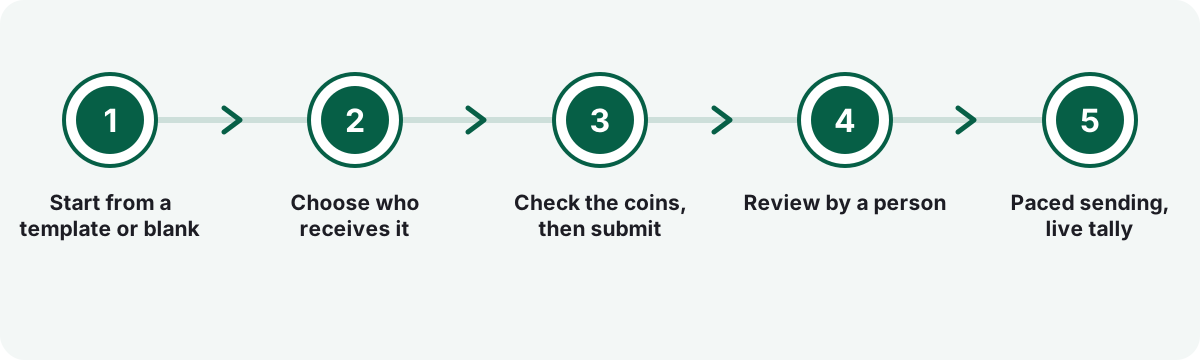
Start from a template or blank
Open WhatsApp Bulk and create a campaign. Begin from a saved template, a library Bulk shares with WhatsApp Blast, or write from scratch. The campaign name is only for you; recipients never see it.
Choose who receives it
Select lists, tags, pasted numbers or everyone subscribed, then narrow it with the recipient range if you want to stage the send. The Reaches line shows the exact head count every time you change something.
Check the coins, then submit
Read the Costs and Wallet balance lines. On Submit the contact list is frozen and the coins for the whole list leave your wallet. Add a date and time if you like; scheduled campaigns still wait for review.
Review by a person
Someone at KaamGPT checks the message and the list size. If it is turned down, you read the reason, edit and resubmit, and the coins are back in your wallet in full. Withdrawing before approval returns them too.
Paced sending, live tally
Once approved, messages leave one at a time with an irregular gap, never as a burst. The campaign screen updates while it runs and finishes with delivered and not-sent counts beside the coins charged.
Why keep bulk WhatsApp sending inside your KaamGPT workspace instead of a standalone panel?
One wallet across every app
The coins that pay for Bulk are the same coins WhatsApp Blast, email and the AI features spend. One balance, one recharge and one statement, instead of a separate credit pack for each tool your business happens to use.
Templates written once, used twice
Bulk and WhatsApp Blast share a single template library. A message saved in one appears in the other, and a campaign copies the words when you use them, so editing a template later never alters a send that is already running.
Drafting and spending are separate rights
Four permissions cover the app: view, create, submit and export. Juniors can draft all day while only the owner or a manager holds submit, the single action that spends coins and puts a message in front of customers.
Your lists stay in your workspace
Contacts, lists and campaigns are walled off per workspace at the database level. WhatsApp contacts export as a CSV and templates as a file whenever you want, so the list you built never turns into a vendor's asset.
Works from a phone browser
KaamGPT opens in any modern phone browser, and a shortcut on the home screen makes it behave like an app. On a small screen the composer stacks into one column and the preview stays phone-width, so an owner can submit from behind the counter.
Room to grow into your own number
When you want two-way chat, pair a number in WhatsApp Blast or set up the official API in WhatsApp Marketing. Your contacts and templates do not have to move anywhere, because they already live in the same workspace.
What will a WhatsApp Bulk campaign cost you on Free, Starter, Growth or Business?
Every KaamGPT plan includes WhatsApp Bulk, the Free plan too, so judging whether this is the best bulk WhatsApp message service in Bengaluru for your list costs nothing until you send. Your plan decides head count, storage for photos and PDFs, and the support you get. Sending is metered separately: coins per contact on each submitted list, drawn from the one prepaid wallet every app shares. Amounts quoted for Bulk plans are INR, the exact sum appears at checkout before payment, and the full plan comparison lists each tier side by side.
Free
₹0forever
No card needed
Costs ₹0, seats 5 employees and holds 512 MB of files; open Bulk, build lists and draft campaigns, then top up the wallet when you are ready to send.
- Up to 5 employees
- 1,000 emails / month
- 200 WhatsApp messages / month
- 512 MB storage
- Community support
Starter
₹999/month
or ₹9,590 billed yearly — 20% less
₹999 a month after a 14-day trial, with room for 25 employees and 5 GB for campaign photos and PDFs; enough for a shop where two people draft and one submits.
- Up to 25 employees
- 25,000 emails / month
- 5,000 WhatsApp messages / month
- 5 GB storage
- Email support
Growth
Recommended₹2,999/month
or ₹28,790 billed yearly — 20% less
₹2,999 a month after a 14-day trial, a 100-employee ceiling, 25 GB of storage and API access; suits an institute or small chain running Bulk beside email and other apps.
- Up to 100 employees
- 1,50,000 emails / month
- 30,000 WhatsApp messages / month
- 25 GB storage
- API access
- Priority email support
Business
₹7,999/month
or ₹76,790 billed yearly — 20% less
₹7,999 a month after a 14-day trial, room for 500 employees and 100 GB, plus priority help and guided onboarding for teams who would like their first campaigns set up with a guide beside them.
- Up to 500 employees
- 7,50,000 emails / month
- 1,50,000 WhatsApp messages / month
- 100 GB storage
- API access
- Priority support + onboarding
Optional add-ons
- Wallet coins for sendingDeducted from your prepaid balance for each contact once a list is submitted; the composer shows the rate in force and the total before you submit.
- Help building a prospect listThe Lead Generation service starts from ₹24,999 a month for B2B prospects; move them onto WhatsApp only after they agree to it.
- The charge covers the whole contact list frozen at Submit, at the rate shown on screen, whatever ends up delivered.
- If the review turns a campaign down, or you withdraw it before approval, its coins return to your wallet in full; once approved, cancelling stops further sending but the charge stands.
- The monthly WhatsApp message allowance printed on each plan applies to WhatsApp Marketing campaigns; Bulk is billed through the wallet instead.
- Wallet recharges are paid by UPI or bank transfer and credited once the payment reference has been checked, so top up a day before a festival send.
Is KaamGPT the best bulk WhatsApp message service in Bengaluru for a business without an API account?
Three realistic ways to run a WhatsApp broadcast for small business owners who want to reach a customer list this week and have no official setup.
| What matters | KaamGPT WhatsApp Bulk | Reseller bulk-WhatsApp panel | Business app broadcast lists |
|---|---|---|---|
| Number you must own or connect | None; the platform sends, and a number you paired in WhatsApp Blast is used too | Varies by vendor | Your own Business app number on your phone |
| Who can receive it | Subscribed contacts from your KaamGPT lists, tags or pasted numbers | Whatever file you upload | Only people who saved your number in their address book |
| Check before sending | A person reviews every campaign | Depends on the vendor | None; you press send yourself |
| How the cost is worked out | Coins per contact on the submitted list, from a prepaid wallet, shown before Submit | Credit packs bought from the reseller | Staff time spent on the handset |
| Personal fields | {{name}}, {{phone}} and custom fields filled per contact | Varies by panel | Same text for everyone on the list |
| Unsubscribes and duplicates | Unsubscribed contacts skipped; one message per number across lists | Depends on the vendor | Tracked by hand |
| What you see afterwards | Contacts, delivered, not sent and coins charged per campaign | Vendor report, format varies | Ticks inside each chat, no campaign total |
The honest verdict. Pick WhatsApp Bulk when you hold a consented list, have no number you want to dedicate, and value a human check and a clear coin bill over raw speed. Stay with Business app broadcasts for a few dozen regulars who already saved your number. If you need a verified sender name, approved templates or delivery within minutes, the official API route in WhatsApp Marketing fits better.
Who is it actually fine to message in bulk on WhatsApp?
WhatsApp's own Business Policy is plain about it: contact people only if they gave you their number and agreed to hear from you, and honour every request to stop. Meta's opt-in guidance adds that the person should know your business name when they agree. Those rules apply whichever number carries the message, so they apply to a Bulk campaign exactly as they would to your own phone.
India's DPDP law, formally named Digital Personal Data Protection Act of 2023, points the same way. A phone number is personal data, processing it needs a lawful purpose, most often consent, and consent can be withdrawn. In practice, a list built from your own billing counter, enquiry forms and past orders is a sound starting point. A list bought from a data vendor is not, however cheap it was.
- Write down where each list came from: billing counter, website form, event sign-up.
- Tell people when you collect the number that offers may arrive on WhatsApp, and under which business name.
- Mark anyone who asks to stop as unsubscribed; Bulk leaves them out of every future audience.
- Use tags to send each campaign only to the people it concerns, not everything to everyone.
- None of this is legal advice; a regulated business such as a clinic or a lender should check with its own adviser.
How do you write a bulk message people trust when it arrives from an unfamiliar number?
With Bulk, a customer may receive your campaign from a number that is not the one painted on your shop board. The words therefore have to do the introducing. Put your business name in the first line, remind the person why they are on your list, and give them one clear thing to do. A call button carrying your own number, or a link to your site, turns interest into a conversation you control.
Bulk itself has no inbox; it is a broadcast tool, not a chat tool. Design every campaign so the next step does not depend on a typed reply: a call button, a website link, a map pin, a store address. If two-way chat on your own number is the goal, that job belongs to WhatsApp Blast or the official setup in WhatsApp Marketing.
- Lead with the business name and area, for example the shop name followed by 4th Block, Jayanagar.
- Keep one offer per message; a second offer belongs in a second campaign.
- Use a carousel only when every card has a photo; one card without a photo turns the set into separate photo messages.
- Write in Kannada, English or both, since the message is free text rather than a pre-approved template.
- Preview on a real handset before submitting, because WhatsApp Web can draw buttons and cards differently.
What should you expect between approval and the last message sent?
Bulk sends one message at a time with an irregular pause between them, and every sending number has a daily ceiling. That rhythm is intentional, because a metronome of identical sends is exactly what looks automated. A list of a few hundred can take hours, and a large list can run across several days. When every sender is at its limit, the campaign waits and resumes by itself once there is room.
There are no quiet hours built in, so plan the timing yourself. Schedule the start for a weekday morning, and use the recipient range to split a long list across two or three days instead of letting the tail arrive late at night. For anything that must land within minutes, such as a login code or a same-hour delivery update, Bulk is the wrong tool.
When it finishes, read the four numbers together. Contacts is the frozen list you paid for; delivered and not sent tell you what happened to it. If those do not add up to the list, the campaign screen explains the gap in a sentence. That written record is how you should judge any claim to be the best bulk WhatsApp message service in Bengaluru, ours included.
Which Bengaluru trades suit a platform-sent WhatsApp campaign?
- Textile and saree wholesaleNew-stock carousels to retail buyers across Karnataka, tagged by fabric and split over mornings with the recipient range.
- Coaching and tuition centresTimetables and holiday notices as PDFs to parents, with drafting open to teachers and submit kept for the head.
- Co-living and PG operatorsBuilding-wise notices on water, power maintenance and rent dates, scheduled for the evening and tagged per property.
- Apparel and footwear storesSeason-end offers to a loyalty list collected at billing, with a product photo, a website button and a call button.
- Home bakers and caterersFestive menus before Deepavali or Christmas to past customers, with one order link instead of asking people to reply.
- Gyms, yoga and dance studiosBatch timings, workshop announcements and renewal reminders to members, each greeted by name and their own batch.
- Event and pop-up organisersVenue, date and entry details to people who registered, sent once sign-ups close and staged over two days if long.
Where in Bengaluru does a no-number bulk WhatsApp service fit best?
Walk through Chickpet on a weekday and the need is obvious: wholesalers photograph new bales on a phone and forward them to buyers, one chat at a time. Stores on Commercial Street gather numbers at the till for loyalty offers. Coaching centres in Malleshwaram and boutiques around 4th Block, Jayanagar keep parent and customer lists in registers. None of them wants to dedicate a spare SIM just to send a monthly announcement.
In Koramangala, pop-up organisers and cafés announce weekend events to people who signed up, while co-living operators in Marathahalli push building notices to residents who have muted every group. The calendar matters as much as the address: Ugadi, Varamahalakshmi, Dasara and Deepavali bunch sends into a few weeks. For these businesses, the best bulk WhatsApp message service in Bengaluru is one they can submit on a Tuesday and trust to go out carefully, which is why review and pacing come first.
Why is messaging a whole customer list on WhatsApp so awkward without an API account?
Most small businesses in the city gathered customer numbers the same way: at the billing counter, in a register, on a form for a workshop. The list exists. Reaching it is the hard part. Forwarding one message at a time from the owner's phone eats an afternoon, and the broadcast feature of the WhatsApp Business app reaches only people who have stored your number. Anyone who never stored it simply does not receive the broadcast.
The official route is real but heavy for a two-person shop. It means a Meta business account, a dedicated number, pre-approved templates and usually a provider in between. At the other end, reseller panels sell a bulk WhatsApp SMS service by the thousand with little explanation of how messages leave or what happens to your list. Plenty of owners looking for the best bulk WhatsApp message service in Bengaluru are stuck between those two extremes.
- Staff forward the same offer to hundreds of chats by hand, and somebody always receives it twice.
- Business app broadcasts silently skip every customer who never saved the shop's number.
- The official API wants business verification, a spare number and template approval before the first send.
- Some reseller panels quote a rate per thousand without saying which number sends or who checks the content.
- Nobody can say afterwards how many people actually got last week's announcement.
- Plans
- Paid tiers run ₹999 to ₹7,999 a month, Starter through Business; Free stays at ₹0; checkout confirms the sum
- Sending cost
- Coins per contact on the submitted list, from the prepaid KaamGPT wallet
- Before the first send
- No WhatsApp number, QR pairing or API account needed
- Review
- Every campaign is checked by a person before anything is sent
- Works with
- WhatsApp Marketing contacts, WhatsApp Blast templates, the shared wallet
- Runs on
- Browser-based on laptop, desktop or phone; can be pinned to a home screen
Where this applies around Bengaluru, Karnataka
- Bengaluru
- Karnataka
- India
- Chickpet
- Commercial Street
- Malleshwaram
- Jayanagar
- Koramangala
- Marathahalli
Frequently asked questions
24 answersHow much does WhatsApp Bulk charge per contact?
Bulk uses per-contact WhatsApp pricing, paid in wallet coins for every contact on the submitted list. At the current default the rate is 5 coins per contact, and the composer always shows the rate in force, the total for your list and your balance before you press Submit. The rate can change, so trust the figure on that screen. Plan prices are separate and listed on the <a href="/pricing">pricing page</a>.
Can I use WhatsApp Bulk on the free plan?
Yes. Bulk is on for all four plans, Free (₹0) among them, since it was written for businesses without a number of their own. Free gives five employees a 512 MB storage allowance, and each paid plan opens with a 14-day trial. On any plan, sending needs coins in the wallet, since each campaign is paid per contact rather than out of the plan price.
How soon can my first campaign go out after I sign up?
There is nothing to pair, so setup is short: <a href="/signup">create a workspace</a>, import contacts from a CSV or paste numbers, write the message and submit. Most of the effort goes into cleaning your list. After Submit the campaign waits for review and then sends at a paced rhythm, so plan a first campaign a day or two before the date it matters.
Do I need a WhatsApp Business API account or a spare SIM?
No. Bulk exists so that you can send bulk WhatsApp messages without API paperwork: no Meta developer account, no number verification and no QR code to scan. The platform sends through its own senders, and if your workspace has already paired a number for WhatsApp Blast, that number is used as well. If you want a verified sender name, the official route suits you better.
Who reviews my campaign before it goes out?
A person on the KaamGPT side reviews every submitted campaign, and nothing is sent until they approve it. If they turn it down, the campaign shows the reviewer's note explaining why, and you can edit it and submit again. Keep the message honest, name your business clearly and send only to people who said yes to your messages.
What happens to my coins if a campaign is rejected or cancelled?
The coins for the full list leave your wallet when you submit. If the review turns the campaign down, or you cancel it while it is still waiting for review, all of those coins go back to your wallet. Once a campaign is approved it has started: cancelling stops further sending, but the coins already charged stay charged.
Will every contact on my list receive the message?
Not necessarily, and KaamGPT does not promise that. Some numbers cannot take a message, and platform rules can limit how much of a list is sent. You are charged for the whole submitted list either way. The campaign screen puts contacts, delivered, not sent and coins charged side by side, with a sentence explaining any gap, so you are never left to work it out.
How quickly do the messages go out once a campaign is approved?
Steadily rather than instantly. Messages leave one by one with irregular pauses, and each sending number has a daily ceiling, so a few hundred contacts can take hours and a big list may need more than a day. If every sender is full, the campaign waits and restarts on its own. Do not rely on Bulk for login codes or anything due within minutes.
Which number will my customers see the message from?
Possibly a number they do not recognise, because the platform picks the sender for each message and does not reveal which one carried it. If your workspace paired its own number in WhatsApp Blast, some messages may leave from that number. Put your business name in the first line and add a call button with your own number, so the message introduces you properly.
Can customers reply to a bulk campaign?
Bulk is built for one-way announcements and has no inbox of its own. Write each campaign so the next step does not depend on a reply: a call button with your number, a website link, a map or a store address. If you want conversations, pair your own number in <a href="/best-whatsapp-blast-software-in-bengaluru">WhatsApp Blast</a> and answer from its inbox.
Could KaamGPT or another customer ever see or keep my contact list?
Everything you load into Bulk, from contacts and lists to templates and campaign history, stays in your workspace, fenced off from other workspaces by database rules, and no other customer can open them. You can export your WhatsApp contacts as a CSV and your templates as a file whenever you like, so leaving never means rebuilding your list from memory or from old chats.
Where do I get help with Bulk on each plan?
Bulk questions from a Free workspace go through community support. Starter unlocks email support, Growth has its email handled with priority, and Business combines priority support with onboarding. For a campaign that was turned down, start with the reviewer's note on the campaign itself; it says what to change, and fixing that is usually the fastest way to get approved.
Is there a person I can call for a walkthrough of WhatsApp Bulk?
Yes. The KaamGPT number, +91 79767 82366, works for a phone call and for a WhatsApp chat alike. Describe your business, the size of your list and how it was collected. We will walk you through the composer, the review step and the wallet, and say plainly if WhatsApp Blast or WhatsApp Marketing suits your case better than Bulk.
Why pick this over a bulk WhatsApp SMS service sold by resellers?
A reseller's bulk WhatsApp SMS service typically sells credits and an upload box, and how messages leave is their business. With KaamGPT the list stays in your workspace, a person reviews each campaign, the coin cost is on screen before Submit, and the finished campaign shows what was delivered against what you paid. If you are weighing the best bulk WhatsApp message service in Bengaluru, ask every vendor for those four things.
How does Bulk differ from WhatsApp Blast and WhatsApp Marketing?
Three apps, three jobs. Bulk sends for you, with no number of your own. <a href="/best-whatsapp-blast-software-in-bengaluru">WhatsApp Blast</a> sends from a number you pair by QR, with pacing you control and an inbox for replies. <a href="/best-whatsapp-marketing-tools-in-bengaluru">WhatsApp Marketing</a> uses the official Cloud API with approved templates. A sensible path is to start with Bulk and add another when you want replies or a verified sender.
Which other KaamGPT apps does WhatsApp Bulk work with?
It shares WhatsApp contacts, lists and tags with WhatsApp Marketing, so a CSV imported there is ready here. It shares one template library with WhatsApp Blast. It is paid from the same wallet as Blast, email and the AI features. And the <a href="/best-b2b-lead-generation-agency-in-bengaluru">Lead Generation service</a> can bring prospects into your KaamGPT contacts, to be moved onto WhatsApp once they agree.
Who should not use WhatsApp Bulk?
Bulk is not the best bulk WhatsApp message service in Bengaluru for every job. Skip it if you need one-time passwords or alerts that must land in minutes, a verified business name on every message, or live two-way support. It also suits nobody holding a purchased or scraped list, because those people never said yes to you. Larger brands with compliance teams are usually better served by the official API setup in WhatsApp Marketing.
Can I write campaigns in Kannada for Bengaluru customers?
Yes. The message is free text rather than a pre-approved template, so Kannada script, English or a mix of both goes out exactly as you type it. For a family audience in Jayanagar or Malleshwaram, a Kannada greeting with the details in English often reads naturally. Preview it on a phone first to check line breaks and how the placeholders fill in.
Is sending bulk WhatsApp messages allowed for a business in Karnataka?
Whether you trade in Karnataka or anywhere else in India, consent is the condition that matters. WhatsApp's Business Policy requires opt-in and respect for opt-outs, and India's DPDP law covers the phone numbers you hold. Message people who gave you their number for this purpose, and mark anyone who asks to stop as unsubscribed. This is general guidance, not legal advice.
Does WhatsApp Bulk work on a mobile phone at the shop counter?
It does. Open KaamGPT in the phone's browser and, if you like, pin it to the home screen, where it opens like an app. On a small screen the composer stacks into one column: message, audience and schedule first, then the preview and the cost lines. You can draft on a laptop in the morning and submit from your phone at the shop later.
My customer numbers are in an Excel sheet; how do they get into Bulk?
Save your list as a CSV with a phone column and, if you have them, name, tags and extra fields such as city. Import it into WhatsApp Marketing's contacts; Bulk reads the same contacts. Any row without a usable phone number, and any number repeated inside the file, is set aside with the reason shown so you can correct it. Indian numbers work with or without +91.
Can I schedule a campaign for a festival morning?
Yes. Set the day and hour in the composer's When field; the default time zone is India's. A scheduled campaign still needs approval and will not send before it has it, so submit a few days early. If approval arrives after the scheduled moment, sending starts once it is approved. For a long list, stage it with the recipient range so the tail does not land late at night.
Can I send a PDF brochure, a video or a product catalogue?
Yes. Choose File + text for a photo, video, PDF or audio clip with a caption, Buttons for text, a photo or a PDF with up to three reply, link or call buttons, or Carousel for a swipeable row of photo cards. Uploads count against your workspace storage. Give every carousel card a photo, or the set arrives as separate photo messages.
Can I stop junior staff from spending wallet coins?
Yes. WhatsApp Bulk has four permissions: view campaigns, create campaigns, submit for review, and export results. Give your team create so they can draft and preview, and keep submit for yourself or a manager. Submit is the only step that spends coins and puts a message in front of customers, so that one permission is your spending control.