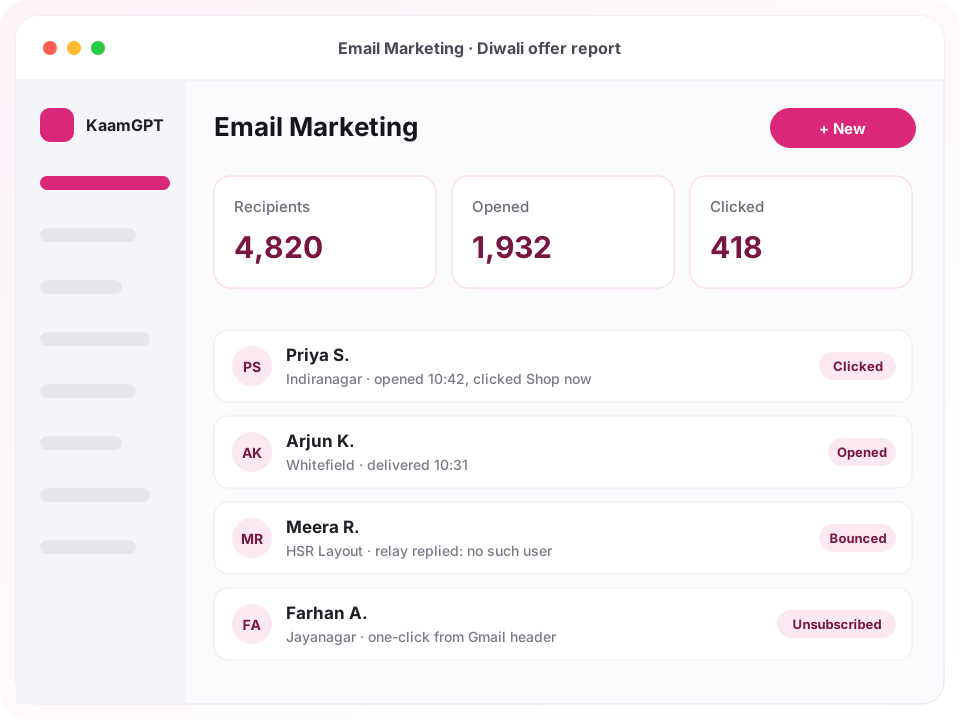
Before you pick from the best email marketing tools in Bengaluru, settle one question: whose server will your mail leave from? KaamGPT Email Marketing sends newsletters and bulk email campaigns through an SMTP relay you already pay for, such as Google Workspace, Microsoft 365, Zoho Mail or Amazon SES, or through a platform delivery server assigned to your workspace. Your sending history builds on your own domain instead of disappearing into a pool shared with strangers.
Around that sender sit the parts a marketing desk touches every week: HTML templates with merge tags, contact lists and tags, a segment builder, the same customer list your CRM and WhatsApp campaigns read from, scheduled sends, and a report per campaign showing who opened, clicked, bounced or unsubscribed. Plans are billed in rupees and begin with a free tier, and 100+ companies across India already use KaamGPT for parts of their daily work.
- ₹0Free plan with 1,000 campaign emails and 5 campaigns every month
- 14 daystrial on the Starter, Growth and Business plans
- 7,50,000emails a month included on the Business plan
- 5free test sends a day, over your real relay
Where does email marketing still pay off across Bengaluru?
Bengaluru uses email differently from one neighbourhood to the next. D2C brands clustered around Koramangala and HSR Layout send product drops and festive offers to people who bought online. SaaS and IT services firms in Whitefield and Electronic City mail release notes and webinar invitations to clients abroad, which makes scheduling by time zone matter far more than subject-line tricks.
In Jayanagar and Malleshwaram, coaching centres, schools and clinics write to parents and patients who expect a proper email with an attachment, often in Kannada as well as English. In Indiranagar, cafés, studios and boutiques invite regulars to events and launches. Across all of them, one test decides between the best email marketing tools in Bengaluru: does it protect your domain, and does it already know your customers?
Why do Bengaluru teams outgrow sending newsletters from a Gmail inbox?
Long before they compare the best email marketing tools in Bengaluru, most growing businesses start the same way: a Google Sheet of customer addresses, a mail-merge add-on, and one staff inbox doing the sending. It holds up for forty people. At four thousand, the inbox reaches its provider's daily cap halfway through, bounce notices bury whoever owns the account, and nobody can say who actually opened the festive offer.
The quieter cost is reputation. A list that is never cleaned keeps mailing dead addresses, and receiving servers notice the pattern. Opt-out requests arrive as irritated replies rather than clicks, get missed, and the same people are written to again next week. Gmail and Yahoo now expect bulk senders to authenticate their domain and honour one-click unsubscribe, which a personal mailbox was never designed to handle.
- A staff mailbox stops at its provider's daily sending limit, often in the middle of a campaign.
- Bounce notices and out-of-office replies pile into one person's inbox, so the list never gets cleaned.
- People who asked to stop hearing from you are mailed again, because the opt-out lived in a reply rather than a system.
- Nobody can tell which link in the newsletter drew the clicks, or whether it was read on a phone.
- Customer data is copied across three spreadsheets, and each one disagrees about who counts as a customer.
Which Bengaluru businesses send what, and how would they set it up?
Illustrative scenarios rather than customer stories: the kind of sender this app was built for, and the settings that suit each one.
A D2C skincare brand in Koramangala
- The situation
- Weekly product drops went out from the founder's Gmail through a mail-merge add-on. The inbox hit its daily cap mid-send, and unsubscribe requests arrived as replies that nobody ever logged anywhere.
- How KaamGPT fits
- Connect Amazon SES in the Mumbai region as the default relay, import the store's customer export with order-count columns as merge fields, and save a segment of repeat customers tagged repeat-buyer who were active in the last 90 days. Schedule each drop email for Friday morning.
- What changes
- Each drop reaches the full list on one relay, opt-outs are honoured without anyone reading replies, and the team sees which product link drew the clicks.
A B2B SaaS company near Whitefield's ITPL
- The situation
- Monthly release notes had to reach admins at customer accounts in India, the Gulf and the US, and the product team also wanted to send account emails from its own application.
- How KaamGPT fits
- Build the release-notes template once with {{company_name}} and {{first_name|there}} tags, schedule separate sends per region using a country segment, and use the Developer API on the Growth plan to send one-off account emails from the product backend through the same relay.
- What changes
- Release notes arrive during each region's working morning, and product-triggered mail shares the same templates and sender identity as marketing.
A coaching institute in Malleshwaram
- The situation
- Batch timings, fee reminders and result announcements reached parents through WhatsApp groups and a patchy spreadsheet, with no record of who had actually received the new timetable.
- How KaamGPT fits
- Pick enrolled students from the customer list by pipeline stage, attach the timetable PDF to the campaign, write the subject in Kannada and English, and keep enquiries who never enrolled in a separate list for admissions mail.
- What changes
- Parents get a proper email with the attachment, and the front office can open the recipient list to see who has opened it.
A residential project's sales team in HSR Layout
- The situation
- A brand-new sending domain had to reach several thousand site-visit enquiries gathered over two years, many of them stale, without the domain being flagged in its first week.
- How KaamGPT fits
- Publish SPF, DKIM and DMARC first, lower the relay's daily limit, and send to the most recently active enquiries before the oldest, in recipient ranges across several days. Hard bounces from early batches are suppressed before riskier addresses are mailed.
- What changes
- The list gets cleaner with every batch, and the team decides when to widen the send based on what each report shows.
What does KaamGPT Email Marketing do between the template and the inbox?
Eight working parts of the Email Marketing app, each one something you can open and use in the product today.
A campaign builder that freezes the send
Set the subject, preheader, from name, reply-to address and any attachment, such as a PDF brochure. The moment you press Send, the audience and the HTML are frozen, so editing a list or template afterwards cannot change who receives this run or what they read. Duplicate a finished campaign to reuse its setup.
HTML templates with merge-tag fallbacks
Templates are HTML with tags like {{first_name|there}}, so a contact without a first name reads a friendly greeting instead of a blank. Any extra column in your import becomes a tag. The preview switches between desktop, tablet and phone widths, and styles are moved inline at send time so Gmail and Outlook keep your design.
Segments built from real contact fields
Lists and tags hold people; segments describe them. Combine up to 25 conditions on fields such as tags, country, source, bounce count, subscribe date or last activity, matched on all or any. Repeat customers who were active in the last 90 days becomes a saved audience you can count before sending.
Customers picked straight from your CRM
Instead of exporting a spreadsheet, choose recipients from the KaamGPT customer list by type, pipeline stage, tag, owner, source or days without activity. Colleagues are left out unless you deliberately include them, opt-outs are always respected, and the identical filter selects the identical people in WhatsApp Marketing.
Your own SMTP, with rotation by capacity
Add a relay using presets for Google Workspace, Microsoft 365, Zoho Mail or Amazon SES in the Mumbai region, or type any host. KaamGPT verifies the login without sending, then picks servers in order: your default, then relays you own, then by priority, skipping any server whose daily limit is used up.
Unsubscribes and bounces handled automatically
If your template has no unsubscribe link, a footer link is added for you, and every message carries one-click unsubscribe headers. When a receiving server rejects an address as non-existent, that contact is marked bounced and suppressed, which stops dead addresses from hurting your domain on the next campaign.
Schedule, pause, resume, send in ranges
Schedule a campaign for Tuesday at 10 am and the scheduler, which checks every minute, starts it on time. Pause takes effect within the current batch of 100 emails. A recipient range lets you mail contacts 1 to 2,000 today and the rest tomorrow, which is how careful senders pace a new domain.
A report down to each recipient
Every campaign shows recipients, delivered, opened, clicked, bounced, failed and unsubscribed counts, plus click-to-open, an hourly activity timeline, the ten most-clicked links, and opens by device and country. Filter recipients by status, or export the full ledger as a CSV that opens safely in Excel.
What does bulk email cost on each KaamGPT plan?
Every plan includes the full Email Marketing app; plans differ in how many emails and campaigns you can send each month and how large a team the workspace can hold. If you are ranking the best email marketing tools in Bengaluru on price, the useful sum is your monthly send volume, not your contact count. The full comparison sits on the pricing page.
Free
₹0forever
No card needed
₹0 a month: 1,000 emails and 5 campaigns a month for up to 5 employees, enough to connect a relay, import a list and run a genuine pilot.
- Up to 5 employees
- 1,000 emails / month
- 200 WhatsApp messages / month
- 512 MB storage
- Community support
Starter
₹999/month
or ₹9,590 billed yearly — 20% less
₹999 a month (₹9,590 billed yearly): 25,000 emails and 50 campaigns a month with email support, which fits a weekly newsletter to roughly 5,000 contacts.
- Up to 25 employees
- 25,000 emails / month
- 5,000 WhatsApp messages / month
- 5 GB storage
- Email support
Growth
Recommended₹2,999/month
or ₹28,790 billed yearly — 20% less
₹2,999 a month: 1,50,000 emails and 250 campaigns a month, API access for sending from your own website or app, and priority email support.
- Up to 100 employees
- 1,50,000 emails / month
- 30,000 WhatsApp messages / month
- 25 GB storage
- API access
- Priority email support
Business
₹7,999/month
or ₹76,790 billed yearly — 20% less
₹7,999 a month: 7,50,000 emails and 1,000 campaigns monthly, room for 500 employees, and priority support that includes onboarding help.
- Up to 500 employees
- 7,50,000 emails / month
- 1,50,000 WhatsApp messages / month
- 100 GB storage
- API access
- Priority support + onboarding
Optional add-ons
- Wallet coins for sendingMetered from the prepaid wallet per email sent; the campaign builder shows the estimated coins before you press Send.
- Managed campaigns through Digital MarketingStrategy, copy and campaign execution run by a team, from ₹19,999 a month, with scope set out in a written quote.
- All amounts are in Indian rupees, and checkout shows the final figure before you pay. Paying quarterly, half-yearly or yearly lowers the plan price by 10%, 15% or 20%.
- The monthly email allowance is checked before every send; a campaign larger than what remains this month waits for an upgrade or the next month.
- Campaign emails are also metered in coins from the prepaid wallet. The builder shows the estimate first, and a campaign whose wallet runs out of coins pauses instead of failing.
- When you send through your own relay, that provider bills you directly for its service.
How does a first campaign get from a CSV file to the inbox?
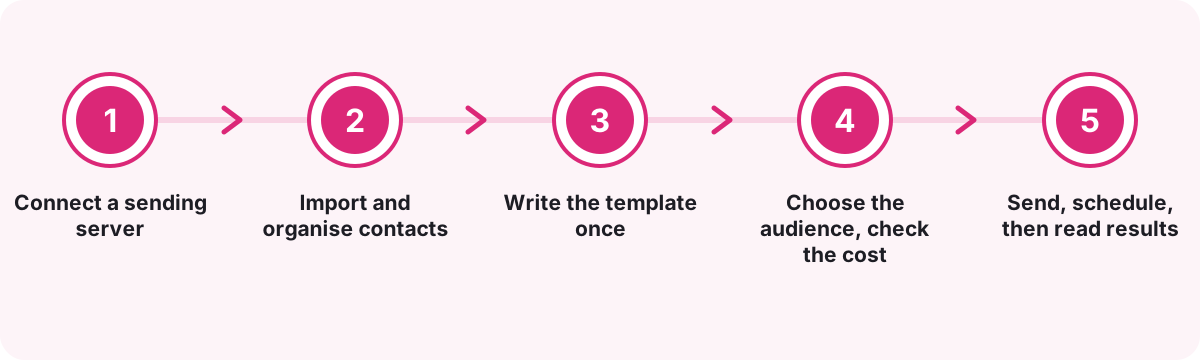
Connect a sending server
Pick a preset or enter any SMTP host, port and login. The password is encrypted on save and never shown back. Verify checks the connection without sending, and a test email confirms delivery. Workspaces with a platform delivery server assigned can send through that instead.
Import and organise contacts
Upload a CSV, TSV or vCard file, map its columns, and choose or create a list. Rows with broken addresses are reported rather than stopping the import, duplicates in the file are collapsed, and big files upload in batches of 1,000 with a progress bar.
Write the template once
Start from the built-in starter layout or paste HTML from your designer. Insert merge tags from the palette, set fallbacks, and check the preview at phone width. Save it to the library under a category such as newsletter, promotional, welcome or re-engagement.
Choose the audience, check the cost
Select lists, narrow them with a segment or a customer filter, and the builder shows exactly how many contacts match. Unsubscribed, bounced and blacklisted contacts are already excluded, and someone on two lists gets one copy. The wallet estimate appears beside the count.
Send, schedule, then read results
Send a test to yourself, then send now or pick a time. Watch the campaign move from queued to running to completed, pause it if something looks wrong, and open the report to see who engaged. Export the clickers when sales wants a warm list.
How do the best email marketing tools in Bengaluru compare with mail merge and overseas platforms?
Teams shortlisting the best email marketing tools in Bengaluru usually weigh three routes: stay on a staff inbox with a mail-merge add-on, sign up to an overseas newsletter platform, or run campaigns inside the workspace that already holds their customers.
| What matters | KaamGPT Email Marketing | Mail merge from a staff inbox | Overseas newsletter platform |
|---|---|---|---|
| Sending server | Your own SMTP relay or an assigned platform server, with daily limits respected | One employee's mailbox and its daily cap | Usually the vendor's own sending infrastructure |
| Audience | Lists, saved segments, or a filter over your CRM customers | Rows in a spreadsheet | Lists and segments inside the vendor's database |
| Unsubscribe | Footer link added when missing, plus one-click headers; opt-outs excluded automatically | Handled by hand from replies | Built in |
| Hard bounces | Contact marked bounced and suppressed from later sends | Bounce notices land in the sender's inbox | Usually suppressed automatically |
| Reporting | Per-recipient status, top links, devices, countries, CSV export | Little or none without extra add-ons | Detailed campaign reports |
| Multi-step automated journeys | Not today: one-off and scheduled campaigns only | No | Often available, sometimes on higher tiers |
| Billing | INR plans from ₹0, sends metered from a prepaid wallet | Included in the mailbox licence | Commonly tiered by contact count and charged in foreign currency |
| Shared with WhatsApp and CRM | Yes, one customer record across KaamGPT apps | No | Through third-party connectors |
The honest verdict. Choose KaamGPT when you want newsletters and offers to leave on your own domain's reputation, drawn from the same customer list your sales and WhatsApp teams already use, and billed in rupees. A mail merge is fine for a few dozen personal notes. If your plan depends on multi-step behavioural journeys, such as a five-email onboarding sequence triggered by sign-up, an overseas automation platform suits you better today.
How should you warm up a new sending domain before the first big campaign?
Receiving servers judge a domain by its history, and a new domain has none. Before the first send, publish SPF and DKIM records for the relay you are using and add a DMARC policy, starting in monitoring mode (p=none) and tightening it once the reports look clean. These records live at your DNS host; the company email guide covers the same domain setup for staff mailboxes.
Then start small, with the people most likely to engage. Build a segment of contacts active in the last 30 or 60 days and send it in slices across several days using the campaign's recipient range. After each slice, check the bounced and failed counts in the report before widening to older addresses. Suppressed bounces from the early slices protect the later ones.
- Publish SPF, DKIM and DMARC before the first campaign, not after the first complaint.
- Lower the relay's daily limit in Sending servers so a large list cannot outrun your provider's cap.
- Mail your most recently active segment first and stale addresses last, in small ranges.
- Keep the from name and address constant between campaigns so recipients recognise the sender.
Which campaign numbers should a Bengaluru marketing team actually trust?
Opens are the shakiest figure in email. Some mail apps fetch images automatically on the reader's behalf, which records an open no person made, while others block images and hide a real one. Treat the open count as a trend across campaigns rather than a verdict on one subject line. Teams judging the best email marketing tools in Bengaluru on dashboards alone often miss this.
Clicks are firmer ground. Click-to-open tells you whether the body delivered on the subject's promise, and the ten most-clicked links show what readers wanted. Bounced and failed counts are the health check for your list and relay: if they climb, stop and clean before the next send. Unsubscribes after a campaign are feedback on frequency as much as on content.
- Compare click-to-open between campaigns sent to similar audiences, not across every send.
- Use the device split to decide how much design effort the phone layout deserves.
- Export clickers from the recipient ledger and hand them to sales the same day.
What do Indian law and Gmail or Yahoo expect from bulk email senders?
India's Digital Personal Data Protection Act, 2023 says consent should be free, specific, informed, unambiguous and given through a clear affirmative action, and that withdrawing it should be as easy as giving it. For email marketing, that points to opt-in forms with unticked boxes, a record of where each address came from, and an unsubscribe that works in one step. Treat this as general guidance, not legal advice.
Mailbox providers set a parallel bar. Yahoo's sender guidance asks bulk senders to authenticate with SPF, DKIM and DMARC, support one-click unsubscribe as defined in RFC 8058, and keep spam complaints low. KaamGPT covers the mechanics it controls: a working unsubscribe link, the one-click headers, and automatic suppression of opt-outs and hard bounces. Collecting consent and publishing DNS records remain your responsibility.
- Record where every imported list came from; the contact source field makes that filterable later.
- Never import bought lists; they arrive full of dead addresses and people who never agreed.
Which Bengaluru industries get the most from email newsletter software?
- D2C & e-commerceProduct drops, restock alerts and festive offers, segmented by tag and last activity and sent through your own relay.
- B2B SaaS & IT servicesRelease notes, webinar invitations and account updates scheduled by region, with the API covering product-triggered mail.
- Coaching & educationBatch schedules, results and fee reminders to parents, with PDF attachments and a delivery record for every recipient.
- Real estateLaunch announcements and site-visit invitations to enquiry lists, paced with recipient ranges while a new domain earns trust.
- Clinics & diagnosticsHealth-camp notices and package updates to patients who opted in, with every unsubscribe honoured without manual work.
- Restaurants & cafésMonthly menus and event nights for regulars, with the opens-by-device view guiding a phone-first layout.
- Events & co-workingMember newsletters and event invitations, where the most-clicked links reveal which sessions actually drew interest.
Why run newsletters inside KaamGPT instead of a separate email tool?
Your reputation, on your relay
A relay you add is preferred automatically over any platform server, so each campaign adds history to your own domain and provider account instead of a pool you share with unknown senders.
One customer record, every channel
The customer filter behind an email campaign is the one WhatsApp Marketing uses too, so VIP customers who have gone quiet for 90 days means the same people on both channels.
Drafting and sending are separate rights
Permissions split creating and editing campaigns from sending, pausing, deleting and exporting reports, so a junior can build the festive email while the marketing head decides when it goes out.
You pay for mail that left
Coins are taken per batch of 100 before it sends, and the share for addresses that bounced or failed is credited straight back to the wallet, so a dirty list does not quietly drain your balance.
Credentials stay locked away
SMTP passwords are encrypted when saved and never displayed again, not even to admins of your own workspace. An edit that leaves the password field blank keeps the stored one untouched.
An API when marketing meets product
On Growth and Business, the Developer API sends single emails or bulk batches of up to 50,000 recipients per call from your own code, using your saved templates and relays, with examples in cURL, JavaScript and Python.
- Price
- Free plan at ₹0; paid tiers start at ₹999 monthly, each with a 14-day trial
- Monthly emails
- 1,000 (Free), 25,000 (Starter), 1,50,000 (Growth), 7,50,000 (Business)
- Sending servers
- Your own SMTP (Google Workspace, Microsoft 365, Zoho Mail, Amazon SES or custom) or an assigned platform relay
- Platforms
- Web app in any desktop or phone browser; Developer API on Growth and Business
- Works with
- KaamGPT customer list, WhatsApp Marketing and the shared prepaid wallet
- Talk to us
- Use the call and WhatsApp buttons beside this guide; demos on request
Where this applies around Bengaluru, Karnataka
- Bengaluru
- Karnataka
- India
- Malleshwaram
- Electronic City
- Koramangala
- Jayanagar
- Whitefield
- HSR Layout
- Indiranagar
Frequently asked questions
23 answersHow much does KaamGPT Email Marketing cost per month?
Free costs ₹0 and covers 1,000 emails and 5 campaigns monthly. Starter at ₹999 monthly covers 25,000 emails, Growth at ₹2,999 covers 1,50,000, and Business at ₹7,999 covers 7,50,000. Figures are in INR, and checkout confirms the precise amount. Campaign sends are also metered in coins from a prepaid wallet, and the builder shows that estimate before you send.
Can I try the email tool free before paying?
Yes, in two ways. The Free plan costs nothing and includes the full Email Marketing app with 1,000 emails and 5 campaigns monthly for a team of five. Starter, Growth and Business each come with a 14-day trial, so you can test a larger send on your own relay before choosing. <a href="/signup">Create a free workspace</a> to begin.
What should I look for when comparing the best email marketing tools in Bengaluru?
Four things matter most. Can it send through your own relay, so your domain builds its own reputation? Are bounces and unsubscribes suppressed without anyone cleaning lists by hand? Does it report per recipient rather than only totals? Is it billed in rupees with limits you can see before sending? KaamGPT Email Marketing is built around all four.
How quickly can we send a first campaign?
Most of the effort sits outside KaamGPT: getting SMTP credentials from your provider and exporting your contacts. With both in hand, connecting and verifying the relay, importing a CSV, adapting the starter template and sending a test fit comfortably into one sitting. DNS records for a brand-new domain can take longer to take effect at your DNS host.
Can I send campaigns through my own Zoho, Google Workspace or Amazon SES account?
Yes. Sending servers offers presets for Google Workspace, Microsoft 365, Zoho Mail on smtp.zoho.in and Amazon SES in the Mumbai region, plus a custom option for any SMTP host. KaamGPT verifies the login without sending anything, and once added, your own relay is preferred over any platform server without further configuration.
What does SMTP rotation mean in KaamGPT?
When a campaign starts, KaamGPT picks its sending server in a fixed order: the relay you marked as default, then relays your workspace owns, then others by priority. Any server that has already used its daily limit is skipped. So SMTP rotation here spreads campaigns across relays by remaining daily capacity; it does not hop between servers message by message within one campaign.
Will my emails land in the inbox rather than spam?
No tool can promise that, because inbox placement is decided by the receiving provider from your domain's authentication, sending history and how recipients react. KaamGPT handles what it controls: one-click unsubscribe headers, an unsubscribe link in every message, styles inlined so the email renders properly, and automatic suppression of hard bounces and opt-outs. Clean lists and SPF, DKIM and DMARC do the rest.
How are unsubscribes and bounced addresses handled?
Every campaign email carries an unsubscribe link, added as a footer if your template lacks one, plus one-click unsubscribe headers that Gmail and Yahoo read. A click marks the contact unsubscribed immediately. When a receiving server rejects an address as non-existent, the contact is marked bounced and added to the suppression list, so later campaigns skip it without any manual cleaning.
How does email list segmentation work in KaamGPT?
A segment is a saved set of up to 25 conditions, matched on all or any of them, over fields such as tags, country, source, subscribe date, bounce count, last activity or any custom column you imported. Lists and segments narrow each other, so choosing a list plus a segment mails only people who are in both. The builder counts matching contacts before you send.
Is there a drag-and-drop email designer?
Not at present. Templates are HTML, edited beside a live preview at desktop, tablet and phone widths, with a palette for inserting merge tags. Teams without a designer start from the built-in starter layout and change the words, colours and links. If a drag-and-drop editor is essential to your team, weigh that honestly against everything else the app offers.
Can I schedule a campaign and pause it once it has started?
Yes. Set a date and time in the builder and the campaign is dispatched when that minute arrives, because the scheduler checks every minute. While sending, Pause stops it within the current batch of 100 emails, and Resume carries on with whoever is still pending. If the wallet runs short mid-send, the campaign pauses itself instead of failing.
How is my contact data kept secure, and who owns it?
Contacts, templates and campaign history are your workspace's own, stored apart from every other company on KaamGPT. SMTP passwords are encrypted when saved and never displayed again. Role permissions decide who can import, export or send, and you can export your contacts or any campaign's recipient ledger as CSV whenever you choose.
What support do I get if a campaign gets stuck?
Free workspaces get community help, Starter adds help by email, Growth gives your support emails priority, and Business adds priority handling plus onboarding. A stuck campaign usually shows its reason on the campaign itself, such as no usable sending server or an empty wallet, which is often enough to fix it without waiting for anyone.
Can I talk to someone or get a demo before signing up?
Yes. Phone or message +91 79767 82366 on WhatsApp and tell us your list size, your current sending setup and what you usually send. We can walk through connecting your relay, importing a sample list and reading a campaign report, so you judge the app on your own data before choosing a plan.
Is KaamGPT better than sending bulk email from Gmail with a mail-merge add-on?
For a few dozen personal notes, a mail merge is fine. Beyond that, the gap to the best email marketing tools in Bengaluru shows quickly: a staff inbox runs into its provider's daily cap, bounce notices pile up in one person's mailbox, and opt-outs depend on someone reading replies. KaamGPT sends from a relay with daily limits enforced, suppresses bounces and unsubscribes on its own, and reports on every recipient.
Does email marketing connect with the other KaamGPT apps?
Yes. Campaigns can target customers straight from the KaamGPT customer list by type, stage, tag or owner, and the same filter works in <a href="/best-whatsapp-marketing-tools-in-bengaluru">WhatsApp Marketing</a>, so both channels reach the same people. Your team, roles and permissions come from the shared workspace, and coins for email and WhatsApp sends come from one wallet.
Which teams should skip KaamGPT Email Marketing?
It is the wrong choice if you need multi-step automated journeys, such as a welcome series triggered by sign-up, or a drag-and-drop designer, because neither exists today. It also suits teams poorly if they want no sending setup at all. For a done-for-you route, the <a href="/best-digital-marketing-agency-in-bengaluru">Digital Marketing service</a> plans and runs campaigns for you.
Can I write email subject lines and content in Kannada?
Yes. Templates are plain HTML sent as Unicode text, so a subject line or body in Kannada, Hindi or English goes out as you typed it. Check the preview at phone width, since Indic scripts can wrap differently, and send a test to a Gmail and an Outlook address before mailing the full list.
Which SMTP provider suits a business in Bengaluru or elsewhere in Karnataka?
Start with the provider you already pay for, since your domain is set up there. For higher volumes, the Amazon SES preset points at the Mumbai region, and the Zoho Mail preset uses Zoho's Indian endpoint. Whichever you choose, set the relay's daily limit to what your provider allows; KaamGPT defaults it to 2,000 a day.
Can I manage campaigns from my phone?
The KaamGPT web app works in a phone browser, so you can check a campaign's progress, read its report or pause a send while away from your desk. Building templates and importing large contact files is easier on a laptop, where the preview and the column mapper have room to breathe.
How do I move my lists from another email marketing platform?
Export every contact from your current tool as CSV, including unsubscribed and bounced ones. Import active subscribers into a list, then import the rest and mark them unsubscribed or blacklisted in bulk so they stay suppressed. Paste your existing HTML into new templates, check the merge tags and fallbacks, and send yourself a test before the first campaign.
Does the report show who opened and clicked each email?
Yes. Each campaign's recipient list shows every address with its status, send time, first open, open and click counts, and any error the relay returned. Filter by status to find bounces or clickers, and export the ledger as a CSV that neutralises formula characters so it opens safely in Excel or Google Sheets.
Can developers send emails from our own app through KaamGPT?
Yes, on Growth and Business, which include API access. The Developer API sends a single email or a bulk batch of up to 50,000 recipients per call, can use your saved templates with merge variables, lets you choose the sending server, and reports wallet balance and campaign status. Requests authenticate with an API key generated inside the workspace and shown only once.