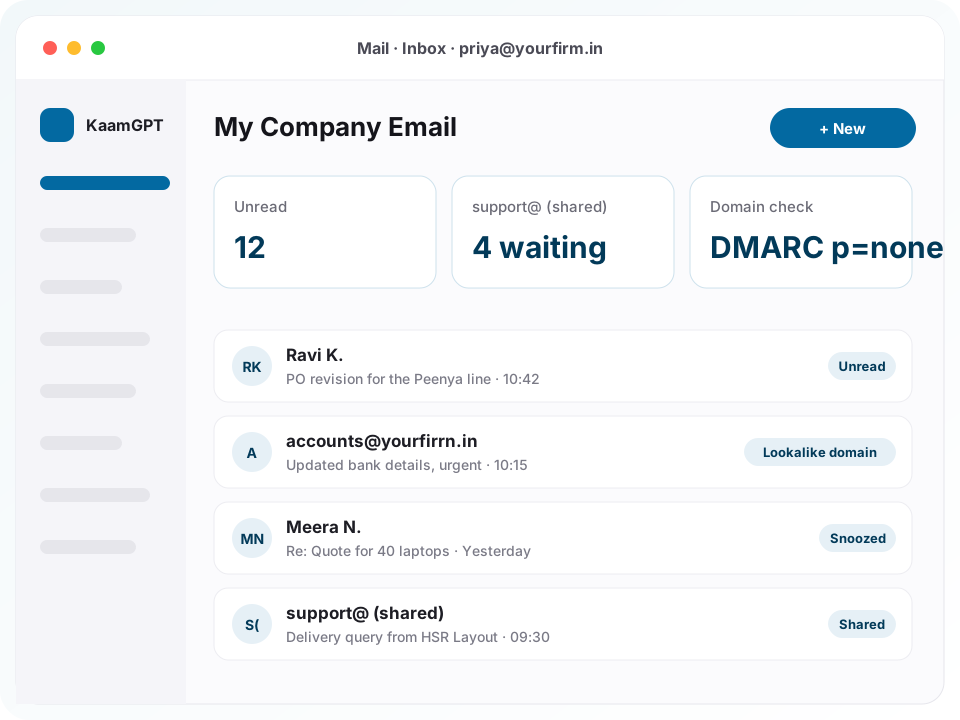
Looking for the best business email software in Bengaluru usually starts with a domain you already own and a team that still writes from personal Gmail. KaamGPT's My Company Email gives each employee a working inbox on that domain, connected to the mail server your company already pays for rather than a new one. Inbox, conversations, reply, reply all, forward, archive, junk, trash and search sit inside the workspace your staff already open for attendance, invoices and projects.
This page is about mailboxes for people, not newsletters. Campaigns to thousands of customers belong in KaamGPT Email Marketing, which has its own lists and sending allowance. The job here is quieter and more important: every employee writes from the company address, info@ and support@ are answered by named people instead of a shared password, a fake vendor asking for new bank details is flagged before anyone pays, and your domain's authentication records finally agree with each other.
- ₹0Free plan with company mailboxes for up to 5 employees
- 14 daysto try Starter, Growth or Business before paying
- 15 secdefault window to undo a message after pressing Send
- 4DNS records read per domain: MX, SPF, DKIM and DMARC
Why do Bengaluru offices lose track of their own company email?
Most small companies buy a domain along with their website, get a handful of mailboxes from the hosting panel, and then stop thinking about it. Two years later the founder's address works, three staff still reply to customers from personal accounts, and support@ is read by whoever remembers the password someone once posted in a WhatsApp group. Nobody is sure which records sit in the DNS zone, or which agency added them.
None of that is really a hosting problem. The mail server usually works. What is missing is the layer people actually use: a proper inbox for each person, shared mailboxes with owners, a record of who opened which mailbox, and warnings that catch impersonation before money moves. That layer is what separates the best business email software in Bengaluru from a login page bolted onto a hosting account.
- A departing employee still knows the info@ password, because it was never really theirs to hand back.
- Customers get quotes from a personal Gmail address and cannot tell whether a later email from your firm is genuine.
- An invoice email that looks exactly like your regular supplier's asks accounts to update the bank account, and nothing on screen helps anyone spot that the domain is one letter off.
- Two agencies each added an SPF record to the domain, so receiving servers treat every message you send as failing authentication.
- An out-of-office reply gets into a loop with another auto-responder over a long weekend and fills both inboxes.
Inside My Company Email: the inbox, the shared mailboxes and the safety checks
Everything listed here is in the product today, and every warning explains itself in a sentence rather than a spam score.
A complete inbox for daily mail
Inbox, sent, drafts, archive, junk, trash and your own folders, with messages grouped into conversations. Reply, reply all, reply to the list, forward inline or as an attachment, or edit an old message as new. Gmail's keyboard shortcuts work: c to compose, j and k to move, e to archive, r to reply. Up to eight conversations stay open as tabs across the top.
Server settings found from one address
Type a company email address and the setup wizard hunts for the server settings: Mozilla's provider database, your domain's own autoconfig file, Microsoft autodiscover, SRV records, then your MX records. If it has to fall back to a convention such as mail.yourdomain.in on port 993, it labels that a guess. Anyone running their own server can type the IMAP and SMTP hosts by hand.
Mailboxes for the whole staff list
Select employees from your staff records, choose one address pattern (first@, first.last@, flast@ or firstlast@) and create every mailbox in a single action. Each mailbox is verified in the background and failures come back grouped by cause, so one wrong password pattern is one fix. Or switch on self-service and let each person sign in with the password their mail server already knows.
Shared team mailboxes with named members
Shared team mailboxes such as info@, support@ or accounts@ appear in each member's own mailbox list, marked as shared, and every member opens them with their own login. Nobody needs the mailbox password. Access is granted per person as read, send or manage, and each grant is written to a log, so you always know who can answer for the company.
Warnings that name the real sender
When an outside sender borrows a colleague's name, a red banner says so and shows the address it really came from. Domains within two characters of yours, including lookalike Cyrillic letters, are flagged, and failed DMARC checks are called out. Suspicious messages are never deleted or hidden. One clear banner appears, and its Report button blocks that sender for the whole company.
Domain health explained in plain words
Press Check DNS on any connected domain and KaamGPT reads its MX, SPF, DKIM and DMARC records live. It tells you when SPF is missing, duplicated or set to +all, when no DKIM key is published on the usual selectors, and whether DMARC only watches (p=none) or actually quarantines or rejects forged mail. Each finding comes with the change to make.
Undo, send later and an honest outbox
Every message waits 15 seconds by default before it leaves, so Undo genuinely pulls it back to drafts. Messages can be scheduled for a later time. The outbox lists queued, scheduled and failed sends with your mail server's own error, retries failures on a widening schedule, and saves the sent copy to the Sent folder on your server. Replying to 15 or more people shows a warning first.
Search, snooze and out-of-office
Search understands from:, subject:, has:attachment, is:unread, larger:5m and newer_than:7d, and a search you use daily can be pinned beside your folders. Snooze a thread until later today, tomorrow morning or next week. Out-of-office replies reach each sender at most once a day and never answer mailing lists or automated mail. Each person keeps a signature placed above or below the quoted text.
How does a company go from a bare domain to working inboxes?
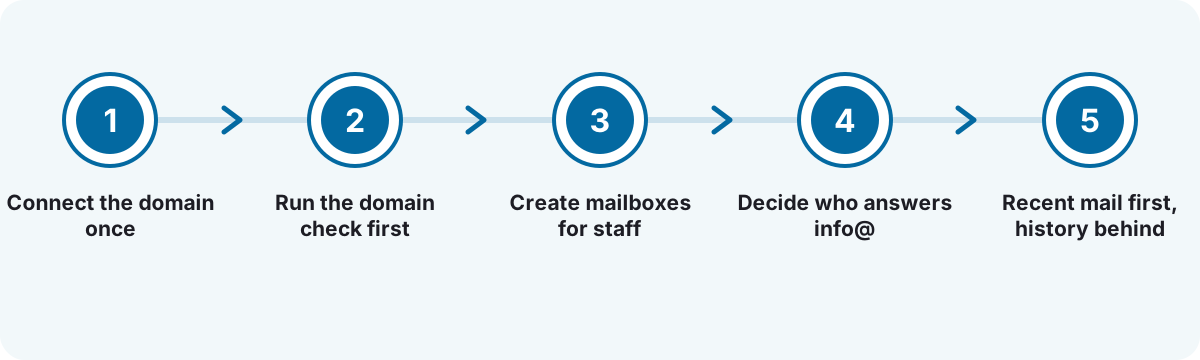
Connect the domain once
The owner or an administrator enters one company email address. KaamGPT finds the IMAP and SMTP settings, or you type them in. On Google Workspace or Microsoft 365 domains, people sign in through Google or Microsoft instead of typing a mail password.
Run the domain check first
Press Check DNS before creating a single mailbox. Fix what it flags with whoever controls your DNS, typically a second SPF record, a missing DMARC record or a DKIM key that was never published, so mail from the new inboxes is trusted from the first day.
Create mailboxes for staff
Pick people from the staff list and choose an address pattern, or turn on self-service so each employee connects their own mailbox with the password they already use. The roster fills in as each mailbox passes verification, and any failure shows the mail server's reason.
Decide who answers info@
Agree who reads info@, support@ or accounts@. Shared mailboxes and their members are configured with the KaamGPT team during setup, after which each member finds the mailbox in their own list, marked as shared, with no password changing hands.
Recent mail first, history behind
The first sync brings in recent message headers so people can start reading straight away, and older mail fills in behind them. Nothing is moved off your server; KaamGPT keeps a working copy so folders open quickly and search stays responsive.
Four Bengaluru offices and the email problem each one had to fix
These are illustrative scenarios built from the kinds of teams that ask about company mailboxes, not accounts of named customers.
A 22-person SaaS company in HSR Layout
- The situation
- The domain was bought on day one and mailboxes were created ad hoc in the hosting panel. Passwords live in a spreadsheet, support@ is checked by whoever remembers, and two new hires still email customers from personal accounts.
- How KaamGPT fits
- The founder connects the domain through autodiscovery, turns on self-service so each person signs in with their own password, and has support@ set up as a shared mailbox with three named members. The first domain check finds two SPF records, which get merged into one.
- What changes
- Everyone writes from the company address, support@ has owners rather than a shared secret, and the domain's authentication records stop contradicting each other.
A precision-parts exporter in Peenya
- The situation
- Purchase orders and payment instructions arrive by email from buyers abroad. One message, apparently from a regular buyer, asked the accounts desk to send an advance to a new bank account; the sender's domain differed from the real one by a single letter.
- How KaamGPT fits
- With My Company Email, that message would carry a lookalike-domain banner naming the real address. The accounts head presses Report, which blocks the sender company-wide and shows how many colleagues received the same email. The domain check shows DMARC at p=none, so a move to quarantine goes on the list.
- What changes
- Payment requests are read with the sender's real address in plain view, and one person's report protects every other inbox in the plant.
An IT services company running project teams from Whitefield and Electronic City
- The situation
- Contract engineers join and leave every quarter. Ex-staff sometimes kept access to client threads, and managers covering a colleague's accounts asked for passwords over chat.
- How KaamGPT fits
- HR keeps the staff list current, and mailboxes are created in bulk with a first.last@ pattern. A leaver's mailbox is suspended on their last day and the password changed at the mail host. Cover is handled by granting read or send access on that one mailbox, and each employee can see the access log for their own mail.
- What changes
- Joiners get a consistent address immediately, leavers stop syncing on their final day, and cover no longer means handing over a password.
A family-run textile wholesaler in Chickpet
- The situation
- Orders come in through three personal Gmail addresses and a WhatsApp number. Retail buyers are unsure which address is really the firm's, and nobody can see what a colleague promised a customer by email last week.
- How KaamGPT fits
- The five counter and accounts staff get mailboxes on the firm's domain under the Free plan, orders@ becomes a shared mailbox, and a saved search for has:attachment newer_than:30d surfaces recent purchase orders. Staff read and reply from their phones between customers.
- What changes
- Buyers see one consistent company address, orders@ is visible to everyone who handles orders, and old conversations are a search away.
Is KaamGPT the best business email software in Bengaluru when you already own a domain?
Most offices weigh three routes: keep the webmail that came with the hosting plan, move everyone to a per-seat email suite, or put a proper inbox on top of the server they already have.
| What matters | KaamGPT My Company Email | Hosting-panel webmail | Per-seat hosted email suite |
|---|---|---|---|
| Where the mail is kept | On the mail server you already use, with a working copy in KaamGPT | On your hosting provider's server | On the suite provider's servers, after a migration |
| Adding one more person | Within your KaamGPT plan's employee limit, plus any mailbox fee your host charges | Usually a spare mailbox slot in the hosting plan | A new user licence, billed monthly or yearly |
| Shared info@ and support@ | Named members, each using their own login | One password passed between people | Available, often depending on licence tier |
| Impersonation and lookalike warnings | A banner naming the real address; one report blocks the sender company-wide | Whatever the host's spam filter catches | Available; depth varies by plan and admin setup |
| SPF, DKIM and DMARC | Plain-language report for each connected domain | Raw records in a DNS zone editor | Setup steps in an admin console, usually IT-led |
| Who opened a mailbox | Access log the mailbox owner can read, including admin visits | Rarely available | Audit logs, usually visible to admins only |
| Connection to the rest of the business | Staff list from HRMS; customer email on the CRM timeline | None | The suite's own apps and add-ons |
The honest verdict. Pick KaamGPT when your mail hosting already works, you want every person on the company address without buying a new licence per head, and shared mailboxes and fraud warnings matter more to you than a new office suite. For that office, it is the best business email software in Bengaluru that needs no migration. Choose a per-seat suite if you also want its documents, meetings and storage and have someone to run it. Plain webmail suits two or three people who never share a mailbox.
Company email pricing across the four KaamGPT plans
My Company Email comes with every KaamGPT plan rather than a separate per-mailbox licence, so the price is simply the plan price and the practical limit is how many employees the plan covers. For a small team comparing the best business email software in Bengaluru, the inbox layer adds nothing on top of the mail hosting you already pay for. The full plan table is on KaamGPT pricing.
Free
₹0forever
No card needed
₹0 covers 5 employees, each with a mailbox on your domain, plus the impersonation banners and the DNS check, which is plenty for a founding team switching over properly.
- Up to 5 employees
- 1,000 emails / month
- 200 WhatsApp messages / month
- 512 MB storage
- Community support
Starter
₹999/month
or ₹9,590 billed yearly — 20% less
At ₹999 monthly, 25 employees get mailboxes and email support, and the plan can be tried for 14 days first; the usual fit for an office that has outgrown one shared info@ password.
- Up to 25 employees
- 25,000 emails / month
- 5,000 WhatsApp messages / month
- 5 GB storage
- Email support
Growth
Recommended₹2,999/month
or ₹28,790 billed yearly — 20% less
At ₹2,999 monthly, 100 employees are covered with priority email support and API access, suited to companies running several shared mailboxes across departments or branches.
- Up to 100 employees
- 1,50,000 emails / month
- 30,000 WhatsApp messages / month
- 25 GB storage
- API access
- Priority email support
Business
₹7,999/month
or ₹76,790 billed yearly — 20% less
At ₹7,999 monthly, 500 employees are covered with onboarding help and priority support, for multi-site organisations creating mailboxes in large batches.
- Up to 500 employees
- 7,50,000 emails / month
- 1,50,000 WhatsApp messages / month
- 100 GB storage
- API access
- Priority support + onboarding
- Mail hosting is billed by whoever provides it, whether that is your hosting company, Google Workspace or Microsoft 365. KaamGPT plans pay for the inbox and its controls, not for mailbox storage on your server.
- The monthly email figures printed on each plan, from 1,000 on Free to 7,50,000 on Business, are the Email Marketing campaign allowance. Everyday mail from staff mailboxes goes out through your own server under per-mailbox limits, by default 50 recipients per message, 200 messages an hour and 500 a day.
- All amounts are in INR, with the final figure shown at checkout. Paying quarterly, half-yearly or yearly works out 10%, 15% and 20% cheaper than paying month by month.
What should you check in your domain's DNS before trusting your own email?
Three TXT records decide whether Gmail, Outlook and your customers' servers believe mail from your domain. SPF lists the servers allowed to send for you. DKIM publishes a public key so receivers can verify a signature on each message. DMARC tells receivers what to do when those checks fail, and where to send reports. The best business email software in Bengaluru should read all three and explain them, because in most small offices nobody remembers who added them.
A fault worth ruling out first is a pair of SPF records. Typically the website agency added one and the mail host added another. The SPF standard says a receiver that finds more than one must return a permanent error, so every message fails, which is worse than publishing none. The fix is a single merged record that lists both senders and ends in ~all or -all.
DMARC deserves a plan rather than a switch. Start at p=none to collect reports without affecting delivery, confirm that your real senders, meaning the mail host, the billing tool and the marketing platform, all pass, then move to p=quarantine and later p=reject. A record left at p=none for years reports impersonation but stops none of it, and the check says exactly that in words.
- One SPF record per domain, never two; merge them.
- Never end SPF with +all, which authorises the whole internet to send as you.
- Publish the DKIM key your mail host gives you; the check looks on common selectors such as default, google, selector1 and zoho.
- Treat p=none as the first step of DMARC, not the destination.
How do fake-invoice emails reach a finance desk, and what stops them?
The attack that costs small companies money rarely involves malware. It is a polite, well-written email that appears to come from the managing director or a known supplier, asking for an urgent transfer or new bank details. Filters built to catch viruses pass it, because nothing about it is technically broken. What gives it away is the sender: a display name copied from a colleague, or a domain one character away from the real one.
My Company Email looks for exactly those signals as each message arrives. A display name matching someone on your staff list but sent from an outside address gets a red banner naming the real sender. A domain within two edits of yours, after lookalike Cyrillic letters are folded to Latin ones, gets a warning. Urgent payment language only raises the level when the message has already failed authentication, because plenty of genuine invoices are urgent.
Links and images get the same care. When a link's visible text shows one website and the link actually goes to another, the real destination is printed beside it. Remote images stay blocked until you choose to load them, because a loading image is how a sender learns you opened the message. Pressing Report blocks that sender for the whole company and tells the reporter how many colleagues received the same email.
- Confirm any change of bank details by phone, on a number you already had on file.
- Read the banner before the body; it names the address the message really came from.
- Report suspicious mail instead of quietly deleting it, so every colleague is covered.
- Keep DMARC moving towards quarantine so your own domain becomes harder to forge.
How should mailboxes change when people join, cover for each other or leave?
Mailboxes follow people, and people in a growing company move constantly. For joiners, bulk creation from the staff list keeps addresses consistent: pick one pattern such as first.last@ and apply it to everyone, so customers can guess an address correctly. With self-service switched on, a new employee connects with their own mail password and starts working without an administrator ever holding it.
Cover is where most offices cut corners, usually by sharing a password on chat. The better route is delegated access: a colleague is given read, send or manage rights on that one mailbox, and the rights are removed when the cover ends. Every grant is recorded, and the mailbox owner can open a list of everyone who has been into their mail, administrators included. Privacy the employee can check for themselves is privacy they believe.
When someone leaves, suspend the mailbox on their last day so KaamGPT stops syncing it, while the address still exists on your mail server for handover. Removing a mailbox from KaamGPT never deletes it from your server, and the product says so on screen. While a legal hold is active, mailboxes cannot be removed at all. Finally, change the password at your mail host so the old one stops working everywhere.
- Choose one address pattern before the first mailbox is created.
- Remove delegated access the day the cover ends.
- Suspend on the last working day; remove only after handover.
- Change the mail-server password yourself; KaamGPT never displays a stored password.
Six reasons offices keep their mail server and change the inbox
Your mail server stays in charge
KaamGPT connects to the server you already use. Nothing is migrated away, sent mail is saved to your own Sent folder, and removing a mailbox from KaamGPT leaves the original untouched on your server.
Privacy each employee can verify
Every person can see who else has opened their mailbox, administrators included. The console KaamGPT's own team uses to configure servers has no screen for reading a message and no way to reveal a credential.
Stored passwords are never shown
Mail passwords are encrypted before storage and have no read path back out: not on the roster, not masked, not to administrators. Google and Microsoft domains need no stored mail password at all, since people sign in there.
Hostile HTML handled with care
Every message body is cleaned on the server against an allowlist and shown in a sandboxed frame with scripts off. Remote images wait for your click, and a link whose text disagrees with its target shows the real host.
Made for conversations, not campaigns
Per-mailbox sending limits and a warning before large reply-alls keep everyday mail personal and protect your domain's reputation. Newsletters to thousands go through the Email Marketing app, which has lists, segments and templates built for that job.
One login across the workspace
The same login opens attendance, invoices, projects and mail, and even the Free plan includes this app. 100+ companies across India use KaamGPT to run day-to-day operations from one workspace.
Which Bengaluru businesses feel the lack of proper company mailboxes most?
- Startups & SaaS teamsHiring outpaces IT; self-service sign-in and a single address pattern keep every new joiner's mailbox consistent from day one.
- IT services & staffingContract staff rotate often; suspend leavers, grant cover per mailbox, and let every employee read their own access log.
- Manufacturers & exportersPurchase orders and bank instructions arrive by email, so lookalike-domain and impersonation banners sit right where the accounts desk reads.
- Wholesale & trading housesMove counter staff from personal Gmail to custom domain email, with an orders@ mailbox several people can read and answer.
- Clinics & diagnostic centresOne front-desk mailbox read by staff across shifts, with remote images blocked and no password taped to the reception monitor.
- CA, legal & consulting firmsClient filings arrive as attachments; from: and has:attachment searches find a client's last submission without scrolling through months.
- Real estate & buildersSite, sales and accounts teams share enquiries@, and cover during leave comes from delegated access, not a borrowed password.
- Schools & coaching centresAdmissions@ needs several readers, and vacation auto-replies answer each parent once a day without looping with other responders.
Company email for Bengaluru offices, from Koramangala to Peenya
Company-email trouble in Bengaluru changes with the neighbourhood. Product startups around Koramangala and HSR Layout set up a domain on day one and then hire faster than anyone can manage mailboxes. IT services and staffing companies across Whitefield and Electronic City take on and release contract staff every quarter. Exporters and component makers in Peenya trade purchase orders and payment instructions with buyers abroad, which is exactly the kind of mail lookalike-domain fraud imitates. Traders in Chickpet often still run orders through personal Gmail.
Two local realities shape setup. Many Karnataka businesses bought their .in or .co.in domain through a web agency that still holds the DNS login, so fixes the domain check suggests often mean one message to that agency. Clinics and diagnostic centres in Jayanagar usually need one front-desk mailbox read across shifts. Choosing the best business email software in Bengaluru is partly about handling both, and all of it happens in the browser rather than at your office.
- Price
- ₹0 Free (5 employees); ₹999, ₹2,999 and ₹7,999 a month on Starter, Growth and Business
- Trial
- 14-day trial on each paid plan
- Works with
- Any IMAP and SMTP mail server; Google Workspace and Microsoft 365 through their sign-in
- Platforms
- Web browser on desktop, laptop and phone
- Integrations
- HRMS & Staff employee records, CRM customer timeline, Email Marketing domain health
- Contact
- Phone and WhatsApp buttons on every page; email support from Starter upwards
Where this applies around Bengaluru, Karnataka
- Bengaluru
- Karnataka
- India
- Peenya
- Chickpet
- Jayanagar
- Koramangala
- HSR Layout
- Whitefield
- Electronic City
Frequently asked questions
23 answersDoes KaamGPT host our email, or do we still need a mail provider?
You still need a mail provider. My Company Email is an IMAP and SMTP mail client, not a mail host: it connects to the server your company already uses, whether that is the mail in a hosting plan, your own server, or Google Workspace and Microsoft 365 through their sign-in. Your mail stays on that server, and KaamGPT keeps a working copy so the inbox opens quickly.
How much does My Company Email cost for a small team?
There is no per-mailbox charge; company email comes with whichever KaamGPT plan you are on. Free is ₹0 and covers 5 employees, Starter at ₹999 monthly covers 25, Growth at ₹2,999 covers 100 and Business at ₹7,999 covers 500. Amounts are in INR and confirmed at checkout, and <a href="/pricing">the pricing page</a> shows the cheaper quarterly, half-yearly and yearly options.
Can we try company mailboxes before paying for a plan?
Yes, two ways. Free never expires and includes every app for up to 5 employees, so you can judge whether this is the best business email software in Bengaluru for your team before spending anything. Starter, Growth and Business each open with a 14-day trial. You can <a href="/signup">open a workspace</a> and connect your domain without speaking to anyone first.
Which mail servers and hosting providers does it work with?
Any server that offers IMAP for reading and SMTP for sending, over SSL or STARTTLS. The setup wizard already knows the settings for Google, Microsoft, Zoho, Titan, Hostinger, GoDaddy and Yandex mail, and finds many others from public autoconfig records. Google Workspace and Microsoft 365 domains sign in through Google or Microsoft rather than with a mail password; Microsoft 365 accepts nothing else.
How quickly can a 20-person office be running on company mailboxes?
The domain step is one short form: enter a company address and confirm the settings it finds. Creating mailboxes for the whole staff list is a single action with an address pattern. What takes longest usually sits outside KaamGPT, such as collecting passwords or waiting for whoever controls your DNS to fix what the domain check flags. With self-service on, each employee finishes their own sign-in.
Can several people answer info@ or support@ without sharing the password?
Yes. A shared mailbox has named members, and each member opens it from their own KaamGPT login, where it appears in their mailbox list marked as shared. Nobody needs to know the mailbox password, so a leaver takes nothing with them. Members can be added or removed at any time and each change is logged. Shared mailboxes are set up with the KaamGPT team during onboarding.
Where are our emails stored, and who owns them?
Your mail stays on your own mail server and remains yours. KaamGPT stores message details in its database and a cached copy of bodies and attachments in object storage so folders open fast; if a cached copy is cleared, opening the message simply fetches it again from your server. Removing a mailbox from KaamGPT leaves the original mailbox on your server untouched.
Can the owner or an administrator read an employee's mail?
Only with a specific permission to open other people's mailboxes, and never invisibly. Every time someone other than the owner opens a mailbox, it is written to an access log that the employee can read on their own settings screen, administrator visits included. Delegated access to personal mailboxes can be switched off for the whole workspace, and KaamGPT's support console has no screen for reading messages.
How does it warn us about fake invoices and impersonation emails?
Each incoming message is checked for failed DMARC authentication, a display name matching a colleague but sent from an outside address, a domain one or two characters away from yours, and urgent payment wording alongside those signals. You see one banner in plain words naming the real sender. Nothing is deleted or hidden, and reporting the message blocks that sender for everyone in the company.
What exactly does the SPF, DKIM and DMARC check tell me?
It reads your domain's live DNS and reports four things: whether an MX record exists so the domain can receive mail, whether there is exactly one SPF record and it avoids +all, whether a DKIM key is published on common selectors, and whether your DMARC policy only monitors (p=none) or actually quarantines or rejects forged mail. Each result comes with a sentence on what to change.
Can we send newsletters or bulk promotional mail from these mailboxes?
No, and that is deliberate. By default each mailbox can address at most 50 recipients per message and send 200 messages an hour or 500 a day, which suits conversations rather than campaigns. Blasting from staff mailboxes also puts your domain's reputation at risk. Use <a href="/best-email-marketing-tools-in-bengaluru">Email Marketing for newsletters</a>; it has its own lists, templates and monthly allowance.
Which businesses should not use My Company Email?
It is not for a business with no mail hosting at all, since KaamGPT connects to a mail server rather than providing one. It is the wrong tool for bulk campaigns. A company that wants documents, video meetings and email from one vendor is better served by a full office suite, and a sole proprietor happy with one personal address may not need it yet.
Can staff read and reply to company email on their phones?
Yes, in the phone's browser, with nothing extra to install. On a narrow screen the message list and the open conversation take turns, so reading, replying, archiving and snoozing all work one-handed. Signature and out-of-office settings are on the same screens. Mail sent from the phone lands in the Sent folder on your server, so it also shows in any other mail app you use.
We already pay for Google Workspace. Why would we use KaamGPT's inbox?
You may not need to, and that is a fair outcome. The reason to connect a Workspace domain is to keep mail next to the rest of your KaamGPT work, such as the staff list, customer history and invoices, and to get the same impersonation banner and access log across every mailbox. Each person signs in with their Google account, so no administrator collects passwords.
How do we move from hosting-panel webmail or Outlook on a desktop?
There is usually nothing to move. My Company Email reads the same IMAP mailbox your webmail or desktop client already uses, so existing folders and history appear once the mailbox connects, recent mail first and older mail filling in behind. Folders called Junk, Spam or INBOX.spam are all recognised as junk. People can keep Outlook open alongside it; both see one mailbox.
What happens to a mailbox when an employee leaves the company?
Suspend it on their last day so KaamGPT stops syncing it, while the address still exists on your mail server for handover. Removing the mailbox later deletes only KaamGPT's copy; the mailbox on your server stays until you remove it there. If a legal hold is active, mailboxes cannot be removed at all. Change the password at your mail host as well.
Is company email linked to HRMS, the CRM and Email Marketing?
Yes, at three points. Mailboxes are created from the employee records kept in <a href="/best-hrms-and-payroll-software-in-bengaluru">HRMS & Staff</a>, and the impersonation check compares senders against those names. Mail from an outside address is linked to the matching customer and appears on their CRM timeline beside invoices and bookings. And fixing your domain's records also helps Email Marketing campaigns sent from the same domain.
Our .in domain was set up by a Bengaluru web agency. Will that cause problems?
Not for KaamGPT, which works with any domain and any registrar. The practical issue is access: the agency may still hold your DNS login, so any SPF, DKIM or DMARC change the domain check recommends has to go through them. Send them the exact record the check shows. If the same agency hosts your mailboxes, ask them for the IMAP and SMTP settings too.
What help is available while we set up company mailboxes?
Free workspaces rely on community help, Starter adds email support, Growth moves you to priority email support, and Business adds priority support plus onboarding. For company email the most useful help is usually reading the domain check together and deciding which DNS record to fix first, and configuring shared mailboxes and their members, both of which the team handles with you.
Can someone show us My Company Email working on our own domain?
Yes. The number is +91 79767 82366, for a call or a WhatsApp message. Share your domain, who hosts your mail and roughly how many people need mailboxes, and we can walk you through the setup screens, the impersonation banner and a live DNS check on your own domain. Starting on the Free plan and asking questions as you go works too.
Can I undo a sent email or schedule one for later?
Yes. By default a message waits 15 seconds after you press Send, and Undo during that window returns it to your drafts. You can also choose a time for it to go out later and cancel a scheduled send the same way. If your mail server refuses a message, the outbox shows the server's reason and retries automatically.
Should a ten-person firm stay on hosting-panel webmail or switch to KaamGPT?
Hosting-panel webmail is fine if everyone has their own mailbox, nobody shares an address and nobody needs warnings. Once info@ is shared, staff change often, or accounts handles payments by email, KaamGPT adds what webmail lacks: shared mailboxes with named members, impersonation banners, an access log and a domain check. Better inboxes on the same mail host is what makes it the best business email software in Bengaluru for a firm that size.
Do emails from these mailboxes count against the plan's monthly email limit?
No. The monthly email numbers on each plan, 1,000 on Free, 25,000 on Starter, 1,50,000 on Growth and 7,50,000 on Business, apply to Email Marketing campaigns. Mail sent from personal and shared mailboxes goes out through your own server and is governed by per-mailbox limits instead, by default 200 messages an hour and 500 a day.