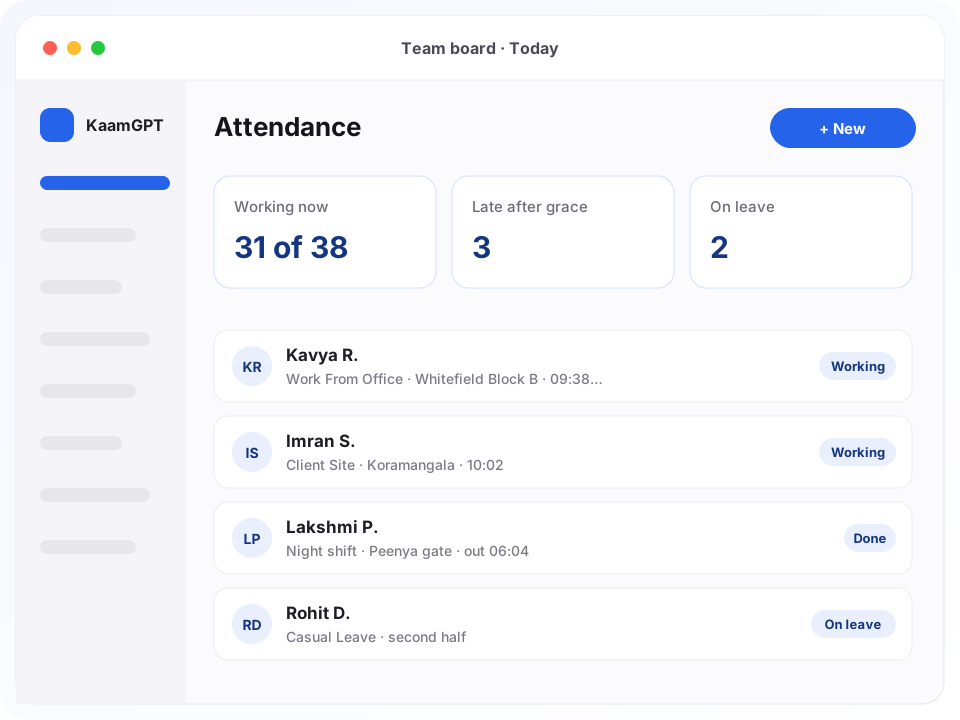
The best attendance management software in Bengaluru must survive a Whitefield tower where GPS drifts, a sales rep who starts the day at a distributor in Peenya, and a founder who wants salaries closed without a spreadsheet. KaamGPT Attendance is built for that mix. Staff check in from a phone or laptop browser, the app measures how far they are from the office pin, and each day is graded against the shift it belongs to.
It stays deliberately in its lane. Attendance covers clock-in and clock-out, work modes, breaks, shifts, leave, holidays, corrections and the monthly timesheet. Salary structures, payslips and hiring sit in the HRMS & Staff guide, and payroll there reads these records when it runs. Every feature is open on the Free plan for up to five people; the paid tiers are laid out on KaamGPT's plans page, and the product itself lives at KaamGPT Attendance.
- ₹0covers a five-person team, with every attendance feature switched on
- 6work modes, from Work From Office to Client Site and On Duty
- 200 mdefault office radius, adjustable per site from 25 m to 2 km
- 14 daysto test geo-fencing and a leave cycle on any paid tier
Where does attendance go wrong for Bengaluru teams before salary day?
Most Bengaluru companies are not short of attendance data. They have too many versions of it. A fingerprint reader at reception knows who walked in. A WhatsApp group knows who claims to be working from home. A spreadsheet knows about leave, if somebody updated it. On salary day, one person merges all three by hand and hopes nobody asks why their pay is short.
The gaps repeat every month. Night-shift punches land on the wrong date. Field staff cannot touch a machine bolted to a wall in Koramangala. A forgotten check-out makes someone look as if they worked all night. And when an employee disputes a deduction, nobody can show which dates caused it or who approved the change. That moment is usually when owners start looking for a geo-fenced attendance app.
- Proxy punches and 'reached office' messages that nobody can check against a real location.
- Leave approved over a phone call, so balances are wrong by the time anyone looks.
- Night shifts that cross midnight broken into two half-days in the register.
- Corrections made by overwriting a cell, with no reason, approver or date kept.
- Loss-of-pay days tallied from three sources on the evening before payroll.
What does the best attendance management software in Bengaluru need to record?
Eight parts of KaamGPT Attendance, each one live in the product and switched on or off from its own settings screen.
Check-in that measures distance
Every office gets a map pin and a radius, 200 m unless you change it. When someone chooses Work From Office, their browser location is compared with the nearest office they are allowed to use. Outside the radius, the punch is refused and the screen states exactly how many metres away they are, which ends most arguments before they begin.
Six work modes instead of one
A punch is Work From Office, Work From Home, Hybrid, Field Work, Client Site or On Duty. Policy decides which modes each person may use, whether a home day needs a manager's approval first, and how many remote days a week are allowed. Field and client-site punches keep the location on record without judging it against an office.
Selfie and office-network checks
Where location alone is not enough, require a photo at check-in, at check-out or when a break starts; the camera opens inside the browser. Offices with a fixed internet line can also limit office punches to their own IP ranges, so a tap from the tea stall across the road does not pass as a day at the desk.
Shifts that can cross midnight
Set start and end times, grace minutes, early-exit grace, half-day and full-day hours, working days and a colour. A shift can span midnight for night operations, or be flexible with core hours. Assign it to people from a chosen date, and lateness is measured from the shift start plus its grace, never from a company-wide clock.
Breaks split into paid and unpaid
Staff start and end a break as Short, Lunch, Tea, Meeting, Personal or Other. Lunch comes out of worked time; the rest are recorded but still paid. You can cap total break minutes and the number of breaks per day, and a break someone forgot to end is closed by their check-out, using that punch's own location.
Leave types, balances and approvals
Give each leave type a yearly quota, paid or unpaid status, a carry-forward cap, a notice period and an optional document rule. Requests are checked against the balance and any overlapping dates before they are saved, half days are allowed, and managers get an in-app alert. New quotas are added every 1 January, with permitted carry-forward included.
A leave and holiday calendar
Add public, company, optional and restricted holidays, including half-day ones. Employees choose their own optional holidays, up to two each year. Holidays and weekly offs are taken out of the working-day count, so a month with Deepavali in it does not drag everyone's attendance figure down, and a month-view grid shows each person's gaps at a glance.
Corrections that leave a trail
A missed punch, a wrong time or a system error becomes a regularisation request with a reason and an optional attachment. It must be raised inside the policy window, seven days unless you change it. Approval rewrites that day and marks it regularised in every report and CSV, so the employee and the auditor read the same history.
What happens between opening a workspace and closing the first attendance month?
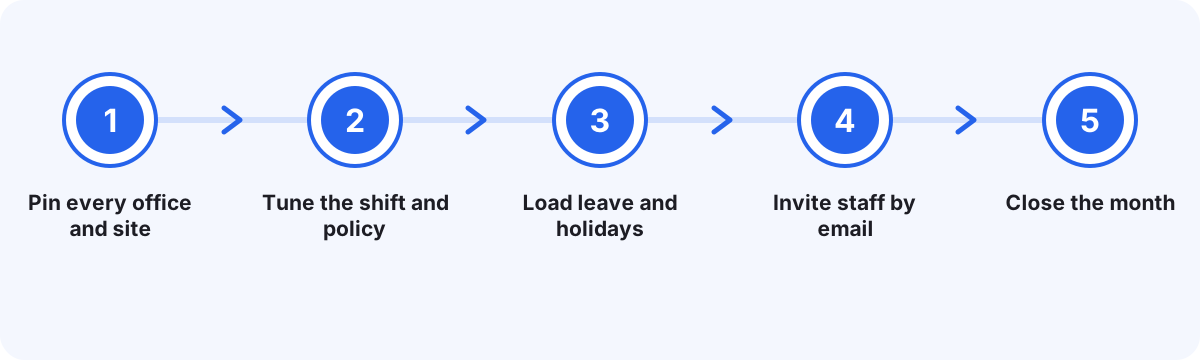
Pin every office and site
Add each office or site with its address. Stand at the entrance people really use, tap Use my location to drop the pin, then set the radius on the slider. Add your office IP ranges now if you plan to restrict check-ins to your own network.
Tune the shift and policy
A new workspace already holds a General Shift from 09:30 to 18:30 and a default policy. Adjust working days, grace minutes, weekly offs and allowed work modes, then add a night or flexible shift if you run one.
Load leave and holidays
Casual, Sick, Earned and Unpaid leave types are created for you. Edit their quotas, add any your company uses, and enter this year's Karnataka and company holidays, marking which ones are optional.
Invite staff by email
Each employee accepts an email invitation and gets a personal login with a role. From the next morning they punch from their phone browser, and managers watch the team board fill in, refreshed every minute.
Close the month
Decide pending leave and corrections, export the month as CSV if your accountant wants it, then open payroll in HRMS & Staff. It proposes loss-of-pay days per person with the dates behind them, and a person approves before salaries are worked out.
Which Bengaluru workplaces benefit most when punches move to the phone?
Four typical set-ups, written as patterns rather than client stories, each showing which settings it leans on hardest.
A 60-person IT services office in Whitefield with hybrid staff
- The situation
- Half the team works from home on agreed days, but nobody can tell an approved home day from an unannounced one. The reception fingerprint reader sees only people who walk in, so every remote day shows up as an absence.
- How KaamGPT fits
- Office and Home modes are allowed, home days need prior approval, and remote days are capped at two a week. The two towers the company rents get separate pins with a 250 m radius, and the team board separates people who are in, remote or not yet punched.
- What changes
- Managers stop chasing status messages, and at month-end HR sees remote days recorded as remote work instead of absences.
A packaging factory in Peenya with supervisors on nights
- The situation
- Supervisors work from 22:00 to 06:00, and the old register split each night into two part-days. Nobody could say who had finished a full shift, so night allowances and half-day cuts were argued over every month.
- How KaamGPT fits
- A shift spanning midnight is assigned to the supervisors with ten grace minutes and eight full-day hours. Each supervisor punches from their own phone at the gate pin, and a forgotten check-out is closed at the policy limit with a note on the record.
- What changes
- Each night becomes one record on one date, graded full, half or absent by hours worked, so payroll has a single answer.
A distributor's field sales team based in HSR Layout
- The situation
- Reps begin the day at retailers across the city and rarely visit the office. A WhatsApp location pin could be forwarded or reused, and the owner had no record of which days a rep had really started work.
- How KaamGPT fits
- Reps are allowed Field Work and Client Site modes, which record where each punch happened without an office check. A selfie is required at check-in, and the company turns on the daily work report, so each rep lists visits with minutes and status before checking out.
- What changes
- The owner sees where and when every rep began and what they say they did, without asking on the group.
A three-branch diagnostics group across Jayanagar and Koramangala
- The situation
- Technicians rotate between branches, receptionists work six-day weeks, and leave used to be approved over the phone. Balances drifted, and the payroll person spent the last evening of each month reconciling three front-desk registers.
- How KaamGPT fits
- Each branch has its own pin and staff are assigned to the branches they may punch at. Sick leave needs a document, earned leave needs notice, and every approval happens in the app, where balances move as requests are decided.
- What changes
- Branch heads see their own department, the owner sees all three clinics, and leave balances stop being a monthly argument.
How does KaamGPT Attendance compare with a fingerprint reader or a WhatsApp group?
Most Bengaluru businesses run one of two set-ups before they look for software. This table covers the points that turn into month-end disputes.
| What matters | KaamGPT Attendance | Biometric device + Excel | WhatsApp group + spreadsheet |
|---|---|---|---|
| Where staff can punch | Any phone or laptop browser, checked against the office pin | Only at the device on the wall | Anywhere; a shared pin is optional and can be forwarded |
| Remote, field and client-site days | Six work modes with approval rules and weekly caps | Not captured; usually typed in later | A message in the group, with no rules |
| Night shifts past midnight | One shift, one date, graded by hours worked | Depends on the device software; often fixed by hand | Formulas rebuilt each month |
| Leave and holidays | Balances, notice periods and optional holidays in the same app | Kept separately on paper or email | Tallied by hand |
| Fixing a missed punch | Request, reason, approval, flagged as regularised | HR edits the export; no record of why | Cell overwritten |
| Month-end payroll input | Loss-of-pay days with dates, proposed to HRMS payroll | Export, clean and re-type | Counted by hand |
| Upfront cost | ₹0 for a team of five; ₹999 monthly covers 25 | Device and installation, quoted by the vendor | No licence; the cost is HR time |
The honest verdict. Pick KaamGPT when your people carry phones, work in more than one place, or you want payroll to read attendance directly; for that kind of team it earns the label of best attendance management software in Bengaluru on features you can check yourself. Keep a biometric device if staff cannot use personal phones at work or you need a physical gate check, because KaamGPT does not connect to fingerprint machines. A WhatsApp group only works for a team small enough to track from memory.
What does attendance cost for a Bengaluru team of 5, 25 or 100 people?
Attendance is not a separate purchase. It rides along with every KaamGPT plan, beside the other apps, and the plan price follows the size of your workforce. That makes the best attendance management software in Bengaluru a line you already pay for if you use KaamGPT elsewhere. Figures are in Indian rupees, checkout confirms the final amount, and choosing quarterly, half-yearly or yearly billing trims the rate by 10%, 15% or 20% respectively.
Free
₹0forever
No card needed
Free at ₹0 keeps geo-fencing, shifts, leave and reports switched on for a workspace of five or fewer, which suits a founder-led team testing the idea.
- Up to 5 employees
- 1,000 emails / month
- 200 WhatsApp messages / month
- 512 MB storage
- Community support
Starter
₹999/month
or ₹9,590 billed yearly — 20% less
Starter, the 25-employee tier, is ₹999 per month or ₹9,590 for a full year, with a 14-day trial and email help, enough for most single-office teams.
- Up to 25 employees
- 25,000 emails / month
- 5,000 WhatsApp messages / month
- 5 GB storage
- Email support
Growth
Recommended₹2,999/month
or ₹28,790 billed yearly — 20% less
Growth at ₹2,999 monthly covers 100 employees and adds API access plus faster email help, suiting multi-branch teams that run shifts and field staff.
- Up to 100 employees
- 1,50,000 emails / month
- 30,000 WhatsApp messages / month
- 25 GB storage
- API access
- Priority email support
Business
₹7,999/month
or ₹76,790 billed yearly — 20% less
Business at ₹7,999 monthly covers 500 employees with priority support and guided onboarding, for plants and chains configuring many sites.
- Up to 500 employees
- 7,50,000 emails / month
- 1,50,000 WhatsApp messages / month
- 100 GB storage
- API access
- Priority support + onboarding
- The employee limit is for the whole workspace, so each person counts once whichever KaamGPT apps they use.
- Attendance carries no per-punch or per-device charge, and there is no hardware to buy.
- Email and WhatsApp quotas on each plan belong to the marketing apps and do not affect attendance.
How wide should the geo-fence be around a Bengaluru office?
Phone GPS is an estimate, not a fact. The browser asks the employee's permission before sharing a position, then reports it with an accuracy figure in metres. Inside a glass tower or a basement car park in Electronic City, that figure can be poor, so a radius drawn tightly around the building will refuse honest people standing at the lift lobby.
Start at the 200 m default, which covers a building plus normal drift, and tighten only after a week of real punches. The team board and the CSV export show how far each punch was from the pin, so you can tell whether refusals come from people who were elsewhere or from a radius that is simply too strict.
Large campuses need more than one pin. A tech park in Whitefield can have blocks several hundred metres apart; add each block as its own location and assign people to the ones they use. Where your office has a fixed internet line, the office-network restriction adds a second check that does not depend on GPS at all.
- Drop the pin at the entrance people use, not the centre of the plot.
- Keep the radius generous for a week, then read the distance column before tightening it.
- Give field and client-site staff the right work mode instead of a huge radius.
- Use per-person overrides for the few who punch at a second site.
What should HR check before attendance goes to payroll each month?
Even the best attendance management software in Bengaluru cannot rescue a payroll run fed with undecided days. Before the run, clear the queue: pending leave, work-from-home requests and corrections should all be decided, because a pending day is neither paid nor docked. The regularisation window, seven days by default, stops anyone rewriting the start of the month once salaries are being prepared.
Next, look for days nobody touched. KaamGPT marks yesterday's no-shows absent on its own, but only where there is no punch, no approved leave, no holiday and no weekly off; anything uncertain stays blank for a person to decide. Records left open past the policy limit, twelve hours by default, are closed with a note, which makes them easy to find in the export.
Then open payroll in HRMS. For each employee it proposes loss-of-pay days built from absences, half days and approved unpaid leave, lists the dates behind every figure, and shows the rupee effect. It also warns when absence marking has not run for that month, so a quiet month is not mistaken for perfect attendance. A human approves; nothing is deducted silently.
- Decide every pending leave, remote-day and correction request.
- Filter the report for late arrivals and early exits before any conversation.
- Find auto-closed days in the CSV and ask those people for a correction.
- Approve loss-of-pay days only once the listed dates make sense.
- Download the attendance report for payroll as CSV and file it with that month's salary sheet.
Which attendance rules cause the most disputes in Karnataka workplaces?
Weekly offs come first. Plenty of Bengaluru shops, clinics and factories work six days, while most tech offices work five. The ready-made shift runs Monday to Friday, so a six-day business should change the shift's working days and the policy's weekly offs on day one, or every Saturday will read as an absence.
Holidays come second. The Karnataka government publishes its holiday list every year, and it carries state days such as Kannada Rajyotsava on 1 November alongside national ones. Enter the days you actually give, mark festival days some staff skip as optional, and decide how a half-day holiday counts before the first one arrives.
Personal data comes third. A check-in can capture a location and a photo, and both count as personal data under the Digital Personal Data Protection Act that Parliament passed in 2023. Tell staff in writing what each punch records and why, switch on selfies only where they earn their place, and keep visibility narrow: employees see their own days, managers their team, admins everyone.
- Write grace minutes and half-day hours into the staff handbook, not only the software.
- Publish the year's holiday list, optional days included, in the first week of January.
Why do Bengaluru owners run attendance inside KaamGPT instead of a standalone app?
Payroll reads the same records
HRMS payroll proposes loss-of-pay days straight from attendance, with dates attached. There is no export-and-retype step between the register and the payslip, and no second copy of the truth to reconcile.
One employee list for every app
Departments, managers and roles are set once for the workspace. Attendance, HRMS and the other apps read the same people, so a joiner is added once and a leaver is removed once.
Nothing to mount at the door
There is no device to wire, calibrate or repair. A phone or laptop browser is the terminal, and the office pin plus an optional photo or network check does the work a fingerprint reader used to.
Rules written as plain settings
Grace minutes, half-day hours, remote-day caps and the correction window are all labelled settings. When someone asks why a day was marked half, the answer is a number on a screen, not a guess.
Privacy decided by role
Employees see only their own records, managers see their team, and admins see the company. Daily work reports can be written only by the person whose day it was, so nobody can put words in their name.
Priced for small teams first
Five people run free and 25 people cost ₹999 a month. A growing company moves up a plan without switching software or re-keying a year of attendance history into something new.
Which kinds of Bengaluru businesses use attendance this way?
- IT services and SaaS officesHybrid rules, weekly remote-day caps and several tech-park blocks, each with its own pin and radius.
- Factories and warehousesShift and overtime tracking for nights that span midnight, supervisors punching at the gate pin, and forgotten check-outs closed automatically.
- Field sales and distributionField Work and Client Site modes, a selfie at check-in and a daily work report before check-out.
- Clinics and diagnostic labsStaff tied to the branches they work at, leave with notice periods, and six-day weekly off settings.
- Retail storesShop staff punch at the store pin while the till runs in the retail POS guide, with lunch and tea breaks logged by type.
- Agencies and studiosAttendance shows who was working; the daily work report and client project tracking show what they worked on.
- Security and facility servicesGuards on night duty at client premises, recorded under the Client Site mode with a photo at each punch.
Attendance across Bengaluru's tech parks, industrial estates and high streets
Few cities spread their workforce the way Bengaluru does. IT and BPO teams sit in Whitefield and Electronic City towers where lifts, basements and glass upset phone GPS. Manufacturing runs in Peenya and Bommasandra, often with a night shift. Startups in Koramangala and HSR Layout mix office days with home days, while shops and clinics in Jayanagar keep six-day weeks.
That is why settings are per office and per person rather than one rule for the whole company. A Whitefield block can have a wide radius plus an office-network check, a Bommasandra gate a tighter pin and a night shift, and a Jayanagar branch its own weekly off. Owners searching for the best attendance management software in Bengaluru usually need exactly this kind of mix.
Commutes along Hosur Road or the Outer Ring Road make a few minutes' delay routine. Grace minutes exist for that: set them per shift so a short hold-up at Silk Board is not a late mark, while a manager is still alerted the same morning about anyone running 30 minutes or more past that grace. Workspaces default to India Standard Time, so 'today' means today in this city.
- Price
- Starter ₹999/month (25 staff), Growth ₹2,999/month (100 staff), Business ₹7,999/month (500 staff); Free ₹0 for 5
- Trial
- 14-day trial on each paid tier; the Free plan never expires
- Setup
- No hardware; a default shift, policy and four leave types are ready in every new workspace
- Platforms
- Any modern browser on Android, iPhone or laptop; installable as a home-screen shortcut
- Works with
- HRMS & Staff payroll, which receives loss-of-pay days with dates; one shared employee list
- Support
- Scales by plan, from community help on Free to priority help and guided onboarding on Business
Where this applies around Bengaluru, Karnataka
- Bengaluru
- Karnataka
- India
- Whitefield
- Electronic City
- Peenya
- Bommasandra
- Koramangala
- HSR Layout
- Jayanagar
Frequently asked questions
22 answersWhat will attendance cost a 20-person Bengaluru company?
A 20-person team fits Starter, at ₹999 monthly for as many as 25 employees. There is no separate attendance fee; the app comes inside every KaamGPT subscription. Five people or fewer pay ₹0 on Free, Growth covers 100 people at ₹2,999 and Business covers 500 at ₹7,999. Longer billing periods lower the effective monthly figure. Every amount is quoted in rupees, and checkout displays the final figure before you confirm.
Can a five-person team use attendance without paying?
Yes, indefinitely. A workspace of five employees or fewer stays on Free with every attendance feature switched on, and there is no expiry date to watch. Starter, Growth and Business each open with a 14-day trial, long enough to test the geo-fence, one shift and a full leave cycle with real staff. Create a workspace from <a href="/signup">the KaamGPT sign-up page</a>.
How quickly can our office start recording attendance?
Without hardware, setup is only the settings screens. A new workspace already holds a General Shift from 09:30 to 18:30, a default policy and four leave types. You add an office pin, adjust the shift and weekly offs, enter holidays and invite staff by email. For one office and one shift, the whole job fits comfortably into a single sitting.
Is phone check-in more reliable than a fingerprint machine?
They prove different things. A fingerprint reader proves a finger touched the device at the door; it cannot see remote days, field visits or client sites. For mixed teams, the best attendance management software in Bengaluru checks location against the office pin, can require a photo and can limit office punches to your network, which is what KaamGPT does. If staff cannot use personal phones at work, a biometric device may still suit you better.
Can employees fake their location to check in from home?
Phone location is reported with an accuracy estimate, and a determined person with spoofing tools can mislead any phone-based system. That is why KaamGPT lets you stack checks: a selfie at check-in or check-out, office punches allowed only from your own internet IP ranges, and home days that need approval in advance. Combine two of them for roles where attendance is sensitive.
How does attendance connect to payroll in KaamGPT?
Payroll lives in <a href="/best-hrms-and-payroll-software-in-bengaluru">KaamGPT's HRMS & Staff app</a> and reads attendance directly. For each employee it proposes loss-of-pay days from absences, half days and approved unpaid leave, leaving out holidays and weekly offs, and lists the exact dates behind every figure. Someone reviews and approves those numbers before payslips are generated, so a salary is never cut without a person agreeing.
Does it handle night shifts that end the next morning?
Yes. A shift can be marked as spanning midnight, so a 22:00 to 06:00 shift stays one working day instead of two broken halves. Lateness is measured from the shift start plus its grace minutes, and once the person checks out, the day is graded as present, half day or absent by the hours actually worked.
What happens when someone forgets to check out?
Open records are closed automatically at the policy limit, twelve hours after check-in unless you change it, and a note on the record says it was auto-closed. The employee can then raise a correction with the real time. This keeps the next morning's team board accurate and stops one forgotten tap from looking like an extraordinarily long day.
Can staff apply for leave and see their balance on their phone?
Yes. Employees see the balance for each leave type, apply for a full or half day with a reason, and attach a document when the leave type asks for one. The request is checked against the balance, the notice period and any overlapping leave before it is saved, and managers receive an in-app alert to approve or reject it.
Does attendance need a Play Store or App Store download?
No. KaamGPT runs in the browser on Android phones, iPhones and laptops, and staff can pin it beside WhatsApp on their home screen so it opens like any other app. The first check-in asks for location permission, and the camera opens inside the browser when your policy needs a photo. Staff need mobile data or Wi-Fi at the moment they punch.
How do we add Karnataka government holidays?
Enter them once a year in the holiday settings, choosing public, company, optional or restricted for each date. Ugadi, Kannada Rajyotsava and the other state days sit alongside your own company days, and half-day holidays are supported. Employees choose their optional days themselves, up to two each year, and every holiday is excluded from the working-day count in reports.
Is our attendance data secure, and who owns it?
The records belong to your company. Each workspace is isolated at the database level, and row-level rules decide who sees what: employees their own days, managers their team, admins everyone. Photos are taken only when your policy requires one, and location is read from the browser only after the employee grants permission. You can export every punch to CSV whenever you like, with 23 columns covering times, modes, distances and corrections.
Where do we get help if a shift rule behaves oddly?
What you get depends on the tier: a Free workspace leans on community answers, a Starter account can write to the support inbox, Growth tickets are answered ahead of the standard line, and Business pairs priority attention with guided onboarding. Most attendance questions come down to a single setting, so describing your shift timings, offices and leave rules is the quickest way to get a precise answer.
Can someone look at our shift pattern before we sign up?
Yes. Ring or WhatsApp +91 79767 82366 with three facts: your headcount, the number of sites, and whether anyone works nights or in the field. From that, the team can show which policy, shift and leave settings match the way your company actually operates, before you commit to any paid plan.
How is the attendance app different from HRMS?
Attendance answers whether, where and how long people worked, along with leave and holidays. <a href="/best-hrms-and-payroll-software-in-bengaluru">HRMS & Staff</a> handles the rest of the employee lifecycle: profiles, recruitment, offer letters, salary structures, payslips, the org chart and training. Both share one employee list, and payroll in HRMS reads attendance. Many small teams begin with attendance and add HRMS when payroll comes in-house.
Which businesses should skip KaamGPT Attendance?
It is not the best attendance management software in Bengaluru for every business. It is the wrong tool if your workers cannot carry or use a phone on site and you need a wall-mounted biometric reader, because it does not connect to one. It also does not follow field staff around all day; it records where each punch, break and check-out happened. And if you want a complete HR suite rather than attendance, pair it with HRMS.
We use a biometric device and Excel today. How do we switch?
Choose a go-live date at the start of a pay month so no payroll period straddles two systems. Set up offices, shifts, leave types and holidays first, then invite staff and run both side by side for a week if that reassures you. Earlier months stay in your old export as the archive, and KaamGPT records everything from the go-live date onward.
Can managers see who is in the office right now?
Yes. The team board lists everyone for the chosen date, grouped as working, done, on leave, holiday or not in, and refreshes every minute for today. Filters narrow it to people working now, remote today, late or absent, and opening a person shows their punches, breaks, distance from the office and any photos taken.
Does it work for field sales staff who never come to the office?
Yes. Allow them the Field Work, Client Site or On Duty modes, which record where each punch happened without checking it against an office radius. You can require a photo at check-in, and if the company switches on the daily work report, each person lists what they did, with minutes and a status per task, before they can check out.
Can we set different rules for different employees?
Yes. The company policy is the default, and any employee can carry overrides: which work modes they may use, a personal geo-fence radius, remote-day limits, photo requirements and the offices they may punch at. A sales head can use Field Work while the accounts team stays office-only, without writing a separate policy for every department.
How are late marks, half days and overtime calculated?
Lateness counts from the shift start plus its grace minutes, fifteen on the ready-made shift, and managers are alerted when someone is 30 minutes or more late. After check-out, a day meeting the full-day hours is present, one meeting the half-day hours is a half day, and time past the full day is logged as overtime once it clears the policy threshold.
Why do GPS check-ins fail inside some Bengaluru office buildings?
Tall glass towers, basement parking and dense tech parks weaken phone GPS, so the reported position wanders. KaamGPT shows the live distance to the office pin while the check-in card is open, so staff can step towards a window or entrance. Any candidate for the best attendance management software in Bengaluru should handle this; start at 200 m and add a pin per block on large campuses.