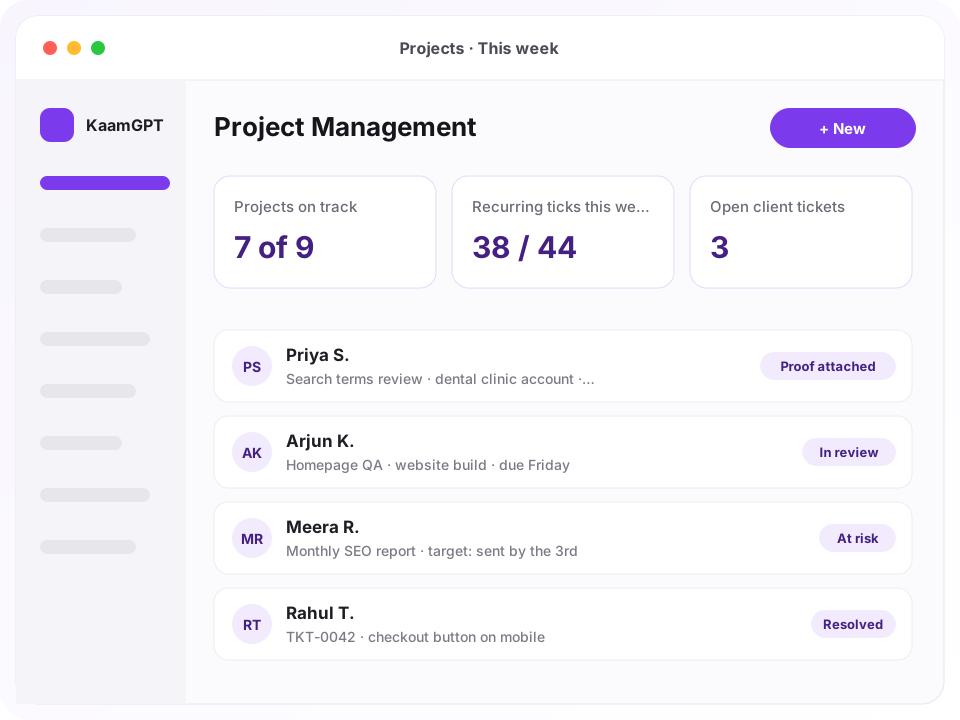
For a team that delivers work to clients, the best project management software in Bengaluru must remember Tuesday's search-terms check as carefully as next month's website launch. KaamGPT Project Management is built on that premise: clients, projects, one-off deliverables and standing daily, weekly, monthly or quarterly commitments sit in one place, every update can carry proof of what was done, and each client gets a login to follow progress without chasing your account manager.
That is how KaamGPT Project Management tends to be used by performance agencies in Indiranagar, design studios in Koramangala and web shops in HSR Layout. A manager plans from a template, staff tick their commitments from a screen called My Work, and the client sees delivered milestones and recent updates in a portal that carries the agency's own logo. You can open a free workspace for a team of five and run a real retainer on it before paying anything.
- ₹0on the Free plan, which gives a team of five the projects app, client portal and tickets
- 5task cadences: one-time, daily, weekly, monthly and quarterly
- 10starter project templates, from Google Ads and Meta Ads to video production and general retainers
- 14 daysof trial on any paid tier, from Starter upward
Why does retainer work slip through the cracks at Bengaluru agencies?
Most agency work is not a project with a start and an end. It is a pile of standing promises: check the ad accounts every morning, publish three posts a week, send the performance report by the third of each month. General-purpose task boards treat a card as something you close once, so repeating work gets cloned, forgotten or kept in a side sheet that nobody opens after the first fortnight.
Meanwhile the client relationship runs on WhatsApp. Screenshots of finished work scroll away within days, revision requests arrive as voice notes, and the question every account manager dreads, what exactly did your team do for us this month, gets answered from memory. When an executive resigns, the history of their clients often leaves with their phone.
- A daily check that nobody ticked looks exactly like a daily check that nobody did.
- Evidence of finished work sits in personal chats instead of against the task it belongs to.
- Clients ask for status on calls because they have nowhere to look it up themselves.
- Milestones get delivered while invoices and collections are tracked in another file, by another person.
- A project drifting off schedule is usually noticed only after its deadline has gone.
What should the best project management software in Bengaluru do for client work?
Eight capabilities that come from how agencies actually deliver and bill, not from a software sprint board.
Recurring commitments, ticked per period
Mark a task daily, weekly, monthly or quarterly and it never closes. Each period gets its own tick instead, stored against the day, week, month or quarter it covers, so whether last Wednesday's search-terms review happened still has an answer next quarter. My Work lists today's recurring checks above one-off tasks, because those are the ones that quietly get skipped.
Updates that carry proof of work
Staff post dated updates on a task with links attached: the live ad, a Drive folder, a Figma frame, a hosted screenshot, plus minutes spent and a status change. These proof of work updates are what the client later reads. A task flagged as needing proof refuses an update that has neither a link nor a written account, and the manager and reviewer are notified.
A client portal carrying your logo
Issue each client contact a login to a portal that shows your agency's name and logo, not ours. They see their own projects, progress, team, milestones with billed and paid totals, the latest thirty updates and only the files you have marked client-visible. Internal notes, budgets, cost to date and hourly rates are never part of what the portal reads.
Numbered tickets instead of voice notes
Clients raise a ticket from the portal with screenshots attached, and your team can log one on their behalf after a phone call. Each gets a reference such as TKT-0042, a priority, an owner and a status trail. Internal notes stay inside the team, every status change can carry a remark and proof, and the time of the first reply is recorded.
Milestones with the money attached
Break an engagement into milestones, each with an amount, a due date, a delivery status running from pending to approved, and a payment status that moves from unbilled through invoiced, part-paid and paid. Recording full payment settles the status on its own, and an invoiced milestone that passes its due date turns overdue without anyone flagging it.
A health score nobody has to update
Every live project carries a score out of 100, recalculated from signals already in the data: overdue and blocked tasks, a passed or looming deadline, calendar used against work delivered, an on-hold status and spend above budget. Projects fall into on track, at risk or critical with the reasons written out, so the Monday review starts where it should.
Starter templates for ten service lines
Ten starter blueprints ship with the app, covering Google Ads, Meta Ads, website builds, app development, social media, SEO and content, branding, e-commerce, video and general retainers. Each holds tasks with a cadence, category, estimated hours, checklist and proof setting. Edit them, write your own, or add a second template to a running project, which remembers what it has already received.
Checklists, minutes and a reviewer per task
Tasks hold a tickable checklist, labels, a dependency, an assignee and a separate reviewer, with @mentions in comments. Minutes logged against a task roll up into actual hours for the project, and the delivery report shows each person's assigned, completed and overdue work, updates posted and time logged. A CSV of every live project is ready for the client deck.
What happens between sign-up and a client's first portal login?
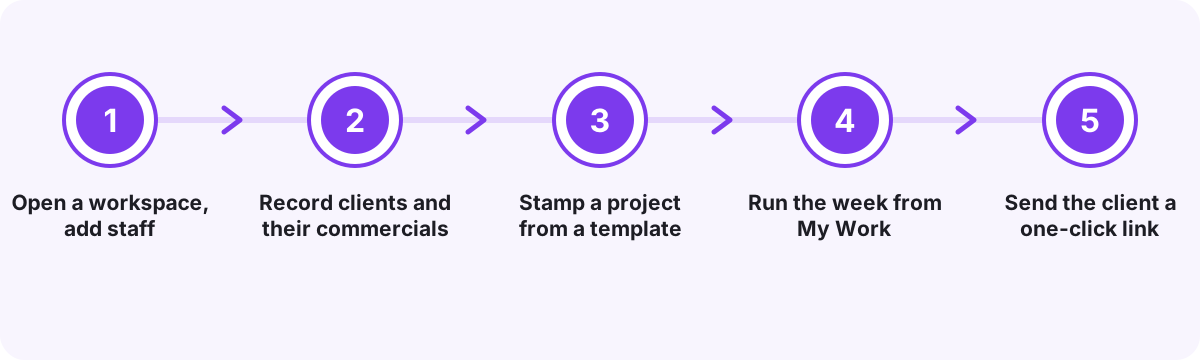
Open a workspace, add staff
Create the workspace and add your team as employees. It is the same directory that KaamGPT Attendance and HRMS & Staff draw on, so nobody is typed in twice and each person's project roles sit beside the rest of their record.
Record clients and their commercials
Add each client with business name, GSTIN, city, industry and an internal account manager, plus the monthly retainer and the day of the month you invoice them. Additional contacts at the client sit under the same record, with one marked as primary.
Stamp a project from a template
Pick one or more service lines, a template, dates, a budget and a billing type: fixed price, monthly retainer, per milestone or hourly. The template's tasks arrive with their cadences, checklists and estimates, ready to reassign, reschedule or trim for this particular client.
Run the week from My Work
Each person opens My Work to find today's recurring commitments and their one-off tasks, ordered by how late they are. They tick, post updates with proof and log minutes, while managers watch health scores and overdue counts move on the overview.
Send the client a one-click link
Create a portal login for the client contact and send a sign-in link by email or WhatsApp. The link works once and expires after 72 hours, and a client signing in for the first time must set their own password before they see anything.
Four Bengaluru client teams and the delivery problem each one had
Illustrative scenarios showing how teams weighing up the best project management software in Bengaluru would put this one to work.
A performance marketing agency off 100 Feet Road, Indiranagar, running ads for clinics
- The situation
- Twenty-odd ad accounts each need a morning pacing check and a search-terms review, and clients ring on Friday asking whether anyone looked at their account this week. The honest answer lived in one executive's head.
- How KaamGPT fits
- Every client gets a project stamped from the Google Ads template. Daily checks are assigned to named executives, who tick them in My Work and attach screenshot links to their weekly optimisation updates. The monthly report is a monthly task with its target written in: sent by the third.
- What changes
- The Friday question gets answered from dated updates the client can already read in the portal, rather than from reassurance on a call.
A branding and packaging studio in Koramangala 5th Block
- The situation
- Revision rounds arrive as WhatsApp voice notes from three people at the client, approvals go missing, and the second instalment is chased only after the print-ready packaging files have already gone out.
- How KaamGPT fits
- Identity, packaging and brand guidelines become milestones with amounts. Figma links go into Files and are switched to client-visible only once they are ready. Revision requests come in as portal tickets with screenshots, so each round has a number, an owner and a record.
- What changes
- Revision rounds become countable, and each milestone's payment status settles when the next stage begins instead of an awkward phone call.
A twelve-person web and app development shop in HSR Layout
- The situation
- After launch, bug reports reach developers through the founder's phone. Fixes happen, yet weeks later the client insists an issue was never resolved, and nobody in the team can show otherwise.
- How KaamGPT fits
- Clients raise tickets in the portal, and calls are logged as tickets by the team. Developers discuss fixes in internal notes the client never sees, then move a ticket to resolved with a remark and a screenshot attached to that exact status change.
- What changes
- A disagreement over whether something was fixed is settled from the ticket's own history, with the evidence sitting on the move that closed it.
A bookkeeping and compliance practice in Malleshwaram serving neighbourhood retailers
- The situation
- Each client has monthly and quarterly obligations handled by juniors who change every year or so. When someone leaves, their successor inherits a list of client names but no record of which periods were actually completed.
- How KaamGPT fits
- The practice runs one retainer project per client, with monthly and quarterly tasks carrying checklists and a proof requirement: an acknowledgement link or a written note. The delivery report shows who ticked what, and the partner reviews it at month end.
- What changes
- A new joiner can see, client by client, which months and quarters were closed and what evidence was filed against each one.
Is a spreadsheet and a WhatsApp group enough to run agency projects?
Most agencies in the city start on one of two setups and outgrow it before moving to dedicated agency project management software. This is how the three compare on the jobs client work actually involves.
| What matters | KaamGPT Project Management | Spreadsheet + WhatsApp groups | Generic kanban or sprint board |
|---|---|---|---|
| Repeating daily, weekly and monthly work | One task, ticked once per period, with the history of every period kept | A new row or tab each week, copied across by hand | A card closes once; repeats mean cloning cards or adding plug-ins |
| Evidence that the work was done | Updates carry links and minutes; a task can refuse an update without proof | Screenshots scattered across personal chats | Attachments are optional and nothing checks for them |
| What the client can see | Their own login: progress, milestones, shared files, updates and tickets | A shared sheet that shows everything or nothing | Guest access to your internal board, or exported PDFs |
| Client requests and bugs | Numbered tickets with an owner, a status trail and hidden internal notes | Messages and voice notes in a group chat | Emails that someone copies into cards |
| Money against delivery | Milestones with amount, invoice number and payment status; a retainer on each client | A separate billing sheet, reconciled by hand | Usually kept outside the tool, in accounting software |
| Early warning on a slipping project | Health score with written reasons, recalculated from task data | Whoever happens to notice first | Manual labels or colours someone must remember to change |
| Cost for a small team | Nothing while the team is five or smaller; Starter is ₹999 monthly | No licence fee, but manager hours every week | Varies by vendor, often priced per user |
The honest verdict. Choose KaamGPT when you deliver repeating work to several clients, need evidence against each task and want clients to check progress on their own; for that loop, it is our honest answer to anyone searching for the best project management software in Bengaluru. A spreadsheet is fine for a solo freelancer with three clients. A generic kanban board suits an in-house product team shipping sprints, with no outside client to report to.
What does KaamGPT Project Management cost an agency team?
Projects is included in full on every KaamGPT plan. The tiers differ on employees, storage, messaging volume, API access and support, not on project features, so a small studio pays nothing for the best project management software in Bengaluru until its team grows past five people. All figures are INR, and the checkout page settles the precise sum before any payment; every plan and limit is listed here.
Free
₹0forever
No card needed
Costs nothing while the team is five people or fewer, with 512 MB for uploads: room for a founder-led studio to run its live retainers, portal logins and tickets included, keeping heavy files as pasted links.
- Up to 5 employees
- 1,000 emails / month
- 200 WhatsApp messages / month
- 512 MB storage
- Community support
Starter
₹999/month
or ₹9,590 billed yearly — 20% less
At ₹999 monthly, following a 14-day trial, Starter holds 25 employees and 5 GB, the usual fit for an agency with a handful of account managers and a production team behind them.
- Up to 25 employees
- 25,000 emails / month
- 5,000 WhatsApp messages / month
- 5 GB storage
- Email support
Growth
Recommended₹2,999/month
or ₹28,790 billed yearly — 20% less
Growth, at ₹2,999 monthly, seats 100 employees with 25 GB and API access, and its email queries jump the line, for multi-team agencies that want project data flowing into their own dashboards.
- Up to 100 employees
- 1,50,000 emails / month
- 30,000 WhatsApp messages / month
- 25 GB storage
- API access
- Priority email support
Business
₹7,999/month
or ₹76,790 billed yearly — 20% less
Business, at ₹7,999 monthly, stretches to 500 staff and 100 GB, puts your support requests first and includes help getting teams set up, suiting agency groups and IT service firms that run several delivery units.
- Up to 500 employees
- 7,50,000 emails / month
- 1,50,000 WhatsApp messages / month
- 100 GB storage
- API access
- Priority support + onboarding
Optional add-ons
- Custom automation on your project dataBuilt to order by KaamGPT's AI Development service, from ₹49,999 per project, with scope and timeline fixed in a written quote.
- Commit for a quarter and the per-month price drops 10%; for six months, 15%; for a full year, 20%, which puts a year of Starter at ₹9,590.
- Client portal logins are issued separately from employee accounts, so a client contact does not take up one of your plan's employee places.
- Files uploaded to a project count towards storage; links to Drive, Figma or Canva folders do not.
How should you split recurring retainer work from one-off deliverables?
Start by writing down every promise in the client's contract or scope email, then sort each one by how often it recurs. Anything that happens more than once belongs on a cadence: daily for pacing and moderation, weekly for optimisation and creative refreshes, monthly for reports and targets, quarterly for audits and strategy reviews. Anything that happens once, such as a site launch or a pixel install, is a one-off with a due date.
The usual mistake is creating a fresh one-off task called Week 32 report every Monday. It feels tidy for a month, then the backlog becomes a graveyard of near-identical cards. With proper recurring task tracking, the report is one task on a monthly cadence with a target such as sent by the 3rd, and each month's tick lives underneath it.
Keep the recurring list short. If a daily check takes two minutes and nobody would notice it missing for a week, it is probably weekly. Staff facing fifteen daily ticks start ticking without looking, which defeats the reason for recording them at all.
- Write the client-visible target into the task itself, not into someone's notebook.
- Give every recurring task a named assignee; the overview counts unassigned tasks separately for a reason.
- Put estimated hours on template tasks so a project's estimate adds up before work starts.
- Use quarterly tasks for account reviews and renewals, which retainers tend to forget.
What counts as good proof of work before a client reads it?
Proof is anything a sceptical client could open and verify without asking you: the live post, the published page, the ad preview, the report PDF in a shared folder, or a screenshot hosted where they have access. A proof link that needs your own login to open is not proof to them, so agree on the storage location during onboarding.
Decide per service line what proof looks like and write it into the template's task descriptions. For SEO it might be the URL of the published article; for social, the post link; for ads, a screenshot of the change history. Then keep the proof requirement on tasks where a dispute would be expensive, and switch it off for internal chores.
Remember that updates appear in the client portal in your team's own words. Train staff to write each update for the client: what changed, where to see it, what comes next. Internal debate belongs in task comments, which the portal does not show, and rough drafts belong in Files with client visibility left off.
- One update per meaningful change beats a daily line saying work is in progress.
- Minutes logged with an update feed the delivery report, so ask for them on billable work.
- Links to personal drives break when someone leaves; use shared agency storage instead.
What should an agency settle before giving clients a login?
Issue one login per person at the client rather than a shared one, so access can be withdrawn from a marketing manager who resigns without locking out the founder. KaamGPT suggests a login ID built from the client's name or accepts an email address, makes every client set their own password on first entry, and keeps passwords only as salted PBKDF2 hashes, the approach that OWASP and NIST password-storage guidance describes.
Switching a login off takes effect on the client's next request, not whenever their session happens to expire, and repeated wrong passwords park the login for a few minutes. Tickets a client raised stay attached to their name after access ends, so the history survives staff changes on either side. That combination is what a client portal for agencies has to get right.
Client contacts are personal data. The 2023 Digital Personal Data Protection Act expects organisations to process only the personal data a purpose needs and to protect it with reasonable safeguards, so store the phone and email you will actually use for updates and little else. Decide which files are safe to show, too: nothing in Files reaches the portal until someone marks it client-visible.
- Send the first sign-in link on WhatsApp; the single-use link stays valid for 72 hours.
- Give portal-login permission to account managers, not to the whole team.
- Review client-visible files before each milestone handover.
Why do agencies pick a shared workspace over a stand-alone task board?
One employee directory for every app
Staff are added once and appear in Projects, Attendance and HRMS & Staff alike. There is a single directory to keep current when people join or leave, instead of three tools that slowly disagree about who works here.
Internal detail stays internal
The portal is built from an explicit list of fields. Budgets, costs, hourly rates, internal notes, task comments and unshared files are simply not part of what a client session can read, whatever the screen shows.
A flat plan price, not per seat
Each plan is one monthly price up to an employee cap, and client logins sit outside that cap. Adding a second or third contact at a client to the portal does not change how many employees you are counted for.
Every app available on every plan
Projects, Bills, Attendance, HRMS and the marketing apps are open from the Free plan upwards, because the tiers sell volume rather than features. You can try the whole agency setup before paying anything.
Shaped for Indian client billing
Clients carry a GSTIN, amounts default to rupees, and invoices are raised in KaamGPT Bills with the invoice number recorded on the milestone it settles. Delivery and collection stay in one conversation with the client rather than two spreadsheets.
Trusted by 100+ companies in India
The same workspace already runs attendance, invoicing and marketing for businesses across the country, so project data sits beside the rest of your operation rather than behind yet another login and password.
Service businesses that fit the agency task model
- Digital marketing and ad agenciesDaily pacing checks, weekly optimisation and monthly reports sit on cadences, with screenshot proof the client can read.
- Branding and design studiosA milestone per deliverable, Figma links shared only when ready, and revision rounds arriving as numbered tickets.
- Web and app development shopsBuild milestones before launch, then a ticket queue for post-launch bugs with fix evidence on each status change.
- Video and content production housesShoot, edit and delivery tasks with checklists, and rough cuts kept internal until someone marks them client-visible.
- SEO and content teamsMonthly article targets and quarterly audits as recurring tasks, each update carrying the published URL as its proof.
- CA, bookkeeping and compliance practicesMonthly and quarterly client obligations with checklists, so a new joiner inherits a record rather than a list of names.
- IT services and maintenance vendorsRetainer projects for support contracts, tickets logged from calls, and a delivery report showing who handled what.
Client delivery across Bengaluru, from Indiranagar studios to Whitefield vendors
The city's agency map is dense. Performance marketers cluster around Indiranagar and Domlur, design and branding studios fill the lanes of Koramangala, and small web and app shops work from co-working floors in HSR Layout. Their clients are often a long drive away in Whitefield's tech parks or along Outer Ring Road, which is why the monthly in-person review has quietly become a video call nobody prepares for.
A portal changes that routine. The client in Whitefield opens the same progress, milestones and recent updates your team sees, minus the internal notes, before the call begins. The Malleshwaram practice with retail clients across the old city stops sending status messages at month end. For many teams here, that shift is what makes KaamGPT the best project management software in Bengaluru rather than one more board to maintain.
Clients outside the city, in Mysuru, Hubballi or Mangaluru, receive the same single-use sign-in link on WhatsApp, which matters when a review elsewhere in Karnataka would otherwise cost someone a full day on the road.
- Starting price
- ₹0 while your team is five people or fewer; Starter ₹999 monthly for a 25-person agency
- Trial
- 14 days on each paid tier
- Onboarding
- 10 starter templates and 10 service lines created on first open; Business adds onboarding help
- Platforms
- Any web browser on desktop or phone, installable to the home screen; client portal in the browser
- Works with
- KaamGPT Bills for GST invoices; Attendance and HRMS & Staff share the employee directory
- Contact
- Call or WhatsApp buttons on every page; demos on request
Where this applies around Bengaluru, Karnataka
- Bengaluru
- Indiranagar
- Koramangala
- HSR Layout
- Domlur
- Whitefield
- Malleshwaram
- Karnataka
- India
Frequently asked questions
22 answersHow much does KaamGPT Project Management cost for a small agency?
Every plan carries the full projects app, so the price tracks team size. A studio of five or fewer pays ₹0. Starter, at ₹999 monthly, covers a 25-person agency; Growth, at ₹2,999, stretches to 100 people; Business, at ₹7,999, reaches 500. Every amount is in rupees, and the checkout screen confirms the precise charge. Paying for a quarter, half-year or year at once trims the per-month rate.
Can we run a live retainer on KaamGPT before paying?
Yes. Any team of five or fewer employees gets the whole projects app, portal logins and tickets included, at no charge, with 512 MB for uploaded files. Bigger teams can move to Starter, Growth or Business, and each paid tier opens with 14 trial days, long enough to watch two weeks of recurring ticks and client updates build up.
How quickly can a manager get the first client project running?
Starter templates and service lines are created the first time you open the app, so a manager can add a client, pick a template such as Google Ads or Website Development, adjust dates and assignees, and issue a portal login in one sitting. Rebuilding every live retainer takes longer, so begin with a single client and add the rest week by week.
Who owns the client and project records we put into KaamGPT?
Your agency does. Each client, project, task and file sits inside your own workspace, and queries are scoped to that workspace, so no other business on the platform can open your client list. Staff permissions decide who views, edits or exports projects, and authorised users can download a CSV of every live project whenever they need one.
What exactly does a client see after signing in to the portal?
Only their own projects: status, health, progress, dates, the team on each, milestones with billed, paid and outstanding totals, the latest updates your staff posted with proof, files you marked client-visible, and their tickets. The portal carries your agency's name and logo. It never shows budgets, cost to date, hourly rates or internal notes.
Can a client read our internal discussion on a ticket?
No. Messages marked internal on a ticket are filtered out in the query that feeds the portal, not merely hidden on screen, and they are never included in a notification to the client. Your developers can argue about a fix in the thread while the client sees only the replies written for them.
How do recurring daily, weekly and monthly tasks work?
A recurring task stays open for as long as the engagement runs. Each day, week, month or quarter it is ticked separately, and every tick is stored with who did it and when, so you can look back at any earlier period. You can give a commitment an end date, such as the last day of a three-month campaign.
Does a team member have to attach proof to update a task?
Only where you ask for it. Every task has a proof setting, switched on by default; while it is on, an update is refused unless it carries at least one link or a written note of the work. Quick ticks on recurring tasks remain possible from My Work, so reserve strict proof for work a client may question.
How do clients report a bug or ask for a revision?
From the portal they raise a ticket against a project, with a subject, category, priority and screenshots. It gets a reference such as TKT-0042, the project manager assigns it, and the client follows replies and status changes, with notifications by email or WhatsApp. When a request comes in by phone, your team logs the ticket on the client's behalf.
Can we record the time spent on each task?
Yes. Staff enter minutes when they post an update, and those minutes roll up into actual hours for the task and the project, next to the estimate. The delivery report totals minutes logged per person for any date range. Time is typed in rather than run on a stopwatch, which suits teams that fill in their day at the end of it.
Does it raise GST invoices for delivered milestones?
GST invoices are raised in <a href="/best-gst-invoicing-and-billing-software-in-bengaluru">KaamGPT Bills</a>. In Projects, each milestone records its amount, the invoice number, what has been paid and a payment status, and the clients screen totals billed and outstanding amounts. Fully paid milestones settle on their own, and invoiced ones past their due date are marked overdue without anyone chasing the status.
Which other KaamGPT apps work alongside Projects?
Projects draws on the same employee directory as Attendance and HRMS & Staff, so assignees are people you already manage. Milestone invoices are raised in Bills. Portal sign-in links and ticket notifications go out by email or WhatsApp, the whole workspace sits behind one login, and the Growth and Business plans add API access.
Why not keep running projects on a spreadsheet and WhatsApp groups?
A sheet can list tasks, but it cannot hold a daily check's history without a new column every day, it cannot show one client their rows without showing everyone's, and proof ends up in chats that disappear when staff leave. With three clients and no staff, a spreadsheet is fine. Beyond that, the gaps start costing client trust.
How is it different from a general kanban board tool?
A kanban tool is shaped around cards that move once from to-do to done, which fits product sprints. KaamGPT also has a board view with to-do, in progress, review, blocked and completed columns, but its default groups work by cadence and it adds clients, milestones, payments, proof and a portal. That is why agencies shortlisting the best project management software in Bengaluru often compare the two.
When would an agency be better off with a different kind of tool?
It is not built for software teams that plan in story points and burndown charts, for construction firms that need Gantt charts and resource levelling, or for anyone who wants a desktop stopwatch timer. There is no native app-store download either. Agencies, studios and consultants delivering repeating client work are who it was designed around.
Can my team use it on their phones?
Yes. KaamGPT opens in any phone browser, and staff can pin it to their home screen as an installed web app, so executives can tick daily commitments and post updates from a client's office or a shoot. Clients open the portal the same way, straight from the sign-in link sent on WhatsApp. Nothing needs installing from an app store.
Can we move our projects over from another tool?
There is no automatic importer for projects today. Most agencies recreate their active clients first, stamp each live retainer from the closest template, and paste links to existing Drive or Figma folders into Files instead of re-uploading them. Finished projects can stay in the old tool until their history is no longer needed.
What help do we get once our agency is on KaamGPT?
That depends on the tier. On Free you rely on the community channel; Starter includes email assistance; Growth puts your email tickets ahead in line; Business gets first attention plus assistance when you move over, which matters when several delivery teams switch at once. Before you sign up, the call and WhatsApp buttons across this site reach the same people.
Whom should we contact for a walkthrough of the projects app?
Phone +91 79767 82366, or message it on WhatsApp, with a line about how your agency delivers: the services you sell, how many clients are on retainer and how you report to them today. Someone will walk you through a project built from the matching template, including the portal screen your client would see after signing in.
Can an agency in Mysuru or Hubballi use this too?
Yes. Everything runs online, so a studio in Mysuru or a marketing team in Hubballi uses the same workspace, and their clients sign in to the portal from anywhere. The things that make KaamGPT the best project management software in Bengaluru, such as portal links over WhatsApp and rupee billing on milestones, work the same way across Karnataka.
Can we restrict which staff can change or see a project?
Yes. Access is permission-based: roles decide who can view, create, edit or delete projects, manage milestones and files, export reports, handle tickets or issue portal logins. Only an admin, the project's own manager or someone granted the manage-all permission can change a project's plan, and a ticket is visible only to people on that project.
How is the project health score worked out?
It starts at 100 and loses points for a passed deadline, a close deadline with plenty of work outstanding, overdue tasks, blocked tasks, an on-hold status, a project with no tasks, far more calendar used than work delivered, and spend over budget. Scores of 75 and above read on track, 45 and above at risk, and anything lower critical.