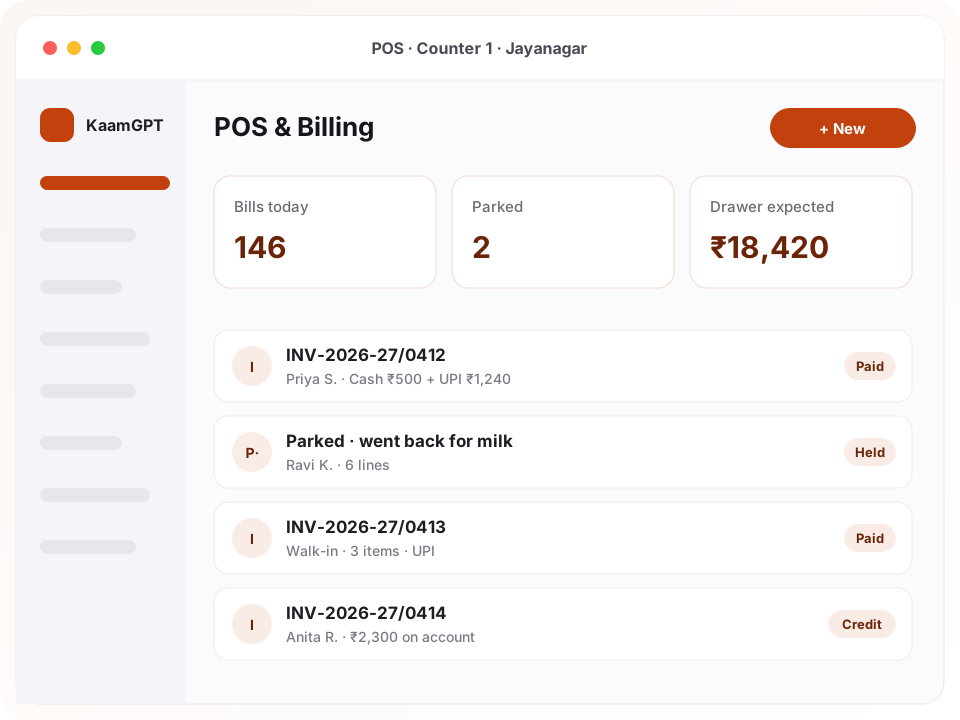
Anyone comparing the best retail POS billing software in Bengaluru is really asking a narrower question: will the counter keep moving at 7pm on a festival Saturday? KaamGPT POS & Billing answers with a browser till built around the barcode scanner. A scan lands the item on the bill, typing 6* before a scan lands six, F6 parks a half-rung cart for the customer who went back for curd, and F8 opens payment.
The counter is only half the job. Behind it, every unit that arrives, sells, comes back, breaks or moves between branches is written to a stock ledger with its reason, so a wrong count can be traced instead of argued about. Products carry sizes, colours and units, customers carry credit, and the drawer is counted at close. Read the POS & Billing product page for the full feature list, or sign up for a free workspace and ring up a test bill today.
- ₹0runs the full till, ledger and reports for a workspace of up to 5 employees
- F1–F10function keys printed on the billing buttons, so staff learn them by clicking
- 13reasons a stock movement can carry, from opening stock to expired and made up from parts
- 4paper sizes for bills: 58 mm and 80 mm thermal rolls, A5 and A4
Why do Bengaluru shop counters lose money between the bill book and the stock register?
Most independent shops in the city keep two records that never meet. The bill is written or printed at the counter; stock is counted once a month from a register or a spreadsheet. When the two disagree, nobody can say whether the gap is a miscount, a damaged carton written off in someone's head, a transfer to the other branch, or plain theft. The owner ends up trusting whichever number is less inconvenient.
Payments open a second leak. A customer hands over ₹500 in cash and pays the rest by UPI, the cashier records one mode, and the evening drawer comes out short by an amount that looks like theft but is really an unrecorded split. Udhaar lives in a notebook and gets chased only when the owner remembers. Closing those gaps is the real test for the best retail POS billing software in Bengaluru, and a faster printer closes none of them.
- A queue builds because prices are looked up by hand while the scanner sits unplugged under the counter.
- The drawer is counted against total sales, so UPI and card takings make every close look short.
- Stock goes negative on paper because nobody wrote down the three pieces sent to the other branch.
- Credit balances are scattered across a notebook, WhatsApp chats and the cashier's memory.
- A cashier can quietly knock a price down, and the owner finds out only when the month's margin shrinks.
What should the best retail POS billing software in Bengaluru do from the first scan to the closing count?
If you are shortlisting tills, these are the eight jobs worth testing with your own products and your own cashiers before you decide.
Scanner-first billing with function keys
Good barcode billing software treats the scanner as a keyboard, and this one does: the scan box keeps focus and Enter adds the exact barcode or SKU match. Type 6* before a scan to add six. F1 opens another bill, F4 attaches a customer, F6 holds, F8 takes payment and Ctrl+K returns to the scanner. Every key is printed on its button.
Split tenders, change and UPI codes
One bill can take cash, UPI, card, bank transfer, a wallet and an on-account balance together, so split payments are the normal shape rather than a workaround. Change is worked out from cash only, since a card machine cannot hand notes back. With your UPI ID saved in the company profile, the payment screen draws a QR code carrying the exact amount.
Parked bills and parallel bill tabs
Open a second or third bill tab at the same counter when somebody goes back for milk, and the tabs survive a page reload. For longer pauses, F6 lets a cashier hold the bill on the server under a label and serve the next customer; it can be resumed from another device. A parked bill reserves no stock, so a forgotten cart never blocks the last packet on the shelf.
GST worked out on every line
Choose GST split by place of supply, one flat rate, or no tax at all. Prices can include tax: a ₹118 shelf price becomes ₹100 plus ₹18, worked out by division rather than subtraction. CGST and SGST or IGST follow from comparing state codes, and each completed bill freezes its rate-wise breakup, so editing a product later never rewrites a bill already issued.
Variants, units and customer price lists
A kurta can have Black / M and Maroon / L, each with its own barcode, SKU and price, while a plain item quietly gets a single variant. Kilograms, litres and metres sell in fractions; pieces and boxes do not. Customer groups pay retail, wholesale or MRP, so attaching a trade buyer reprices the whole bill, and a minimum selling rate stops prices sliding too low.
A stock ledger with reasons
Stock never changes without a row saying why: opening, bought in, sold, returned by a customer, sent back to the supplier, transferred, damaged, expired, lost, counted and corrected, used internally or made up from parts. Each row stores the balance after it. Weighted average cost updates as goods arrive, and a single digest at 06:30 lists what has run out or is running low.
Returns, exchanges and store credit
Find the original bill, tick the lines coming back and decide whether each one goes back on the shelf, because a cracked jar should not. Settle by paying the customer, swapping for another item, or keeping the amount as store credit on their account. Restocked items re-enter the ledger as returned by a customer, so the shelf count stays honest.
Drawer shifts and cashier limits
Open the till with a float, record cash paid in or taken out, and count the drawer at close. The expected figure counts cash only, and the difference is stored against that shift. Cashiers can bill and take returns, but typing a price needs a manager, and line discounts above 10% need the unlimited-discount permission.
How does a new shop get from signup to its first printed bill?
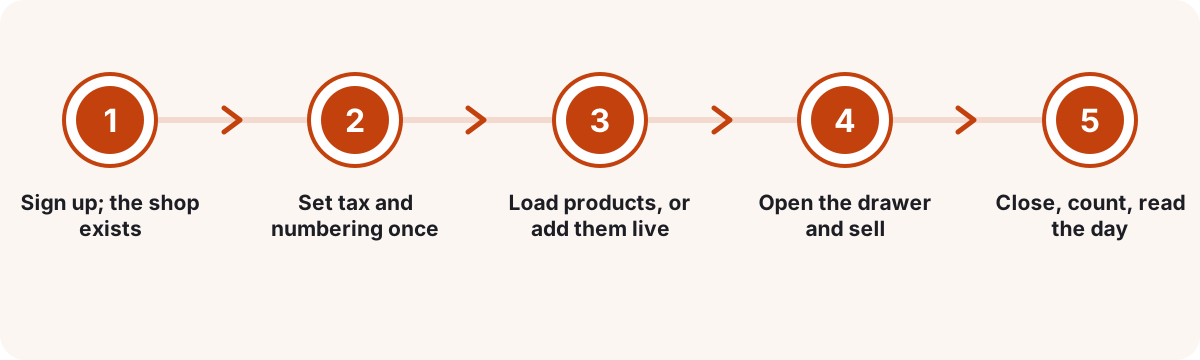
Sign up; the shop exists
Creating the workspace also creates a shop called Main store, a register called Counter 1, ten everyday units from pieces and kilograms to plates, Retail and Wholesale price groups, and a General category. Rename or add to any of them whenever you like.
Set tax and numbering once
Enter your GSTIN and state code, decide whether shelf prices already include tax, pick a short invoice prefix, and let numbering restart every financial year. Choose the paper size, and whether bills go out on WhatsApp always, only when asked, or never.
Load products, or add them live
Add products with variants, HSN codes, cost, selling rate and MRP on the Products screen. Or press F3 at the till, scan the item into the code field, snap a photo, enter opening stock, and it lands straight on the bill being rung up.
Open the drawer and sell
Count the opening float, then scan, search or tap picture tiles. Press F8, split the tender however the customer pays, and print a thermal slip or a GST tax invoice layout, or send the bill to the customer's phone.
Close, count, read the day
Count the drawer and the till records the difference. Reports then break sales down by hour, cashier, payment mode, product, category and branch, alongside a tax summary, stock value and slow movers, with a CSV export of daily sales.
Which Bengaluru shops fit this till, and how do they set it up?
Four illustrative shop types, each with the settings that change how their counter behaves.
A two-counter supermarket in Jayanagar 4th Block
- The situation
- Weekend evenings bring a queue at both counters. Prices get typed by hand whenever a label will not scan, customers pay part cash and part UPI, and the closing count never matches because digital takings sit inside the expected cash.
- How KaamGPT fits
- Each counter gets its own register and shift. Cashiers use the 6* prefix for multipacks, park a bill with F6 when a customer goes back to the aisle, and record every tender separately. At close the expected figure counts only cash, so a short drawer means genuinely missing notes.
- What changes
- The queue moves on keystrokes instead of lookups, and the evening count becomes a figure the owner can act on rather than argue with.
A saree and kurta store on Commercial Street with a Chickpet godown
- The situation
- One design comes in six sizes and four colours. Stock sits partly in the shop and partly in a godown, and nobody knows whether Maroon / L is available until someone walks across to check.
- How KaamGPT fits
- Each size and colour becomes a variant with its own barcode. The godown is set up as a warehouse location that holds stock but never sells, and transfers move pieces to the shop with a dispatch step at one end and a receive step at the other.
- What changes
- Staff can tell a customer what exists in each size without leaving the counter, and every piece that crossed between locations leaves a record.
A mobile accessories wholesaler-retailer on SP Road
- The situation
- Walk-in buyers pay retail, while smaller shops from across the city buy at trade prices on credit and settle weekly. Cashiers were negotiating on their own, and the credit notebook never had a total.
- How KaamGPT fits
- Trade buyers sit in the Wholesale group, so attaching one reprices the bill. Unpaid balances go on account against a named customer, a minimum selling rate blocks under-pricing, and the owner sends each buyer a reminder listing every unpaid bill before the collection round.
- What changes
- Retail and trade prices stop leaking into each other, and the owner knows exactly which shop owes what before stepping out to collect.
A sweets and bakery counter in Malleswaram
- The situation
- Most sweets sell by weight, cakes are ordered before they are baked, and the rush before Ugadi and Deepavali turns the counter into a crowd holding half-finished orders.
- How KaamGPT fits
- Sweets use the kilogram unit, so 0.35 kg bills correctly while puffs stay whole pieces. Custom cakes are set up as items that keep no stock, and several bill tabs stay open at once while boxes are packed and weighed.
- What changes
- Weighed items bill correctly the first time, festival orders stop colliding at the counter, and the stock report reflects only what is really on the trays.
How does KaamGPT POS compare with installed desktop billing or a handwritten bill book?
Most Bengaluru shops are choosing between these three setups. The differences below are the practical ones, including the place where older tools still win.
| What matters | KaamGPT POS & Billing | Installed desktop billing software | Handwritten bill book and stock register |
|---|---|---|---|
| Where it runs | A current browser on a tablet, laptop or phone | The single PC it was installed on | Wherever the book is kept |
| Billing speed | Scanner-first, F1–F10 keys, 6* quantity prefix | Scanner support is common; shortcuts vary by package | Every price written and totalled by hand |
| Split payments | Cash, UPI, card, bank, wallet and on-account on one bill | Depends on the package and its version | Noted in the margin, if at all |
| Stock history | A ledger row with a reason for every movement, per location | Usually a running quantity; history depth varies | A separate register, updated when someone remembers |
| More than one branch | Shops and godowns in one workspace, with transfers | Often one install per branch; syncing varies | One book per branch, reconciled over the phone |
| Billing with no internet | Not possible; a half-rung bill does survive a reload | Yes, on that one machine | Yes |
| Cost to start | ₹0 on Free for up to five employees; Starter ₹999 a month | Licence fee plus renewals, varying by vendor | The price of the books, and the owner's evenings |
The honest verdict. Set the best retail POS billing software in Bengaluru against the tools already on your counter and the choice gets simpler. Pick KaamGPT when the counter, the stock and the credit book need to agree, when you run more than one location, or when you want to check the day from your phone. Stay with an installed package if your street loses connectivity for hours and a hotspot is not an option. A tiny shop with a handful of lines can live with a bill book until stock starts moving.
What does POS & Billing cost a Bengaluru shop each month?
Price matters less than people expect when choosing the best retail POS billing software in Bengaluru, because here the till is included in every plan with the same features. What changes between plans is headcount, storage, messaging volume and the level of support. Amounts are quoted in INR and confirmed on the checkout screen, and committing for a quarter, six months or a year brings 10%, 15% or 20% off. The plan comparison lists each limit.
Free
₹0forever
No card needed
₹0 with room for 5 employees, enough for an owner and a few cashiers to run a real counter with real stock.
- Up to 5 employees
- 1,000 emails / month
- 200 WhatsApp messages / month
- 512 MB storage
- Community support
Starter
₹999/month
or ₹9,590 billed yearly — 20% less
₹999 monthly, or ₹9,590 billed yearly, covering 25 employees, 5 GB of storage for product photos, email support and a 14-day trial.
- Up to 25 employees
- 25,000 emails / month
- 5,000 WhatsApp messages / month
- 5 GB storage
- Email support
Growth
Recommended₹2,999/month
or ₹28,790 billed yearly — 20% less
₹2,999 monthly for as many as 100 employees across several branches and a godown, adding API access and priority email support.
- Up to 100 employees
- 1,50,000 emails / month
- 30,000 WhatsApp messages / month
- 25 GB storage
- API access
- Priority email support
Business
₹7,999/month
or ₹76,790 billed yearly — 20% less
₹7,999 monthly for a larger retail group with as many as 500 employees and 100 GB of storage, plus priority support and onboarding help.
- Up to 500 employees
- 7,50,000 emails / month
- 1,50,000 WhatsApp messages / month
- 100 GB storage
- API access
- Priority support + onboarding
- Everyone who signs in to use the till counts as an employee on the plan, so add cashiers, managers and godown staff together.
- No plan bundles scanners, thermal printers or tablets; the till runs on devices you already own or buy locally.
- Bills sent on WhatsApp go through the number paired in WhatsApp Blast, so pair that number before switching automatic sending on.
- Every amount on this page is in INR, and the checkout screen shows the exact payable figure before anything is charged.
How should a Karnataka shop set up GST, invoice numbers and HSN codes before the first bill?
Start with the state code, because no till, including the best retail POS billing software in Bengaluru, can fix a wrong one later. Karnataka's GST state code is 29, and the till compares it with each bill's place of supply: same state means CGST plus SGST, another state means IGST. A walk-in sale in Jayanagar is intra-state, but a carton delivered to a buyer in Hosur ends its journey in Tamil Nadu, so set that bill's place of supply before charging.
Numbering comes next. Rule 46 of the CGST Rules, 2017 asks for a consecutive serial number of no more than sixteen characters, unique for a financial year. The default series, INV-2026-27/0001, is exactly sixteen, so a longer prefix pushes it over, and so does a five-digit count. GST billing for retail shops stays tidy with a two-letter prefix and the yearly reset, which starts a fresh series every April.
- A shop expecting more than 9,999 bills a year should use a prefix such as IN- so IN-2026-27/10000 still fits in sixteen characters.
- Enter HSN codes on products; the e-Invoice System notice says taxpayers with aggregate turnover above ₹5 crore must report 6-digit HSN codes.
- The e-Invoice System covers B2B invoices uploaded to the IRP. The till does not generate an IRN, so a business above the threshold should issue trade invoices through its e-invoicing tool.
- Rule 48 has invoice serial numbers for each period reported in GSTR-1, which is why a cancelled bill here keeps its number instead of disappearing.
Why does a stock ledger beat a stock counter, and how should you run a count?
A stock counter is one number per product that every sale subtracts from. It is quick, and when it goes wrong there is no way to learn why. A stock ledger writes each movement as its own row: the quantity, the reason, the bill or transfer it belongs to, who made it, and the balance afterwards. The running balance is kept for speed; the rows are the evidence you reach for when a number looks wrong.
The payoff arrives at month end. When the system expects 40 and the shelf holds 34, the ledger shows whether six left on a transfer to the Indiranagar branch, were marked damaged, or simply went missing. Profit reports use the weighted average cost frozen on each bill line at the moment of sale, so a new delivery at a higher price never rewrites last month's margin after the fact.
- Open the count sheet for one location at a time and have staff note what they physically find, not the difference.
- Enter the found quantity; the system works out the adjustment and records it as counted and corrected.
- Use damaged, expired or lost or stolen instead of a blanket correction, so shrinkage shows its cause.
- Leave selling below zero switched off unless you genuinely sell goods before they are booked in.
What should a shop owner check at closing time, and which numbers deserve attention?
Begin with the drawer difference rather than total sales. Because the expected figure counts only cash, a difference means real notes are missing or were miscounted, and it is stored against that shift and whoever closed it. Then look at what went on account that day. That is stock which left the shop unpaid, and the till has already refused to let it leave without a customer's name attached.
Next, clear any parked bills that were never finished, and read the low-stock digest that lands at 06:30 the following morning, before the wholesaler's order goes in. The profit view subtracts cost of goods, returns and recorded expenses such as rent, electricity and delivery. It is labelled approximate on purpose, because it knows nothing about depreciation or anything paid outside the app.
- Sales by hour shows when a second person belongs on the counter.
- Sales by cashier and by payment mode shows who handles the UPI-heavy evening rush.
- Sales by product and category shows what to reorder before the weekend.
- Only roles holding the cost-and-profit permission see margins; the default cashier role never does.
Why run the counter inside KaamGPT rather than on a standalone billing box?
One customer record across apps
A customer billed at the till is one contact shared with every other app in the workspace. The sale lands on their timeline, and the WhatsApp Blast inbox shows their recent bills and lifetime spend while you chat with them.
Sales that trigger automations
Automations can listen for a sale being rung up and send a thank-you or a feedback request. A sale that goes on a customer's tab raises a separate event, so gratitude and a payment nudge never share one rule.
Restaurant orders on the same engine
If you also run a café counter, RestroMenu table orders are settled by the very checkout the shop uses, taking stock from one ledger, so a single stock report covers the kitchen shelf and the retail shelf.
Permissions shaped like a shop floor
Twenty-five POS permissions divide the work. Cashiers sell and take returns, managers override prices and see profit, and tax settings and invoice numbering stay with the owner, where a mistake is a compliance problem.
Cancelled bills are never deleted
Cancelling a completed bill keeps it in the series marked cancelled, reverses the stock with its own ledger rows and recomputes the customer's balance, so any question about a bill number has an answer.
The rest of the workspace included
The same plan runs Attendance for counter staff shifts, Bills for trade invoices and QR Studio for printed shelf codes, with no second login and no second customer list to maintain.
Which retail counters does this till suit best?
- Kirana stores and supermarketsScanner-first billing, kilogram and litre units, and a morning low-stock digest that arrives before the wholesaler's order goes in.
- Garment, saree and footwear storesSize and colour variants with their own barcodes, exchanges against the original bill, and a godown that holds stock but never sells.
- Mobile and electronics accessoriesA wholesale price group for trade buyers, minimum selling rates, and credit on account with reminders listing every unpaid bill.
- Bakeries and sweet shopsDecimal weights for sweets, whole pieces for cakes and puffs, and several bill tabs open together during a festival rush.
- Hardware, paint and sanitarywareMetres, boxes and pieces on one bill, wholesale pricing for contractors, and transfers between the shop and a storage yard.
- Stationery, books and gift shopsPicture tiles for items without barcodes, parked bills for long school-list orders, and a GST tax invoice layout when a buyer asks.
- Salons that sell retail productsServices set to keep no stock, while shampoos and serums on the shelf keep a proper ledger with reasons.
Retail billing on Bengaluru's busiest shopping streets
Bengaluru retail is not one market. Chickpet and Avenue Road run on wholesale volume, credit between traders and cartons heading to shops across the city. Commercial Street and the boutiques around Indiranagar deal in sizes, colours and exchanges. SP Road sells phones and accessories to walk-ins and to other shop owners, where price discipline decides the margin. A till that suits one of these streets can struggle badly on the next.
The older neighbourhoods keep their own rhythm. Gandhi Bazaar in Basavanagudi and the Sampige Road stretch of Malleswaram see flower, sweet and provision rushes before Ugadi, Varamahalakshmi and Deepavali, and the Jayanagar 4th Block complex fills up every weekend evening. Those are the hours when parked bills, cash-and-UPI splits and a scanner that never loses focus earn their place.
Every one of these shops files GST under Karnataka's state code 29, and most sell to a mix of walk-ins, regulars on credit and other businesses. For an owner here, the best retail POS billing software in Bengaluru is the one whose stock, credit book and drawer still agree after the rush, and whose day can be checked from a phone on the ride home.
- Price
- ₹0 Free with 5 employees; paid tills from ₹999, ₹2,999 or ₹7,999 monthly
- Trial
- A fortnight free on any paid plan (14 days)
- Ready at signup
- Main store, Counter 1, ten units, Retail and Wholesale price groups
- Runs on
- Browser on tablet, laptop or phone; keyboard-mode barcode scanner; 58/80 mm thermal, A5 or A4 paper
- Works with
- Customers, Automations, WhatsApp Blast, RestroMenu, Attendance
- Support
- Community help on Free, email from Starter, priority from Growth, guided onboarding on Business
Where this applies around Bengaluru, Karnataka
- Bengaluru
- Karnataka
- India
- SP Road
- Gandhi Bazaar
- Chickpet
- Malleswaram
- Commercial Street
- Indiranagar
- Jayanagar
Frequently asked questions
24 answersHow much does KaamGPT POS & Billing cost for a shop in Bengaluru?
Among the options for the best retail POS billing software in Bengaluru, this one keeps the till in every plan. Free costs ₹0 with 5 employees, Starter ₹999 monthly with 25, Growth ₹2,999 with 100, and Business ₹7,999 with 500. Longer billing periods take 10%, 15% or 20% off. Amounts are in INR and settled on the checkout screen; the <a href="/pricing">pricing page</a> has every limit.
Can I try the till without paying first?
Yes, two ways. The Free plan runs the full till, stock ledger, returns and reports for as many as five employees, with no feature locks. Starter, Growth and Business each start with a 14-day trial, long enough to run a fortnight of real billing, a stock count and a closing routine before paying anything.
How soon after signing up can a new shop ring up its first bill?
The shop, a first register called Counter 1, ten common units and Retail and Wholesale price groups are created along with the workspace. Add your GSTIN and state code, add one product, and the first bill can go through. Loading the catalogue takes longer; a sensible approach is to enter fast movers first and use F3 Quick Add at the till for the rest as they sell.
What hardware do I need at the billing counter?
A tablet, laptop or desktop with a current browser and an internet connection. Any barcode scanner that works in keyboard mode, over USB or Bluetooth, types the code and presses Enter, which is exactly what the scan box expects. Bills print through the browser's print dialog on 58 mm or 80 mm thermal rolls, or on A5 and A4 paper, with no proprietary terminal to buy.
Can I scan barcodes with the phone or tablet camera?
Not at the till today. The camera on the product screens photographs items so they appear as picture tiles on the billing grid. For scanning, use a keyboard-mode USB or Bluetooth scanner, or type the barcode or SKU into the scan box and press Enter; an exact match goes straight onto the bill without a second step.
Does the till keep working if the internet goes down?
No, it needs a connection, and that is worth knowing before you choose it. A half-rung bill is kept in the browser tab and survives a page reload, and parked bills live on the server, but a new sale cannot complete offline. On a street with patchy broadband, keep a mobile hotspot ready as the backup for the counter.
How do split payments work when a customer pays partly in cash and partly by UPI?
The payment screen holds a list of tenders, so ₹500 in cash and the balance on UPI is one bill with two payment lines. Change is calculated from cash only. With your UPI ID saved in the company profile, a QR code carrying the exact UPI amount appears on screen. The till does not confirm the UPI credit itself, so check your UPI app before handing over the goods.
Can I give regular customers goods on credit and remind them later?
Yes. Any unpaid part of a bill goes on account, and the till insists on a named customer first, because a balance nobody owns is never collected. The balance updates automatically, the payment screen shows it against the customer's credit limit, and staff allowed to collect on account can take a payment later or send a WhatsApp or email reminder listing every unpaid bill.
How are returns and exchanges handled at the counter?
Open the original bill, choose the lines and quantities coming back, and decide for each one whether it returns to the shelf; damaged goods stay out of sellable stock. Settle by paying the customer, by an exchange, or as store credit on their account. Restocked items re-enter the ledger as returned by a customer, so the shelf count stays correct.
Is my sales and stock data secure, and who controls it?
Your workspace content is processed on your instructions, and KaamGPT's privacy policy says it is never sold. The same policy commits to TLS encryption in transit, encryption at rest and tenant isolation enforced at the database layer. Inside the shop, role permissions decide who sees cost and profit, and daily sales can be exported to CSV whenever you want a copy.
Can cashiers see purchase prices or give large discounts?
Not unless you allow it. The default employee role can bill, take returns, run the drawer and record expenses, but it cannot see cost or profit. Typing a price other than the catalogue one needs the change-a-price permission, line discounts above 10% need the unlimited-discount permission, and a minimum selling rate on a product blocks anything below your floor.
How do I move from my current billing software or a handwritten bill book?
There is no spreadsheet importer in the POS app today, so plan the switch rather than expecting one click. Enter products with variants and barcodes on the Products screen, or add them from the till with F3 Quick Add as they sell. Record opening stock per location so the ledger starts from a known number, and run the old method alongside for a day or two.
Does it calculate GST correctly for a shop registered in Karnataka?
Set your GSTIN and state code 29 once. Sales inside Karnataka then carry CGST and SGST, and a bill whose place of supply is another state switches to IGST. Prices can be tax-inclusive or exclusive, HSN codes sit on each product, the rate-wise tax breakup is frozen on every bill, and numbering restarts each April with the Indian financial year.
Can I send the bill to the customer on WhatsApp instead of printing it?
Yes, from the receipt screen. WhatsApp bills go through the number paired in WhatsApp Blast, with the itemised bill in the message and a copy attached as an image or PDF; email goes through your nominated sending server. A shop setting decides whether bills go out always, only when asked, or never, and the screen reports it plainly if nothing actually left.
Can one account run two shops and a godown?
Yes, and the till can track stock at each location separately. A location is either a shop that sells or a warehouse that only holds goods. Transfers use a dispatch step that takes stock off the sending shelf and a receive step that puts it on the other. Each shop can carry its own GSTIN and state code, and reports filter by location.
How is POS & Billing different from KaamGPT's Bills app?
POS is for a sale settled at the counter: scan, pay, print, and the stock leaves the shelf. <a href="/best-gst-invoicing-and-billing-software-in-bengaluru">Bills</a> is for documents with terms and due dates, such as GST invoices to trade buyers, quotations, proformas, delivery challans and credit notes. A shop can use both, with the till for walk-ins and Bills when a company buyer wants a formal invoice carrying their GSTIN.
Can a café or restaurant use this till?
A café counter that also sells packaged goods can bill here like any shop, with several bill tabs open at once. A restaurant that wants diners to order from a QR code at the table should use <a href="/best-qr-code-restaurant-ordering-in-bengaluru">RestroMenu</a> instead. Its bills settle through the same checkout, tax engine and stock ledger as POS, so the kitchen and the retail shelf report together.
Who should not choose KaamGPT POS?
It is not the best retail POS billing software in Bengaluru for every shop. Pharmacies that need batch-wise expiry tracking will find the ledger too general, since it records expiry as a reason rather than by batch. Shops that must bill for hours without internet should keep an installed system, and businesses that need an IRN generated at the counter need a separate e-invoicing tool.
Can I bill from a phone at a stall or exhibition?
Yes. On a phone the function-key row becomes a thumb-sized strip of the same actions, and a fixed bar at the bottom holds the running total, the pay button and a switch between products and the bill. It suits a weekend market stall or a trade fair, provided the phone has data and either a printer is within reach or bills go out on WhatsApp.
What kind of help do I get after I start billing?
Help scales with the plan: community support on Free, email on Starter, priority email on Growth, and priority support plus guided onboarding on Business. On any plan, it is worth talking to us before a big catalogue goes in, so that locations, price groups and invoice numbering are set up the way your counter actually works.
How do I talk to someone or book a demo of the till?
Ring or message +91 79767 82366 on WhatsApp. Describe your shop, how many counters and locations it has, and whether your stock carries barcodes, and we will walk you through a counter set up the way yours would be: scanning, a split payment, a parked bill, a return and the ledger rows each one leaves.
Does the till connect to the other apps in my KaamGPT workspace?
Customers billed at the till join the workspace's shared Customers list, with each sale on their timeline. Automations can react when a sale is rung up or goes on a tab. Bills go out through WhatsApp Blast, RestroMenu settles restaurant orders through the same checkout, <a href="/best-attendance-management-software-in-bengaluru">Attendance</a> covers counter staff shifts, and <a href="/best-dynamic-qr-code-generator-in-bengaluru">QR Studio</a> makes printable codes for shelves and windows.
Does the till print a proper GST tax invoice or just a slip?
Both. Twenty bill templates ship with the till, including a thermal POS slip, a GST tax invoice with an HSN/SAC column, colourful and modern layouts, and a restaurant bill. F10 switches template at the counter, and your GSTIN prints when that option is on. F9 prints an estimate before payment, clearly marked as an estimate rather than an invoice.
Can wholesale buyers pay a different price from walk-in customers?
Yes. Each product can carry a retail rate, a wholesale rate and an MRP, and customer groups decide which applies, with an optional group discount on top. Attach a trade buyer from the Wholesale group and every line on the bill reprices at once. A minimum selling rate on a product still blocks any price below the floor you set.