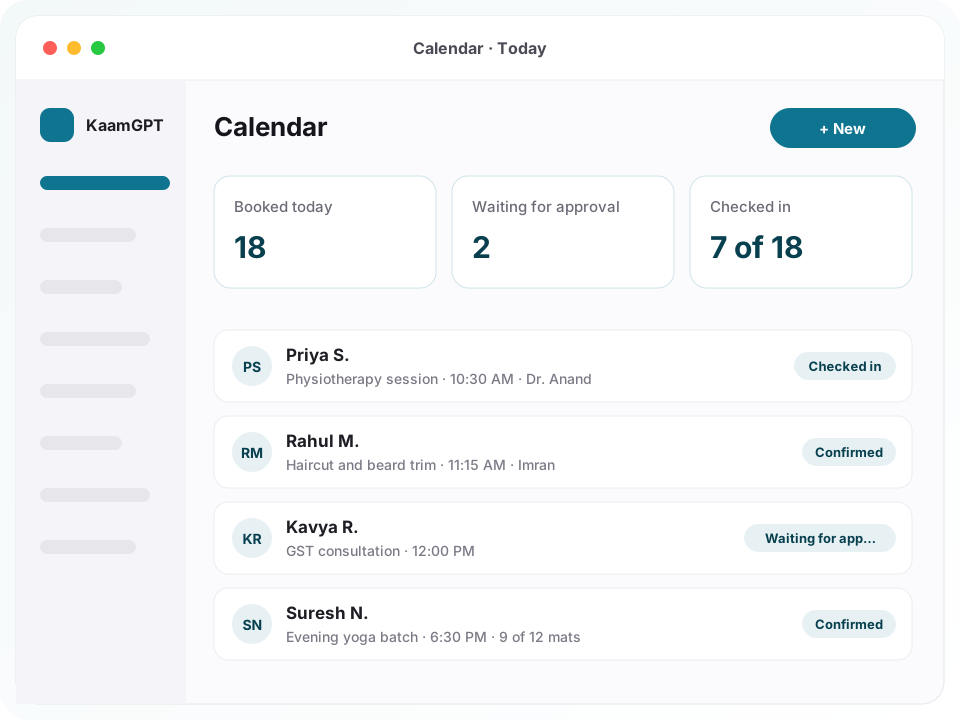
Searching for the best appointment scheduling software in Bengaluru usually starts after a bad week: two patients sent to the same 6 pm slot, a stylist on leave who still had bookings, a consultant answering “is Thursday free?” on WhatsApp at midnight. KaamGPT Calendar replaces that guesswork with a public booking page that only offers times your hours, staff and existing bookings genuinely allow.
It is built for businesses that sell time by the slot — clinics in Jayanagar and Malleshwaram, salons in Indiranagar, CA and legal practices in Koramangala, yoga studios in HSR Layout. You describe each service once, set who works when, and share one online booking page on WhatsApp, Instagram or a counter QR code. Confirmations and reminders go out on WhatsApp and email, and the Calendar app comes with every KaamGPT plan, the free one too.
- ₹0Calendar is on the Free plan — no paywall in front of your booking page
- 4 stepsfor a customer to book: service, day, time, then their details
- 6 shiftsallowed per weekday, so morning and evening sessions fit one calendar
- 15 minbetween reminder sweeps; each rule fires from 5 minutes to 14 days ahead
What does KaamGPT Calendar take care of, from the first tap to the thank-you message?
Everything here ships inside the Calendar app today, on every plan — the parts that separate the best appointment scheduling software in Bengaluru from a shared spreadsheet.
Services with their own rules
Each service carries its duration, how often slots start, how many people fit in one slot, its price and any gap before or after. It can also override the calendar's notice period, how far ahead people may book and whether requests need approval. Leave a field blank and it simply follows the calendar's default.
Opening hours with split shifts
Set up to six shifts per weekday, so a clinic with a 9–1 morning session and a 5–9 evening session describes its week exactly. Each doctor, stylist or trainer can have separate hours that replace the calendar's, and a preview shows precisely which times a customer would be offered on any date.
Holidays, leave and blocked time
Mark a holiday, closure, leave, break, maintenance window or one-off block for the whole calendar or for one person. Slots inside it disappear from the booking page at once. Existing appointments are never cancelled behind your back; the app tells you how many fall inside the block so you can call those customers.
A four-step page in your colours
Customers choose a service, a day and a time, then fill in their details, on a page carrying your logo, brand colour, address, map link, introduction and booking policy. You decide whether it shows only the times, an “almost full” flag, or exact places left. The confirmation offers an add-to-calendar file.
Booking questions you write yourself
Each service has its own form: short or long text, number, phone, email, date, time, dropdowns, single or multiple choice, tick boxes, a consent box and an accept-terms box. Mark any question as required, and insist on a mobile number, an email or both before a booking can go through.
WhatsApp appointment reminders and email
Confirmations, approval notices, reminders, reschedule and cancellation notes, and an optional thank-you after the visit go out on WhatsApp and email. Add as many reminder rules as you need — a day before by email, three hours before on WhatsApp — and edit the wording of every message in the workspace's messaging settings.
Self-service moves and cancellations
Every confirmation carries a private manage link. Customers use it to reschedule or cancel their own booking up to a cut-off you choose, four hours before by default. A moved booking passes the same capacity check as a new one, and a cancelled slot goes straight back on sale for someone else.
A front desk on one screen
The Today view lists who is next, who is waiting for approval and how full recent days have been. Walk-ins drop into today's next free slot without anyone hunting for a time. Staff check people in, start and complete appointments, mark no-shows, and record payments by amount, mode and reference.
What will online booking cost a Bengaluru practice on each tier?
No KaamGPT plan switches booking features on or off, so trying the best appointment scheduling software in Bengaluru starts at ₹0. What changes between tiers is team size, monthly message allowances, storage, API access and support. Amounts are quoted in rupees (INR) and finalised on the checkout screen; paying for a quarter, half-year or full year up front takes 10%, 15% or 20% off. Compare each tier's allowances on the plans and limits page.
Free
₹0forever
No card needed
On Free (₹0) the entire Calendar app is yours, with room for five people in the workspace — enough for a solo consultant or a two-chair salon to run genuine bookings before spending a rupee.
- Up to 5 employees
- 1,000 emails / month
- 200 WhatsApp messages / month
- 512 MB storage
- Community support
Starter
₹999/month
or ₹9,590 billed yearly — 20% less
Starter, at ₹999 monthly after a 14-day trial, gives a clinic or salon of up to 25 people email support and a workspace allowance of 5,000 WhatsApp and 25,000 email messages each month.
- Up to 25 employees
- 25,000 emails / month
- 5,000 WhatsApp messages / month
- 5 GB storage
- Email support
Growth
Recommended₹2,999/month
or ₹28,790 billed yearly — 20% less
Growth, at ₹2,999 monthly, suits a multi-doctor clinic or busy studio with up to 100 people that runs campaigns beside its bookings and needs API access with priority handling of support emails.
- Up to 100 employees
- 1,50,000 emails / month
- 30,000 WhatsApp messages / month
- 25 GB storage
- API access
- Priority email support
Business
₹7,999/month
or ₹76,790 billed yearly — 20% less
Business, at ₹7,999 monthly, is meant for groups of up to 500 people who want priority support and onboarding help while calendars, staff and messages go in.
- Up to 500 employees
- 7,50,000 emails / month
- 1,50,000 WhatsApp messages / month
- 100 GB storage
- API access
- Priority support + onboarding
Optional add-ons
- Website with a booking buttonKaamGPT's Website Development service starts at ₹9,999 a project and can put your booking link behind a Book button; the scope is fixed in a written quote.
- Instagram and Facebook ads to a booking linkMeta Ads management from ₹4,999 a month, pointing ads at a per-service link tagged so each booking shows its source.
- Calendar records payments rather than collecting them online: set a price and whether you expect a deposit, full payment or payment on the day, then log what you received.
- WhatsApp messages leave from the WhatsApp sender your workspace connects; any charges from a WhatsApp Business API provider you choose are paid to that provider.
- Bookable staff do not need an employee record, so a visiting doctor or freelance stylist can be listed by name alone.
Why do Bengaluru clinics, salons and consultants keep losing appointments between WhatsApp chats and the register?
Most appointment businesses in the city run on three things that never talk to each other: a paper or Excel register at the front desk, the owner's WhatsApp, and memory. A patient messages at 10 pm asking for tomorrow evening. Someone replies in the morning, the slot has gone, and the conversation starts again. Meanwhile the register still shows a doctor as free on a day she has already taken off.
None of this is a people problem. The receptionist cannot see the stylist's leave, the stylist cannot see the pile of unread messages, and nobody reminds the customer who booked nine days ago. The result is idle chairs at 3 pm, a crowded waiting room at 7 pm, and skilled staff spending their breaks on scheduling chat instead of the work customers actually pay for.
- Customers ask for a time on WhatsApp, and the slot is gone by the time anyone replies.
- The last place in a batch, or the last evening slot, gets promised to two people.
- A doctor's leave or a public holiday is known at the desk but not to whoever is taking bookings.
- Reminders depend on someone remembering, so a no-show is discovered only when the chair sits empty.
- Rescheduling needs a phone call, and a missed call quietly becomes a lost customer.
How does a clinic or salon go from switching Calendar on to its first online booking?
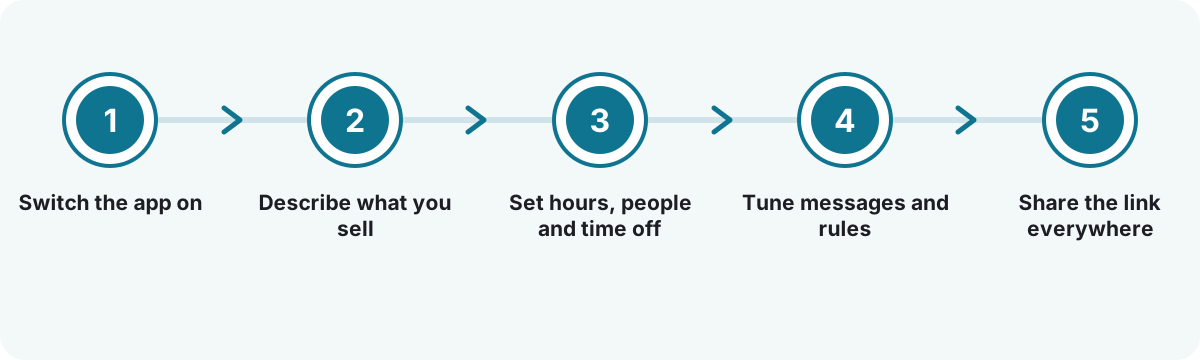
Switch the app on
Turning Calendar on creates a working calendar straight away: Monday to Friday, 9 to 1 and 2 to 6, a 30-minute consultation service and two reminders. Replace the defaults with your business name, brand colour, address, map link and WhatsApp number.
Describe what you sell
Add each service with its duration, price, places per slot and booking questions. Decide whether it confirms instantly or waits for someone to approve it, and which staff members are allowed to take it.
Set hours, people and time off
Enter weekly hours, give each person their own schedule where it differs, and block holidays and leave. Then use the availability preview to check what a customer would see next Tuesday, before any real customer tries.
Tune messages and rules
Keep or change the two starter reminders, set how much notice customers must give, how far ahead they can book and when self-service changes close. Adjust message wording if your practice prefers a more formal tone.
Share the link everywhere
Copy the link, share it on WhatsApp or email, or open a QR code for the counter. Every service also gets a link of its own, and adding a utm_source tag records which channel each booking came through.
How does KaamGPT Calendar compare with a register and WhatsApp, or a generic meeting-link tool?
Most Bengaluru businesses weigh Calendar against what they already do, or against a scheduling-link tool built mainly for one-to-one meetings.
| What matters | KaamGPT Calendar | Register + WhatsApp chats | Generic meeting-link tool |
|---|---|---|---|
| How a customer books | Four-step page: service, day, time, details | Calls or messages until a time is agreed | Link to one person's free meeting times |
| Several people in one slot | Places per slot, counted under a lock | Depends on someone keeping count | Often one-to-one; group seats vary by tool |
| Split shifts and staff hours | Up to six shifts a day, separate hours per person | Written in the register | Working hours per user account |
| Holidays and leave | Blocks for the whole calendar or one person | Crossed out by hand, if remembered | Personal time off per user |
| Reminders | WhatsApp and email rules, as many as needed | Typed by hand when time allows | Mostly email; WhatsApp usually needs a separate connector |
| Walk-ins at the desk | Today's next free slot, found automatically | Squeezed into whatever gap exists | Rarely designed for a reception desk |
| After the visit | Booking on the customer's contact, with payments and status history | Chat history on someone's phone | Separate from billing and customer records |
The honest verdict. Choose KaamGPT Calendar when you sell time by the slot — patients, clients, batches — and want reminders, staff hours and walk-ins in one place, starting at ₹0. Handling that mix is the real test of the best appointment scheduling software in Bengaluru. A register still works for a practice with a few fixed regulars, and a meeting-link tool suits a founder booking sales calls with no desk or rota.
Four Bengaluru appointment desks, and how a booking link changes their week
These are illustrative scenarios drawn from common patterns, not stories from named customers.
A two-doctor physiotherapy clinic in Jayanagar
- The situation
- Patients call or WhatsApp for morning and evening sessions, one doctor works only three evenings a week, and the front desk keeps a register nobody else can see. Leave is announced verbally, so patients sometimes arrive for a doctor who is not in.
- How KaamGPT fits
- The clinic sets 45-minute sessions, two shifts a day, and separate hours for the part-time doctor. Her leave is blocked on her own schedule, first visits wait for approval, and reminders go a day before by email and three hours before on WhatsApp.
- What changes
- The desk stops negotiating times over the phone, and patients only ever see sessions a doctor will actually be present for.
A unisex salon with five stylists in Indiranagar
- The situation
- Saturday afternoons overflow while weekday mornings are quiet. Regulars want a particular stylist, walk-ins compete with booked customers, and each chair needs a few minutes of cleaning between clients that nobody plans for.
- How KaamGPT fits
- Each stylist is bookable staff with their own hours. Services carry a ten-minute gap after every appointment, the booking page flags slots as almost full, and walk-ins go into the next free chair from the desk. The busiest-hours report shapes the weekend rota.
- What changes
- Customers choose their stylist without calling, and the owner can see plainly which afternoons need another pair of hands.
An independent CA practice in Koramangala
- The situation
- Consultation requests arrive by email, LinkedIn and referral, usually without the details needed to prepare. Filing-season weeks fill quickly, and clients who reschedule by phone leave gaps that are hard to refill at short notice.
- How KaamGPT fits
- The practice puts a GST-consultation link in its email signature. The form asks for the type of business and the question at hand, each request needs approval, and clients move their own meeting up to a day before through the manage link.
- What changes
- Each meeting starts with the context already on file, and freed slots reopen on the booking page without anyone chasing.
A yoga and fitness studio in HSR Layout
- The situation
- Morning and evening batches have twelve mats each. Members book through a WhatsApp group, the last mat is regularly promised twice, and cancellations are posted too late for anyone else to take the place.
- How KaamGPT fits
- Each batch is a service with twelve places, and the page shows exactly how many remain. Bookings pass a locked capacity check, self-service cancellation closes two hours before class, and the thank-you message is off because members visit several times a week.
- What changes
- The last mat goes to exactly one person, and a cancelled place becomes visible to everyone else straight away.
What is different about taking appointments in Bengaluru?
Bengaluru customers book around traffic. A Whitefield software engineer will take a 7:30 pm dental slot on the way home but not a 5 pm one, and a client in HSR Layout will cancel if the Outer Ring Road is jammed. That is why evening shifts, same-day cut-offs and self-service changes matter more here than in a city where people live near work. Monsoon evenings bring late cancellations too, and a slot that reopens at once gives someone nearby the chance to take it.
Neighbourhoods behave differently as well. Jayanagar and Malleshwaram clinics still see many older patients who prefer to call, so the desk books them from the same screen the link feeds. Indiranagar and Koramangala salons and consultancies hear mostly through Instagram and WhatsApp, where a link does the work. For a state holiday like Kannada Rajyotsava (1 November), a single block closes the day. That is the local test for the best appointment scheduling software in Bengaluru.
How should a Bengaluru clinic set up shifts, buffers and notice periods before going live?
Start with the real week, not the ideal one. If the clinic runs a 9 am to 1 pm session and a 5 pm to 8:30 pm session, enter both as shifts rather than one long day with a break; the slot generator then never offers 2 pm. Give a consultant separate hours only where they genuinely differ, because every personal schedule is one more thing to keep current.
Buffers are where most setups go wrong. A 30-minute physiotherapy session that needs five minutes to wipe down the table is really 35 minutes of room time. Put those five minutes in the gap after the service, not in the duration, so patients still see “30 minutes” while the calendar protects the reset. Set a least-notice period too, so a booking cannot land while the doctor is already mid-session.
Keep the booking form short. Ask only what the first visit truly needs, and add a consent box if you collect health details. Under the DPDP Act passed by Parliament in 2023, a patient's name, number and complaint all count as personal data, so collecting less is both kinder to patients and easier to defend.
- Use approval for first consultations and instant confirmation for follow-ups.
- Set “book up to” to the period you can commit to; the default is 60 days.
- Switch same-day bookings off, or add a cut-off, if files need preparing.
- Preview next week's slots after every change to hours or leave.
What should the best appointment scheduling software in Bengaluru do when two people want the last slot?
On a busy Saturday it is normal for two customers to open the same evening slot within seconds of each other. A page that asks “is it free?” and then saves will confirm both. Calendar takes a short lock on that slot, recounts the places already taken and only then saves, so the second person is told the time has just gone and is shown what remains.
The same rule covers rescheduling. A move is handled as cancel-and-book inside one database transaction, so it cannot squeeze into a slot that is already full; if the new time has gone, the original appointment stays exactly where it was. Customers reach their booking through a private link carrying a long random token, never a guessable booking number.
Public links also attract junk. Each booking page asks the customer to answer a small sum before confirming, every answer works once, and a service can require a mobile number or an email. That will not stop a determined person, but it keeps scripted form-filling from clogging a calendar overnight.
- Leave self-service cancellation on; a freed slot is worth more than a silent no-show.
- Set the cancellation cut-off to match how quickly you can refill a slot.
- Show exact places for classes and batches, but only the times for a clinic.
Which numbers should an appointment business read every Monday morning?
Bookings made is a comforting number and not a very useful one. The Reports tab gives utilisation its own panel: places offered in the hours you actually kept, against places taken. A salon that stays low on weekday mornings has a pricing or promotion question; one near full every Saturday has a staffing question. The busiest-hours chart turns that into a rota decision.
Next, read no-shows and cancellations by service and by person. A spike on one service often means the reminder timing is wrong for it; a three-hour WhatsApp nudge may suit an evening haircut better than a day-before email. The cancellation reasons show whether people leave over timing or something fixable. A nightly sweep marks confirmed appointments nobody closed as no-shows once they are twelve hours past, so the figures stay honest.
Finally, look at where bookings come from. Tag the link in your Instagram bio, your Google Business Profile and the counter QR code with different utm_source values, and the source report splits bookings by channel. Repeat customers against unique customers shows whether the page mainly serves regulars or brings in new people.
- Utilisation and busiest hours, for rota planning.
- No-shows by service and by person, for reminder timing.
- Bookings by source, for deciding where to promote the link.
Which appointment businesses in Bengaluru get the most from Calendar?
- Clinics & diagnosticsClinic appointment booking with morning and evening OPD shifts, doctor-wise hours, approval for first visits and WhatsApp reminders a day ahead.
- Dental & physiotherapyLonger sessions with a cleaning gap after each one, follow-ups booked at the desk, and patients who move their own review visits.
- Salons, spas & groomingSalon booking software that lets customers pick a stylist, puts walk-ins into the next free chair and flags busy weekend afternoons.
- CA, legal & tax consultantsApproval before any meeting is confirmed, intake questions per service, and per-service links for email signatures and proposals.
- Yoga, fitness & dance studiosBatches with a fixed number of places, exact places left on the page, and cancellation windows that release a spot in time.
- Coaching & tutoring centresDemo classes and parent meetings with capacity limits, WhatsApp reminders to parents, and a status record of who attended.
- Vehicle service centresService-bay slots with several vehicles per slot, a form asking for the registration number, and a reminder the day before.
What sets KaamGPT Calendar apart at a Bengaluru front desk?
A booking page on ₹0
Calendar sits on the Free plan because a booking page behind a paywall is one nobody ever sees working. A solo practitioner can take real bookings, with reminders, before deciding whether a paid plan is worth it.
Each booking becomes a customer record
A booking finds or creates the customer's contact by phone or email, so the person who booked in March and bought in June is one record, with the appointment written onto their timeline.
Built around Indian working days
Asia/Kolkata by default, prices in ₹, split morning and evening sessions, and messages that state the time on the business's own clock. A calendar can run in another time zone if you mainly serve clients abroad.
Permissions that suit a reception desk
Let reception book, check in and record payments without letting them change hours, prices or reminder rules. Reports and settings appear only for the roles you choose, so the desk sees exactly what it needs.
Connected to your other KaamGPT apps
Bookings appear in the WhatsApp inbox's customer panel, and automation rules can react when an appointment is booked, cancelled, completed or missed — tag the contact, alert the team or send a follow-up.
History you can always explain
No appointment is ever deleted. A cancelled appointment keeps its reason, every move keeps the old and new time, and each status change is logged, so “why did that slot free up?” always has an answer.
- Price
- ₹0 on Free; ₹999 monthly for Starter, the lowest paid tier (INR, final at checkout)
- Included on
- Every KaamGPT plan: Free, Starter, Growth and Business
- Booking surfaces
- Public booking link, per-service links, QR code and desk walk-in form
- Customer messages
- WhatsApp and email confirmations, reminders, reschedule and cancellation notes
- Setup
- Default calendar, service and two reminders created when the app is switched on
- Works with
- Customer contacts, WhatsApp inbox, automation rules and HRMS employee records
Where this applies around Bengaluru, Karnataka
- Bengaluru
- Karnataka
- India
- Indiranagar
- Koramangala
- Jayanagar
- HSR Layout
- Whitefield
- Malleshwaram
Frequently asked questions
23 answersWhy would a small clinic pick KaamGPT Calendar as the best appointment scheduling software in Bengaluru?
It handles what a clinic desk actually does: split morning and evening sessions, doctor-wise hours, leave, approval for first visits, walk-ins and WhatsApp reminders, all behind one booking link. Slots come from your real hours and bookings, the last place cannot be sold twice, and the app is on the Free plan, so you can judge it on real patients first.
How much does KaamGPT Calendar cost per month?
Calendar comes with every tier, so the real question is which tier. Free is ₹0. Starter costs ₹999 monthly, Growth ₹2,999 and Business ₹7,999, and paying quarterly, half-yearly or yearly cuts 10%, 15% or 20%. All amounts are in rupees, with the final figure shown at checkout. Tiers differ by team size, message allowances, storage and support.
Can a clinic try Calendar properly before paying anything?
In two ways. The Free tier carries the complete Calendar app for up to five people at no cost. Starter, Growth and Business each open with 14 trial days, long enough for a bigger clinic or salon to test staff rotas, reminders and reports before the first charge. <a href="/signup">Open a free KaamGPT workspace</a> and the booking link is ready to edit.
How quickly can a new booking calendar go live for customers?
Most single-location businesses finish setup in one sitting. Switching the app on creates a working calendar with weekday hours, a 30-minute consultation service and two reminders already in place. You replace those with your own services, hours and staff, preview the slots and copy the link. A multi-doctor clinic with personal schedules and leave takes a little longer.
Will patients have to install anything to book a slot?
No. The booking page opens in any phone or computer browser from a link, so customers tap it from WhatsApp, Instagram or a QR code and book in four steps: service, day, time and details. Afterwards they get a reference, an add-to-calendar file and a private link to move or cancel, with no account or password to create.
Can my receptionist and staff manage appointments from a phone?
Yes. A booking tool only earns the title of best appointment scheduling software in Bengaluru if it works on the phone in the receptionist's hand. The KaamGPT workspace runs in any browser, so staff check people in, complete appointments, book walk-ins and record payments from a phone, tablet or laptop. Nothing needs installing from an app store.
Can Calendar collect a deposit or full payment online at the time of booking?
Not today. Each service can show its price and state whether you expect a deposit, full payment or payment on the day, and staff record each amount received with its mode and a reference such as a UPI transaction ID. The payment status then updates to partial or paid. If you need money before confirming, collect it separately and record it.
How are WhatsApp appointment reminders sent, and from which number?
Calendar sends reminders from the WhatsApp sender your workspace has connected — a linked business number, or a WhatsApp Business API provider if you use one — and by email. Each rule sets how long before the appointment it fires, from 5 minutes to 14 days, and which channels it uses. A sweep runs every 15 minutes, and each reminder is logged before it goes so the same one is not sent twice.
What happens if two people try to book the same slot at the same moment?
Only one of them gets it. Before saving, Calendar locks that slot, recounts the places already taken and books only if room remains. The second person sees a message that the time has just gone and is returned to the remaining times, so the desk never has to explain a double booking to two people standing at the counter.
Can customers reschedule or cancel without calling us?
Yes, if you allow it. Every confirmation includes a private manage link. Customers can move or cancel up to a cut-off you set, four hours before by default, and after that the page asks them to call the business. A cancelled slot goes straight back on sale, and a move succeeds only if the new time still has room.
How do I keep fake or spam bookings off a public booking link?
Every booking page asks the customer to solve a small sum before the booking is accepted, and each solved sum works only once, which stops scripted form-filling. For each service you can also require a mobile number, an email or both. Where a no-show is costly, switch on approval so a person reviews every request before it is confirmed.
Can each doctor or stylist have different working hours?
Yes. The calendar has weekly hours with up to six shifts a day, and any staff member can have personal hours that replace them — a visiting consultant on Tuesday and Thursday evenings, a stylist who starts at noon. Leave and breaks are blocked per person, and customers either pick a specific person or choose a time and see who is free.
How do walk-in customers fit around online bookings?
From the desk, open the walk-in form, choose the service and leave the time blank: Calendar books the person into the next slot today that still has room. Pick a time only when they want something specific. Walk-ins and phone bookings pass the same capacity check as the booking page, so a customer at the counter cannot take a place someone just booked online.
Can I run group classes or batches with limited places?
Yes. Set the number of people per slot on the service — twelve for a yoga batch, twenty for a workshop — and Calendar counts places rather than appointments. The booking page can show exact places left, an almost-full flag, or only the times. Cancellations made before your cut-off release the place immediately for someone else to take.
How do I mark Karnataka public holidays or a staff member's leave?
Open Availability and add a block — holiday, closure, leave, break, maintenance or a plain block — for the whole calendar or one person, all day or for a few hours. Slots inside it vanish from the booking page immediately. Existing appointments stay untouched, and Calendar tells you how many fall inside the block so you can contact those customers.
Who owns our appointment records, and who else can see them?
Appointments and customer details belong to your business. Each row carries your workspace's identity, and row-level security in the database keeps other workspaces out. The public page reveals only what a booking needs, and internal notes never appear in the customer's view. Customers created by bookings live in your contacts, which you can export as a CSV file.
Does Calendar connect with contacts, the WhatsApp inbox and automations?
Bookings create or update the customer's contact and appear on their timeline. The WhatsApp inbox shows a contact's recent bookings beside the chat. Automation rules can react when an appointment is booked, cancelled, completed or marked a no-show. Staff can be linked to HRMS employee records, and message wording lives in the workspace's shared messaging templates.
Is online booking really better than a register and WhatsApp for a small practice?
For a practice with a handful of fixed regulars, a register can be enough. Once customers book at night, staff keep different hours or one slot gets promised twice, the register stops coping. At that stage the best appointment scheduling software in Bengaluru pays back its setup time: customers serve themselves, reminders go out automatically, and the desk sees one version of the day.
Who is KaamGPT Calendar not the right fit for?
No tool is the best appointment scheduling software in Bengaluru for everyone. Hospitals that need booking inside an electronic medical record should stay with their hospital system. Businesses that must take payment online before confirming, or that need two-way sync with staff members' personal Google or Outlook calendars, will find those features missing today.
How do we move from our current booking tool or paper diary?
Import your existing customer list into contacts from a CSV file, so returning customers are recognised when they book. Then enter upcoming appointments through the desk booking form, which runs the same capacity checks as the public page. Once the old diary is clear, swap the old link in your Instagram bio, Google profile and WhatsApp status for the new one.
What support is included while we set up?
Help scales with the tier: community help on Free, email support on Starter, priority email on Growth, and priority support plus onboarding assistance on Business. Whatever the tier, the availability preview is the quickest self-check. It shows the exact times a customer would be offered on any date, so a missing Tuesday is caught before anyone tries to book it.
Can I see whether bookings come from Instagram, Google or the counter QR code?
Yes. Add a utm_source value to the link you place in each channel — for example instagram, google or qr — and every booking records it as its source. The Reports tab then shows bookings and completed visits by source, next to busiest hours, utilisation, no-shows by service and the reasons customers gave for cancelling.
How can I see a demo or talk to someone about online booking for my business?
Phone +91 79767 82366, or send a WhatsApp to the same number, with a short picture of your week — services, shifts, staff and where bookings come from now. Someone from KaamGPT can walk through Calendar using your own hours and services and suggest the tier that fits. Prefer exploring alone? <a href="/signup">Sign up free</a> and try the booking link yourself.