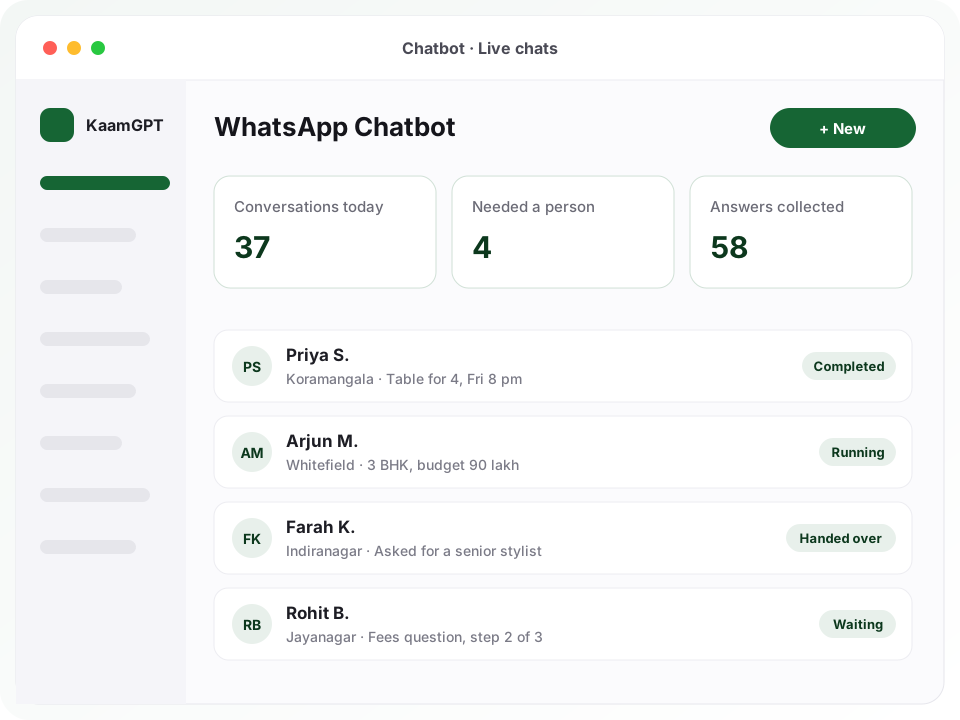
Picking the best WhatsApp chatbot builder in Bengaluru usually comes down to one question: can the person who knows your customers draw the conversation themselves? With KaamGPT, yes. You lay out the chat on a canvas, with a greeting, three tappable buttons, a question that checks its answer and a branch for each reply, then publish it to the number already saved in your customers' phones.
A WhatsApp auto reply bot fires one canned line per message and forgets it. Here every conversation keeps a session, so the bot knows a customer asked for a table for four, which step they are on, and where to resume when they reply an hour later. When a chat needs judgement, it passes to your team and stays quiet. Start with the WhatsApp Chatbot app on any plan.
- ₹0Free plan includes the chatbot app, with no feature locks
- 22step types on the canvas, from questions and buttons to API calls
- 12ready-made bots that install already published, in one click
- 14 daysto trial any paid tier, from Starter upwards
Running a WhatsApp bot for Bengaluru customers, from Koramangala to Whitefield
Bengaluru customers message the way they talk: 'hi', 'rate?', 'namaskara', a voice note, a Google Maps pin. A café off 80 Feet Road in Koramangala hears from students near midnight, an Indiranagar salon gets Sunday requests on Saturday night, and a clinic in Jayanagar 4th Block fields fee questions between patients. Whatever you shortlist as the best WhatsApp chatbot builder in Bengaluru must handle short, informal, mixed-language messages rather than tidy sentences.
Keywords can be written in Kannada or Hindi script as well as English, and each is matched as a whole word, so a short Kannada keyword fires on its own but not inside a longer word. The AI reply, when switched on, answers in the customer's own language. Business hours run on India time by default, so an after-hours flow can tell a customer in HSR Layout exactly when the store reopens.
Traffic shapes the rest. When a site visit from Marathahalli to a Whitefield project eats an hour each way, sales teams want the budget, area and timeline before anyone starts the car, and a coaching centre wants the student's class before a counsellor calls. A WhatsApp booking chatbot that gathers those answers first, then hands the chat to a named person, respects the customer's time as much as the team's.
Why do WhatsApp enquiries go cold between closing time and the next morning?
Most small businesses here run WhatsApp from one phone at the front desk. By late evening it holds a stack of unread chats: somebody wanting tomorrow's slots, somebody after the fee structure, somebody who typed 'price?' and nothing else. Whoever opens the phone the next morning answers the easy ones first, and the enquiry that would have turned into a booking has already messaged the shop down the road.
The WhatsApp Business app helps a little, with a greeting, an away message and some saved quick replies. None of them can ask a follow-up, check that a date is a real date, or recall what the customer said two messages earlier. Closing that gap, without trapping people who want a human, is what separates the best WhatsApp chatbot builder in Bengaluru from a glorified away message, and it is what any WhatsApp chatbot for business should be judged on.
- Messages that arrive after closing wait until someone unlocks the shop phone the next day.
- Staff type the same answer about timings, fees and location again and again every week.
- Booking details trickle in across several messages and get copied into a register by hand.
- Keyword auto-replies misfire, answering the word 'no' buried inside an unrelated sentence.
- When a customer asks for a person, nobody can tell whether the bot or a colleague has the chat.
Four Bengaluru businesses, four very different WhatsApp conversations
Illustrative sketches, each drawn from one of the ready-made bots, of the flow a business like this might publish.
A 60-seat café and bakery in Koramangala 5th Block
- The situation
- Table requests land between seven and ten at night, exactly when the floor is busiest. The manager answers a few from her own phone, misses others, and weekend tables get promised twice because nobody wrote the requests down in one place.
- How KaamGPT fits
- The restaurant bot greets with See the menu, Book a table and Timings. Its booking branch asks for a name, the number of guests and a day and time, saves the name to the contact, labels the chat Table booking and leaves a one-line note for the floor. The café edits the confirmation to say staff will confirm shortly.
- What changes
- Requests arrive complete and in one labelled list, so the manager confirms them in a single pass instead of chasing missing details.
A two-chair dental clinic off 11th Main, Jayanagar
- The situation
- Patients message late at night about pain, fees and free slots, while the receptionist also handles walk-ins and the landline. Urgent messages sit in the same pile as routine questions about cleaning charges.
- How KaamGPT fits
- The clinic bot's appointment flow collects the patient's name, the reason and a preferred time. An AI routing step separates messages that mention severe pain or swelling and sends them straight to a person, while an after-hours flow states when the clinic opens. The bot never offers clinical advice; it only sorts and collects.
- What changes
- Urgent cases reach a human first, routine questions are answered overnight, and mornings begin with a tidy list of appointment requests.
An engineering-entrance coaching institute near Marathahalli bridge
- The situation
- During admission season, parents and students ask the same things about batches, fees and demo classes in English, Hinglish and Kannada. Counsellors lose their evenings to typing replies instead of calling the families who are genuinely interested.
- How KaamGPT fits
- The school and coaching bot's admission flow captures the student's name, class or course and a callback number, validating the number before it moves on. Keywords in Kannada and English open the same flow, and each morning the counsellors download collected answers as a call list.
- What changes
- Counsellors spend their hours calling families who asked for a call, working from a clean list rather than scrolling through chats.
A villa-plot sales team covering Whitefield and Sarjapur Road
- The situation
- Enquiries from hoardings and property portals come in on WhatsApp at all hours. Site-visit requests are mixed up with brochure requests, and salespeople argue over who owns which lead.
- How KaamGPT fits
- The property bot asks for a name, preferred area, budget and timeline, shows current projects as swipeable cards, and assigns each chat to the salesperson for that project. An API step posts the answers to the team's own lead sheet through an HTTPS endpoint.
- What changes
- Every enquiry lands with one named owner and the four answers a salesperson wants before making the first call.
What should the best WhatsApp chatbot builder in Bengaluru let you draw?
Each capability below is a step you drag onto the canvas of a no-code WhatsApp bot builder with twenty-two step types, every one checked by the server before a flow can go live.
A canvas with named wires
Drag a step from the palette, then pull a wire from one of its named exits, such as a button's label, Else, Timeout or Invalid, to the next step. Undo and redo reach back sixty edits, Tidy up straightens a crowded layout, and the draft saves itself a moment after you stop editing, so an unfinished branch is never lost and never live.
Questions that check the answer
An Ask a question step stores the reply in a variable such as {{name}} and can insist on a number, email, phone, date, web address, location, media file or a choice from a list. Dates are read day first, the way India writes them. A wrong answer gets a retry line naming what to fix, never a bare 'invalid input'.
Buttons, numbered menus and carousels
A Buttons step offers up to three taps, which is WhatsApp's own limit, and each tap gets its own path. A numbered menu lists up to ten options as plain text and accepts '2' as readily as the label, so it works on every WhatsApp version. A card carousel shows up to ten pictures, each carrying its own buttons.
Memory across the whole conversation
Every chat gets a session holding the step the customer is on and each answer given so far. Set variables, add to a running count and branch on conditions without sending a word. A session keeps the flow version it started with, so publishing an edit at noon never drops someone halfway through a booking into a step that no longer exists.
A clean handover to your team
The Hand to a person step tells the customer someone is coming, can offer a call button, assigns the chat to a colleague or department and adds it to the Waiting for a person queue. When any staff member replies from the shared inbox, the bot pauses on that chat for sixty minutes by default, adjustable up to a week.
Stop, restart and human words
Three word lists are checked before any trigger or running flow. The defaults include stop, unsubscribe, cancel and 'band karo'; menu and start over; agent and talk to someone. A stop is acknowledged, the session ends, and the opt-out is written onto the contact so no later WhatsApp send can reach that person by mistake.
AI replies from your own facts
Switch on the optional AI reply step and it answers from a knowledge page you write, covering prices, timings and policies up to 60,000 characters, in whatever language the customer used, Hinglish included. If the answer is missing from your notes it says it will check instead of inventing a price. An AI routing step reads what someone meant and picks the matching branch.
Actions that reach the workspace
Label the chat, tag the contact, assign it, mark it resolved, save collected answers onto the CRM record, leave an internal note, send a saved Blast template, or call your own HTTPS endpoint and read the response back into variables. That API step has its own error exit, so a slow booking system gets a polite fallback rather than silence.
What a WhatsApp chatbot costs on each KaamGPT plan
The chatbot is not a separate subscription. Every tier includes it, down to the ₹0 one, because it answers on the number already linked for Blast, and scripted flows are not billed per reply. Plans differ on the rest of the workspace: team size, storage, quotas and support. If cost decides your choice of the best WhatsApp chatbot builder in Bengaluru, set the four tiers side by side in KaamGPT's plan comparison; amounts are in INR and final at checkout.
Free
₹0forever
No card needed
On Free (₹0, five employees), install one ready-made bot on one linked number and find out whether your customers actually tap the buttons.
- Up to 5 employees
- 1,000 emails / month
- 200 WhatsApp messages / month
- 512 MB storage
- Community support
Starter
₹999/month
or ₹9,590 billed yearly — 20% less
Starter (₹999 monthly, 25 employees, fourteen trial days) is sized for a single café, clinic or salon whose front desk works the handover queue together.
- Up to 25 employees
- 25,000 emails / month
- 5,000 WhatsApp messages / month
- 5 GB storage
- Email support
Growth
Recommended₹2,999/month
or ₹28,790 billed yearly — 20% less
Growth (₹2,999 monthly, 100 employees, API access) fits a business running separate sales and support bots, with chats assigned across departments.
- Up to 100 employees
- 1,50,000 emails / month
- 30,000 WhatsApp messages / month
- 25 GB storage
- API access
- Priority email support
Business
₹7,999/month
or ₹76,790 billed yearly — 20% less
Business (₹7,999 monthly, 500 employees) brings onboarding and priority support, useful for chains redrawing flows across several branches at once.
- Up to 500 employees
- 7,50,000 emails / month
- 1,50,000 WhatsApp messages / month
- 100 GB storage
- API access
- Priority support + onboarding
Optional add-ons
- AI repliesMetered per answer from the prepaid wallet and charged only after an answer is sent, so a model that times out costs nothing.
- Custom AI developmentFor a bespoke assistant wired into your own systems, the AI Development service starts from ₹49,999 per project, confirmed in a written quote.
- The optional AI reply and AI routing steps are metered per answer from the workspace's prepaid wallet; a flow without them spends nothing from it.
- Every plan can run up to 20 bots, each on its own linked number, and one number answers for one bot only.
- A bot can only answer while its number stays linked; if someone removes it from Linked devices on the handset, re-link it in Blast before customers notice the silence.
How does a flow go from a blank canvas to a live WhatsApp number?
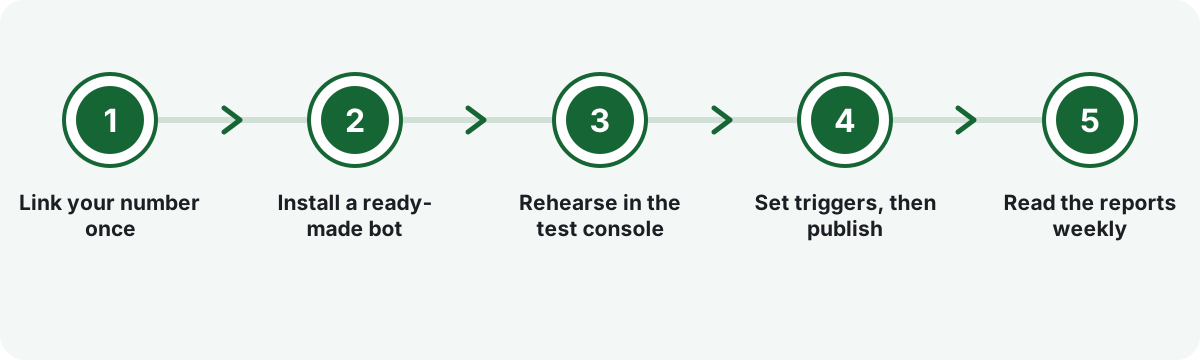
Link your number once
Numbers are paired in WhatsApp Blast, where your own number is linked by QR, not inside the chatbot. Scan the code using Linked devices on the handset, and the number shows up on the chatbot's Numbers page. A spare handset is a sensible place to rehearse before the number customers know.
Install a ready-made bot
Pick one of twelve ready-made bots, from restaurant, clinic and salon to property, online store and coaching, or one of eight flow templates, or a blank canvas. A bot installs with its flows, keywords and starter knowledge already published. Lines written in brackets are the ones to rewrite with your own details.
Rehearse in the test console
The test console walks your real flow using the real step logic but never fires webhooks, writes to the CRM or adds labels, and it lists whatever it skipped. Type the way customers actually do, with 'hii', 'rate?' or a date full of dots, and fix whichever question trips the bot up.
Set triggers, then publish
Triggers decide which flow opens: an exact phrase, a keyword standing as its own word, a button tap, a photo or location arriving, or the very first message a contact sends. Publishing needs its own permission, and the server refuses any flow with a dangling wire or no start step.
Read the reports weekly
Reports show conversations started, how many finished without help, how many needed a person, and a funnel of how many people reached each step. Collected answers sit in a table with one row per conversation, ready to download as CSV by anyone holding export rights.
Should you rely on Business app quick replies, a coded bot, or a drawn flow?
Three routes small businesses commonly weigh, compared on what matters once real customers start messaging.
| What matters | KaamGPT WhatsApp Chatbot | WhatsApp Business app greeting and quick replies | Custom bot coded on the official API |
|---|---|---|---|
| How the conversation is built | Drawn on a canvas from 22 step types, no code | One greeting, one away message and saved replies staff pick by hand | Written by a developer; every change goes back to them |
| Remembers earlier answers | Yes, a session keeps every answer as a variable | No, each message stands alone | Yes, if the developer builds it |
| Number it runs on | The number you already use, linked by QR scan | The number on the shop phone | A number registered on Meta's platform through a provider |
| Handing over to a person | Queue, assignment and an automatic pause when staff reply | Staff read and answer everything themselves | Whatever was specified and built |
| Testing before it goes live | Test console runs the real flow without side effects | Nothing to test | Depends on the developer's staging set-up |
| Green tick and approved templates | Not on this route; use the official API for that | Not available through quick replies | Possible, subject to Meta's review |
| Cost shape | Included in every plan from ₹0; AI replies metered from the wallet | Free app | A development quote plus provider and Meta charges for template messages |
The honest verdict. Choose KaamGPT when the people who know your customers should draw the conversation, on the number those customers already trust, with staff able to step in without losing the thread. On a small-business budget, that combination is what makes it a contender for the best WhatsApp chatbot builder in Bengaluru. Pick a coded bot on the official API if you need a green tick, approved templates at volume, or deep integration a developer will maintain.
What separates a helpful WhatsApp flow from one customers mute?
Start from the messages people actually send, not the menu you wish they would read. Scroll back through a month of chats on the shop phone and list the five things asked most. Those become the menu, the triggers and the knowledge page. Owners who get the most from the best WhatsApp chatbot builder in Bengaluru rarely draw the biggest flows; their first reply simply answers what most people came to ask.
Keep each bubble short enough to read in a billing queue, ask for one thing per message, and name the fix whenever an answer is wrong. Pick a reply speed that suits the brand: instant for order updates, quick or natural when the typing indicator should feel like someone at the counter. And leave a way out on every screen, because a customer who cannot reach a person simply leaves.
- Use buttons for the two or three choices most people make, and a numbered menu once there are more.
- Give every question a Timeout path, so someone who wanders off gets a gentle nudge rather than silence.
- Rewrite every bracketed placeholder in a ready-made bot before publishing; the brackets exist so none is missed.
- Prefer exact phrases and whole-word keywords as triggers over a loose 'contains' match.
Is it safe to run a chatbot on a number linked by QR code?
Straight answer: it is a different route from Meta's official WhatsApp Business Platform, with different trade-offs. Your number connects the way WhatsApp Web does, as a linked device, which is why nothing has to be registered or approved first. The flip side is that this route has no green tick, and WhatsApp's own rules still apply. A number that many recipients block or report can be restricted, and no software, this one included, can promise otherwise.
WhatsApp's Business Policy expects automated replies to come with a prompt, clear and direct route to a human. This chatbot is built around that: it speaks only inside conversations a customer started, human keywords are checked before anything else, and a stop is honoured before any further message goes out. Under the DPDP Act of 2023, pulling consent back should be no harder than granting it, and a one-word stop that ends the chat and records the opt-out fits that expectation.
- Let the bot answer people who wrote first, and keep announcements for campaigns rather than the bot.
- Leave the human keywords switched on, and make sure someone watches the queue during working hours.
- Rehearse on a spare linked number before moving the bot to the number customers know.
- Need a green tick or Meta-approved templates? Read about WhatsApp marketing on the official API first.
Which chatbot numbers should a Bengaluru owner check every week?
Four tiles on the Reports screen tell most of the story: conversations started, conversations that finished on their own, conversations that needed a person, and answers collected. Read them over seven, thirty or ninety days. More chats reaching a person is not failure; often it means customers trust the handover. Fewer answers collected usually means one question has become confusing.
The funnel under those tiles matters even more. It counts how many conversations reached each step, so a sharp drop after 'Which day suits you?' points at one badly worded question rather than a technical fault. Live chats lists every conversation with its status, such as running, waiting, completed, handed over or expired, and each one opens to show why it ended, so a silent bot rarely needs a developer to explain it.
- Conversations finished on their own, set against those that needed a person.
- The single funnel step where the most people stop replying.
- Collected answers per week, downloaded as CSV for the sales or front-desk team.
- Chats still waiting for a person at closing time, which should be none.
Shops, clinics and studios in Bengaluru that suit a drawn WhatsApp flow
- Restaurants & cafésMenu, timings and table requests by party size, plus a feedback flow that asks only happy diners for a Google review.
- Clinics & doctorsAppointment requests with patient name, reason and preferred time, and fee or timing questions answered after the clinic closes.
- Salons & spasA service menu and appointment requests taken late at night, waiting as complete requests when the front desk opens.
- Property & real estateName, area, budget and timeline gathered before an agent calls, with current projects shown as swipeable cards.
- Online stores & D2C brandsOrder-status questions and this week's picks handled by the bot, with return requests collected for staff and complaints passed to a person.
- Schools & coaching centresAdmission enquiries with the student's class and a validated callback number, collected into one downloadable list.
- Home servicesRepair and cleaning requests with the problem, full address and preferred time, captured before a technician is dispatched.
- Gyms & fitness studiosFree-trial bookings and membership questions answered at dawn, well before anyone is standing at the reception desk.
Why keep your WhatsApp bot inside the same KaamGPT workspace
Bot and staff share one inbox
Bot messages land in the shared inbox your team already reads, marked as the bot's, so nobody wonders who promised the customer a Friday slot. Labels, assignment and status are the inbox's own, with the same history.
Drafts cannot reach customers
Saving and publishing are separate permissions. A junior can draw and test a new branch all afternoon, but only someone allowed to publish can put it in front of customers, and a flow with a broken wire is refused.
Every published version is kept
Each publish creates a new version and keeps the earlier ones. Version history restores an older flow as your draft in one step, while customers already mid-conversation finish on the version they began with.
Brakes against runaway replies
Caps on steps and bubbles per turn, a per-contact hourly limit, a time limit on each turn and a budget shared with the auto-reply rules stop a looping flow, or two automations at once, from flooding a customer.
Your company's chats stay walled off
Every chatbot table carries your company's ID behind row-level security, and six separate permissions govern who can view, build, publish, choose numbers, take over chats and export collected answers.
A bot you can export as a file
Export a whole bot, with its settings, flows, triggers and knowledge, as one file and import it into another workspace. The file never carries customer answers, transcripts, phone numbers or analytics history.
- Price
- No extra charge on any tier; tiers run from ₹0 to ₹7,999 monthly
- Trial
- Fourteen days on each paid tier
- Setup
- Link a number by QR in Blast, then install one of 12 ready-made bots
- Where it runs
- Builder in the browser; customers use their usual WhatsApp app
- Works with
- Blast numbers and templates, shared inbox, CRM contacts, prepaid wallet
- AI replies
- Optional, metered per answer from the prepaid wallet
Where this applies around Bengaluru, Karnataka
- Marathahalli
- Bengaluru
- Jayanagar
- Karnataka
- Whitefield
- Koramangala
- India
- HSR Layout
- Indiranagar
Frequently asked questions
22 answersHow much does the WhatsApp Chatbot cost on KaamGPT?
Nothing on top of your plan. A bot runs on the ₹0 Free tier as happily as on Starter (₹999 monthly), Growth (₹2,999 monthly) or Business (₹7,999 monthly). Flows built from messages, buttons, questions and conditions are not charged per reply; only the optional AI reply and AI routing steps draw from a prepaid wallet, per answer. Every figure is in rupees (INR); the payment screen confirms the exact sum.
Can I test the chatbot on a free plan before paying?
Yes. The ₹0 Free tier allows five employees and unlocks every app, so a single linked number can host a working bot there. If you want bigger team limits, API access or faster support while you evaluate, Starter and the tiers above it can be trialled for fourteen days. To begin, <a href="/signup">create your KaamGPT login</a> and install a ready-made bot yourself; no sales call is involved.
How quickly can a first bot start answering customers?
Linking the number is a QR scan in Blast from WhatsApp's Linked devices screen. After that, installing a ready-made bot publishes its flows, keywords and starter knowledge in one step. The real work is replacing the bracketed placeholders with your own menu, fees or timings, which takes as long as gathering those details does, and rehearsing in the test console before customers see it.
Do I need Meta's official WhatsApp Business API to use this chatbot?
No. The chatbot answers on a number linked the way WhatsApp Web is, so there is no Meta application, provider account or template approval to wait for. That also means no green tick on this route. If you specifically need the official Cloud API, a verified display name or approved templates for large campaigns, weigh that route before deciding.
Could WhatsApp restrict my number because a bot is replying?
It is possible, and anyone who says otherwise is overselling. WhatsApp enforces its policies on every number, and heavy blocking or reporting by recipients is the usual cause. The chatbot lowers that risk by design: it speaks only in chats a customer started, checks stop and human words before anything else, and records opt-outs so no later message goes out. Rehearsing on a spare number first is sensible.
What happens when a customer types 'agent' or asks for a real person?
Human words are checked before any flow step, so the request is honoured even halfway through a booking. The customer gets a short acknowledgement, optionally with a call button, and the chat joins the Waiting for a person queue, assigned to a colleague or department if you chose one. Staff open it in the shared inbox and carry on with the full history in front of them.
Will the bot talk over my staff once they reply?
No. The moment a team member replies in a conversation, automation on that chat pauses, for sixty minutes by default, and you can set anything from zero minutes to a week. The pause is re-checked just before each bot message is sent, so even a reply typed during the bot's own typing indicator wins. Staff can also take over or end a running conversation from Live chats.
Who owns the chats and answers the bot collects, and how are they kept private?
They belong to your workspace. Every chatbot table carries your company's ID and sits behind row-level security, so no other workspace on KaamGPT can query your conversations. Six permissions separate viewing, building, publishing, choosing numbers, taking over chats and exporting. Anyone with export rights can download collected answers as CSV whenever they like, and an exported bot file never carries customer data.
Can the bot handle Kannada, Hindi and Hinglish messages?
Keyword triggers can be written in Kannada or Devanagari script as well as English, and each is matched as a whole word, so a short Kannada keyword does not fire inside a longer one. The optional AI reply answers in the language the customer wrote in, Hinglish included. When weighing up the best WhatsApp chatbot builder in Bengaluru, test this with real customer messages; buttons and numbered menus sidestep language altogether.
What does an AI reply cost, and what happens if the wallet runs out?
Each AI answer is metered from your prepaid wallet, and the charge happens only after an answer is produced, so a model that times out costs nothing and a retried job is never billed twice. If the balance is empty, the AI reply sends its fallback line and moves to the next step, while AI routing takes its Else path. Either way the conversation keeps going.
Why not just use the greeting message and quick replies in the WhatsApp Business app?
The Business app's greeting and away messages send one fixed text, and quick replies still need a person to choose and send them. A drawn flow asks follow-up questions, checks each answer, branches on it and remembers everything until the chat ends. If you move from the free app to the best WhatsApp chatbot builder in Bengaluru, switch the app's greeting and away messages off first, or customers get two replies.
Which other KaamGPT apps does the chatbot work with?
It answers on numbers linked in <a href="/best-whatsapp-blast-software-in-bengaluru">WhatsApp Blast</a> and can send Blast's saved templates. Its messages land in the shared WhatsApp inbox, where labels, assignment and status are the inbox's own. The Save to contacts step writes answers onto CRM records, stop requests mark the contact as opted out, and AI steps are metered from the workspace wallet. An API step reaches anything with an HTTPS endpoint.
Can a booking collected on WhatsApp go straight into KaamGPT Calendar?
Not automatically today, and it is better to know that up front. The bot collects the service, day, time and name, labels the chat and leaves a note for staff to confirm. Two practical options: send customers your public booking link from <a href="/best-appointment-scheduling-software-in-bengaluru">KaamGPT Calendar's appointment booking</a> inside a message step, or use the API step to post the request to a booking system that accepts HTTPS calls.
Can I try a flow without messaging real customers?
Yes, in two ways. The test console inside the builder runs your real flow with the real step logic but switches off anything reaching outside the chat, meaning no webhooks, no CRM writes and no labels, and it lists what it skipped. For a full rehearsal on WhatsApp itself, attach the bot to a spare linked number first and move it to your main number once you are happy.
Can I manage the chatbot from my phone?
Partly, and it helps to know which part. Live chats, the waiting queue, reports and collected answers all open in a phone browser, and taking over a chat happens in the shared inbox. Drawing flows is a laptop job, because the canvas, palette and property panel need a wider screen. Your customers, of course, only ever need their usual WhatsApp app.
We already use another chatbot tool. Can we move our flows across?
The importer reads KaamGPT's own bot file, so flows from another vendor are redrawn rather than converted. Most of any flow is its menu, questions and wording, which copy across by hand onto the ready-made bot closest to your business, and old keywords can be pasted in as they are. Switch the old tool off on that number before switching this bot on, or customers receive two answers.
Who is this WhatsApp chatbot not a good fit for?
Businesses that need a verified green tick, Meta-approved templates for large outbound campaigns, or the official API's audit trail are better served by that route. Teams whose customers mostly phone rather than type may get more from <a href="/best-ai-voice-calling-software-in-bengaluru">AI voice agents that answer calls</a>. And anyone hoping a bot will cold-message strangers should know this one only speaks in chats a customer started.
Who helps if I get stuck while building a flow?
If a flow misbehaves on Free, community help is the route. Starter workspaces can email the team about it, Growth emails are handled with priority, while a Business workspace gets priority attention and onboarding as its first flows take shape. The builder carries plenty of guidance too: each step explains what it does, validation names the exact problem before a publish, and every ready-made bot includes a walkthrough showing how its flows connect.
Can someone at KaamGPT show me a chatbot demo on a call?
Yes, and a bot is easiest to judge on your own questions. Dial +91 79767 82366, a line that also takes WhatsApp messages, and share your kind of business plus the three things customers ask most. We can sketch how those would look as a flow on the canvas, which ready-made bot is the closest starting point, and whether the linked-number route suits you or the official API would fit better.
Can one workspace run a sales bot and a support bot on different numbers?
Yes. A workspace can run up to 20 bots, and each linked number answers for exactly one bot, which stops two robots replying to the same customer. A common split is a sales number carrying the enquiry flow and a support number handling order status and complaints. Flows can also jump into a shared flow, such as collecting an address, and return exactly where they left off.
Can the bot answer only outside our working hours?
Yes. Set active days and hours on the bot, including overnight windows such as seven in the evening to nine the next morning, in the Asia/Kolkata timezone by default. Outside that window the bot either stays silent, leaving chats to staff, or runs a separate after-hours flow you choose, which can say when you reopen and still collect a complete booking request.
What does the bot do when someone types 'stop' or 'band karo'?
It acknowledges the request while it still can, ends the conversation, records the opt-out on the contact exactly as an unsubscribe link would, and pauses automation on that chat. From then on every WhatsApp send path in the workspace checks that opt-out. You can edit the stop words, and because they live on the bot rather than in the trigger list, tidying triggers cannot remove them.