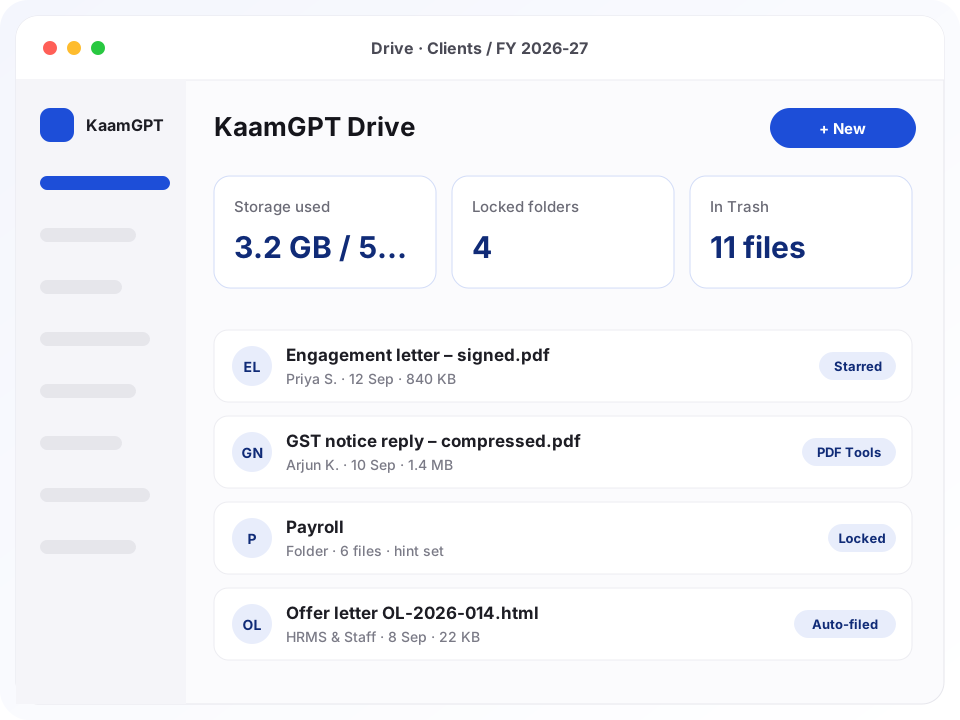
The search for the best cloud drive and document storage in Bengaluru usually begins after something goes missing: a signed agreement on a laptop that left with an employee, or a GST notice buried in a WhatsApp chat. KaamGPT Drive gives the company, not any one person, a single set of folders on Cloudflare R2 storage, with PIN locks on the few folders that need a second gate and a Trash that hands files back.
Drive is also where the rest of the workspace puts its output. Letters issued from HRMS & Staff, PDF Tools results, QR Studio exports, AI Studio images and WhatsApp inbox media all land in it and draw on one allowance, starting at 512 MB on the Free plan. What follows covers what Drive does, what it deliberately leaves out, and how a Bengaluru office can set up company file storage that new joiners can find their way around.
- ₹0Free plan with 512 MB of shared storage for up to 5 employees
- 25 MBper file through Drive's Upload button; executables are refused
- 4–32characters for a folder PIN, kept only as a salted hash
- 15 minlife of the signed link each opened private file gets
Which kinds of Bengaluru teams feel the difference first?
Illustrative scenarios showing how different kinds of Bengaluru businesses could organise their paperwork in Drive.
A 12-person chartered accountancy practice in Jayanagar
- The situation
- Articles and partners pass ITR acknowledgements, GST working papers and signed engagement letters around by email and pen drive. When a client asks for last year's computation, the answer depends on who filed it and whether their laptop is in the office.
- How KaamGPT fits
- The practice builds a Clients folder with a subfolder per client and per assessment year, plus a partner-only vault for fee notes and client KYC. Articles file finished returns into the right client folder, and partners star the clients facing scrutiny this season.
- What changes
- Any partner can pull up a client's papers from home during filing season, and client KYC no longer sits where the whole office can browse it.
A 60-seat IT services firm in Electronic City
- The situation
- HR collects Aadhaar and PAN copies, relieving letters and bank details at joining, and issues offer and appointment letters from templates. All of it lived on one HR laptop and a shared mail folder that several managers could open.
- How KaamGPT fits
- Letters issued from HRMS & Staff now land in Drive by themselves. HR keeps joining documents in a PIN-locked Employee Records folder with a hint only HR understands, and a separate locked Payroll folder holds salary revisions and appraisal letters.
- What changes
- Joining paperwork is in one place when a client audit asks for background-check evidence, and ID proofs sit behind a PIN rather than open to every manager.
An interior design studio working out of HSR Layout
- The situation
- Every project produces drawings, site photos, vendor quotations and client approvals. Designers kept them on their own phones and laptops, so supervisors sometimes reached site with an outdated layout and the studio had no single record of what each client signed off.
- How KaamGPT fits
- Each project gets a folder with Drawings, Site Photos and Approvals inside. Supervisors attach proof photos to project tickets, which Drive files automatically, and heavy drawing sets go through the PDF Tools compress job so the smaller result is what gets filed.
- What changes
- Designers and supervisors open the same drawing, and the approval trail for every project sits in a folder the studio owns rather than on someone's phone.
A precision-machining unit in Peenya
- The situation
- Customer drawings, inspection reports, calibration certificates and purchase orders arrive by email and get printed, filed and sometimes lost. Tender bids and bank papers need tighter control, but the only computer with a password is the owner's.
- How KaamGPT fits
- Drive holds a Customers folder with drawings and inspection reports named by part number, a Quality folder for calibration certificates, and a vault for tenders and bank sanction letters. The plant manager searches part numbers from a shop-floor tablet.
- What changes
- Quality records are findable when a customer's auditor visits, and tender figures stay behind the owner's PIN instead of on a shared desktop.
What does KaamGPT Drive actually do with a company's files?
Eight things that make Drive a fair contender for the best cloud drive and document storage in Bengaluru, described as they work in the product today.
Folders inside folders, with a trail
Create top-level folders and subfolders as deep as your filing needs, and a breadcrumb trail shows exactly where you are standing. Rename a folder and everything beneath it moves with the new name, so subfolders never stay filed under a label that no longer exists. Two folders may share a name in different parents, never side by side.
Stars, Recent and Locked views
Star the files and folders people open every week. The Starred view lists them flat, wherever they sit, so a folder four levels down is one click away. Recent shows the newest uploads across the company first, and Locked Folders gathers every PIN-protected folder in one list, however deep it is buried.
A Trash that keeps the bytes
Moving a file to Trash only marks it; the object stays in storage and Restore puts it back in its folder. Deleting from Trash is a separate, deliberate step that removes the file from Cloudflare R2 for good, after a prompt warning that it cannot be undone. Drive does not empty Trash on a timer.
PIN locks checked by the server
Any folder can take a PIN of 4 to 32 characters plus an optional hint. Its files then drop out of My Drive, Recent, Starred and Trash, and a request to open one is refused without the PIN, even from an old link or a saved file ID. Taking the lock off again requires the current PIN.
A private vault that starts locked
The Private Vault is a private document vault for the handful of papers only founders or the finance head should see. A vault folder cannot be created without a PIN, so it is locked from the moment it exists instead of being private only if somebody remembers a second step afterwards.
Other apps file their output here
Letters issued from HRMS & Staff, PDF Tools results, QR Studio export ZIPs, AI Studio images, media customers send to the WhatsApp inbox and proof photos attached to project tickets are all written into Drive automatically. Nobody downloads and re-uploads them, and every one of them counts on the same storage meter.
Search by the words you remember
Type a few words, such as brochure 2026 or offer letter, and Drive matches each one against file names, folder names and the app that produced the file, newest first. It matches words rather than reading inside documents, so a clear naming habit pays off directly in how fast things turn up.
Rename and delete rules per uploader
Only the person who added a file or folder, or a workspace admin, can rename it; the server decides and the screen simply follows. Removing a colleague's file is admin work. Renaming keeps the extension, so a scan renamed Lease Koramangala still downloads as a PDF your laptop knows how to open.
How does a team move from scattered files to one company drive?
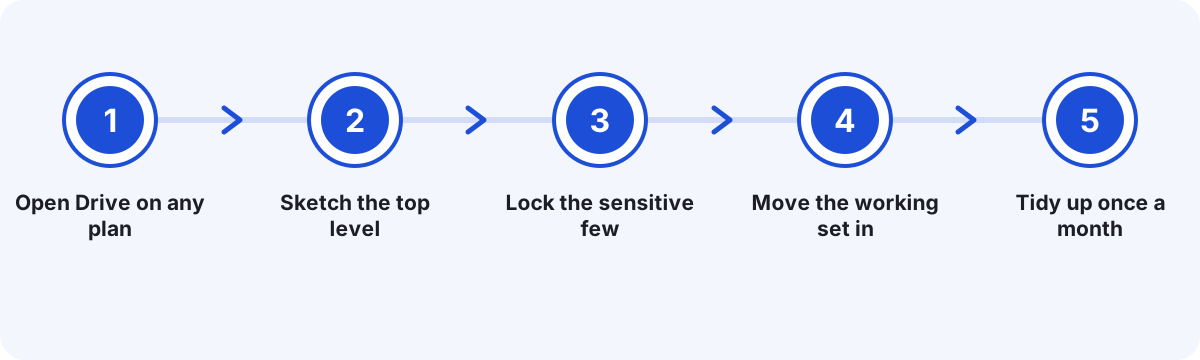
Open Drive on any plan
Create a workspace at KaamGPT signup. Drive is a core app on every plan, including Free, and sits on each employee's Home screen from day one. It opens in the browser under your workspace address, signed in with the same account as the other apps.
Sketch the top level
Create five or six top-level folders named after how the business runs, such as Clients, Finance, HR, Projects and Admin, then add subfolders by year or by client. Agree who owns each top-level folder before anyone starts uploading.
Lock the sensitive few
Put a PIN and a hint on the folders that need a second gate, such as payroll or employee ID proofs, and create vault folders for founder-only papers. Hand each PIN over in person or on a call, never in the office WhatsApp group.
Move the working set in
Upload the files people actually use, one at a time through Upload File, up to 25 MB each. Output from HRMS & Staff, PDF Tools and the other apps starts arriving on its own, so only what lives outside KaamGPT needs moving by hand.
Tidy up once a month
Star what people open every week, glance at the storage meter in the sidebar, and permanently delete from Trash only what is truly finished with. Anything trashed by mistake is one Restore click away until then.
What keeps a file in KaamGPT Drive safer than one on a shared laptop?
The lock lives where files are served
A folder PIN is checked by the server both when files are listed and when one is opened. A copied file ID, an old link or a bookmarked page still meets the lock, because the check does not depend on what the screen shows.
PINs kept as salted hashes
Drive never stores a folder PIN as typed. It keeps a salted PBKDF2 hash, the password-based key derivation approach NIST describes in SP 800-132, so a copy of the database does not reveal the PINs themselves.
Links that expire in fifteen minutes
Opening a private file creates a signed link that stops working after 15 minutes. A link pasted into the wrong chat goes stale on its own, instead of staying live for anyone who scrolls back to it next month.
Encrypted at rest on Cloudflare R2
File contents live on Cloudflare R2, which, according to Cloudflare's own documentation, encrypts every stored object with AES-256 and protects it in transit with TLS. Names, sizes and folder details are kept separately in KaamGPT's database.
Executables turned away at upload
Program and script files such as .exe, .dll, .bat, .msi, .jar, .sh, .ps1 and .php are refused at the door. A company drive is for documents and media, and it should not become a way to pass installers around the office.
Every workspace kept apart
Each company's files are stored under their own key prefix, and every Drive query is scoped to that company, so one workspace's folders never surface in another's, even though both sit on the same storage service.
What does each KaamGPT plan give Drive in storage and price?
Drive carries no price tag of its own. It is a core app on every KaamGPT plan, and what changes between plans is the storage pool Drive shares with every other app, along with how many employees the workspace can hold. All figures are in rupees, and the amount you actually pay appears at checkout. Choose longer billing and the monthly equivalent drops: 10% for a quarter, 15% for six months, 20% for a year. Every figure sits on the KaamGPT plans page.
Free
₹0forever
No card needed
No charge, five employees and 512 MB between them: room to build the folder tree, test PIN locks and the vault, and hold a small team's live documents.
- Up to 5 employees
- 1,000 emails / month
- 200 WhatsApp messages / month
- 512 MB storage
- Community support
Starter
₹999/month
or ₹9,590 billed yearly — 20% less
At ₹999 a month, 5 GB spread across as many as 25 people suits an office filing contracts, scans and HR letters, though not much video.
- Up to 25 employees
- 25,000 emails / month
- 5,000 WhatsApp messages / month
- 5 GB storage
- Email support
Growth
Recommended₹2,999/month
or ₹28,790 billed yearly — 20% less
₹2,999 a month buys 25 GB and room for 100 people, the sensible step once WhatsApp inbox media, AI Studio images and project photos start piling up.
- Up to 100 employees
- 1,50,000 emails / month
- 30,000 WhatsApp messages / month
- 25 GB storage
- API access
- Priority email support
Business
₹7,999/month
or ₹76,790 billed yearly — 20% less
₹7,999 a month brings 100 GB, space for 500 people, and priority handling with help at onboarding when a larger collection of company files moves across.
- Up to 500 employees
- 7,50,000 emails / month
- 1,50,000 WhatsApp messages / month
- 100 GB storage
- API access
- Priority support + onboarding
- Storage is one pool per workspace: Drive uploads, WhatsApp media, PDF Tools output and AI images all draw from the same allowance.
- Each file uploaded through Drive can be up to 25 MB, and there is no separate storage add-on today, so more space means the next plan up.
- A paid plan can be tried for 14 days first, while the Free plan never asks for payment details to begin.
Is a company drive better than personal cloud logins or an office PC?
For an owner who wants records to outlast any one employee, the real alternatives are rarely other drives; they are habits. Here is how Drive compares with the two most common ones.
| What matters | KaamGPT Drive | Personal cloud accounts and WhatsApp | Office PC or local file server |
|---|---|---|---|
| Who holds the files when someone resigns | The company workspace; files stay where they are | The employee's own login, until they hand things over | Whoever still knows the office PC password |
| A second lock on one sensitive folder | PIN of 4–32 characters per folder, checked by the server | Depends on each person's sharing settings | Windows folder permissions, if someone set them up |
| Getting back a wrongly deleted file | Restore from Trash; nothing leaves storage until deleted there | Depends on each person's bin and account | Only if somebody kept a backup disk |
| Files created by HR, PDF and marketing tools | Written into Drive automatically | Downloaded, then forwarded or re-uploaded by hand | Copied across on a pen drive |
| Working from home or a client site | Any browser, same folders, same PINs | Works, but files are split across personal accounts | Needs a VPN or remote desktop, or is simply out of reach |
| What storage costs | Included in every plan, from 512 MB free to 100 GB on Business | Free tiers per person, paid upgrades per person | Hardware, backup disks and someone's time |
| Finding a file | Word search across names, folders and the source app | Search inside each person's own account only | Desktop search on that one machine |
The honest verdict. Pick KaamGPT Drive when files should belong to the company, a few folders need a PIN, and your team already uses KaamGPT apps whose output ought to land in one place; for many small firms that is what the best cloud drive and document storage in Bengaluru really means. Stay with a file server or an enterprise content system if you depend on desktop sync, offline folders, version history or multi-gigabyte video.
How should you lay out folders before anyone uploads a file?
The most useful hour you can spend on Drive comes before the first upload. Teams that skip it end up with folders called New folder 3 and final-final that make sense to one person for one month. Teams that plan it get a structure a new joiner can navigate on day one, and that difference, more than any gigabyte figure, is what separates the best cloud drive and document storage in Bengaluru from an online dumping ground.
Organise the top level by what the business does, not by who does it. People change roles; functions rarely do. Under each function, split by financial year or by client, whichever question colleagues ask more often. Keep the Private Vault small: if half the company's papers are in it, the PIN gets passed around widely and the lock quietly stops meaning anything.
- Top level by function: Clients, Finance, HR, Projects, Admin, Marketing.
- Second level by client or financial year, whichever people search by.
- File names that start with a date, such as 2026-09 Rent agreement, sort themselves.
- One named owner per top-level folder, who decides what belongs in it.
- Vault only for founder-level papers: shareholder agreements, bank sanctions, tender bids.
What quietly fills up a company's storage allowance?
Drive's meter counts far more than what people upload by hand. Every app in the workspace writes into the same pool: media customers send on the WhatsApp inbox, AI Studio images, PDF Tools results, QR Studio exports, HR letters and proof photos on project tickets. Before blaming the Finance folder for a full meter, check which of these your team leans on heavily.
The allowance comes with the plan: 512 MB on Free, 5 GB on Starter, 25 GB on Growth and 100 GB on Business. Drive checks the remaining space before a file is written, so an upload that would cross the line is refused with a plain message rather than half-stored. Trash is not free parking, either: to release space for certain, delete finished files from Trash permanently.
What to measure is simple. At each month end, note the figure on the storage meter and which folders grew. A steady climb from WhatsApp media points to an inbox habit, not a filing one. A sudden jump usually means someone uploaded raw scans; running them through the compress job in the PDF Tools guide before filing keeps the same pages in a smaller file.
- Write down the sidebar meter reading at every month end.
- Compress scanned PDFs before they are filed, not after.
- Delete from Trash what is truly finished, rather than only moving it there.
- Move up a plan when growth is steady, not after uploads start failing.
Which HR papers belong behind a PIN once the DPDP Act applies?
The Digital Personal Data Protection Act, 2023 asks a business holding personal data to take reasonable security safeguards against a breach, and to erase that data once its purpose is served unless another law requires keeping it. For a small employer, the everyday form of that duty lives in a few folders: ID proofs collected at joining, bank details, salary letters and medical certificates sent in with leave requests.
Those folders are where a Drive PIN earns its place. Lock them, give the PIN only to the people who process them, and write a hint that means something to them and nothing to anyone else. When a PIN holder leaves, remove the lock with the current PIN and set a new one the same day. A PIN is an access control, not legal advice; read the Act with your advisor for what it requires of your business.
- Lock: Aadhaar and PAN copies, bank mandates, salary revisions, medical notes.
- Vault: shareholder papers, loan sanctions, board resolutions.
- Leave open: brochures, policies, templates and anything already public.
- Review every locked folder the week a PIN holder resigns.
Where a PIN-locked company drive fits, sector by sector
- Chartered accountants and tax consultantsClient folders by assessment year, finished returns filed by articles, and KYC plus fee notes behind a partner-only PIN.
- Law chambers and in-house legal teamsSigned agreements and notices in one company-held place, with sensitive matter folders locked for the advocates handling them.
- Architects and interior studiosDrawings, site photos and client approvals per project, with ticket proof photos filed automatically from Projects.
- Manufacturing and engineering unitsStore drawings, inspection reports and calibration certificates online by part number, and keep tender bids in the vault.
- Clinics and diagnostic centresStaff credentials, equipment service records and vendor contracts; patient records belong in clinical software, not here.
- IT services and staffing firmsJoining documents in a locked HR folder, letters from HRMS & Staff filed automatically, client contracts in their own folders.
- Real estate and property brokersSale agreements, khata extracts and site photos per property, with owners' ID copies kept behind a PIN.
- Startups and D2C brandsInvestor agreements in the vault, brand assets and AI Studio images under Marketing, and one storage meter for all of it.
The best cloud drive and document storage in Bengaluru, from Peenya to Whitefield
Bengaluru's paperwork problems change with the neighbourhood. A startup in Koramangala or HSR Layout collects investor agreements, ESOP letters and vendor contracts faster than anyone files them. Chartered accountants and lawyers around Jayanagar carry years of client papers that must stay findable long after a return is filed. For each of them, what earns the name best cloud drive and document storage in Bengaluru is keeping papers in company hands and putting a PIN on the folders that are nobody else's business.
On the city's edges the pattern shifts. Machining and fabrication units in Peenya deal in drawings, calibration certificates and purchase orders that need to reach a shop-floor tablet. Service companies along the Whitefield and Electronic City corridors hire in batches, and each new joiner arrives with ID proofs and bank details HR must keep but should not spread. Design studios in Indiranagar juggle drawings and site photos across supervisors who spend most of the day on the road.
Hybrid weeks add their own twist. When a team splits its days between office and home, a file that lives on one office desktop is out of reach half the week, and a crawl past Silk Board is the wrong moment to discover it. Because Drive opens in any browser, the same folders serve the office, the home laptop and a client's conference room, with the same PINs guarding the same folders.
Why do Bengaluru offices end up with company files in five different places?
Most small firms never decide where files live; it simply happens. The founder keeps contracts in a personal cloud account, accounts keeps vouchers on the office desktop, HR mails offer letters as attachments, and site photos sit in a WhatsApp group nobody can search. Each habit works on its own. Together they turn a simple request from an auditor or a client into an afternoon of forwarding and asking around.
The deeper issue is ownership. Files owned by the company should not depend on one employee's login, yet a document in someone's personal account belongs, in practice, to that person. When they leave, the business gets whatever they remember to hand over. Sensitive papers suffer the opposite fault: salary sheets and ID copies land in folders the whole office can open, because the tool at hand had no way to put a second lock on just one folder.
- A former employee's personal cloud login still holds the only copy of three client agreements.
- Salary revisions and Aadhaar copies sit in a shared folder that interns can browse.
- Someone deletes the wrong folder on the office PC and there is no bin to pull it back from.
- Files produced by HR, PDF and design tools sit in the Downloads folders of different laptops.
- Nobody knows how much space the company is using until an upload suddenly fails.
- Price
- Never billed separately; part of every plan, from ₹0 on the Free plan up to ₹7,999 monthly on Business
- Storage
- 512 MB, 5 GB, 25 GB or 100 GB per workspace, shared by all apps
- Per-file limit
- 25 MB per upload through Drive; executable and script files refused
- Security
- Per-folder PINs of 4–32 characters, a private vault, 15-minute signed links
- Integrations
- HRMS & Staff, PDF Tools, QR Studio, AI Studio, WhatsApp inbox, Projects
- Platform
- Browser app on Cloudflare R2 storage; nothing to install
Where this applies around Bengaluru, Karnataka
- Peenya
- Jayanagar
- Indiranagar
- Bengaluru
- Koramangala
- Electronic City
- HSR Layout
- Whitefield
- Karnataka
- India
Frequently asked questions
23 answersHow much does KaamGPT Drive cost?
There is no separate Drive bill; Drive rides along with whichever KaamGPT plan you choose. That means ₹7,999 a month on Business, ₹2,999 on Growth, ₹999 on Starter or nothing on Free, with lower monthly equivalents on quarterly, half-yearly and yearly billing. The plan sets how much storage Drive and the other apps share. Live figures are on <a href="/pricing">the pricing page</a>, in rupees, with the payable amount confirmed at checkout.
Can we try Drive before paying for a plan?
Yes. The Free plan stays at ₹0 permanently, holds five employees and gives them 512 MB, enough to build a folder structure, lock a folder and test the private vault with real documents. Any paid plan can also be run for 14 days first, which is the easiest way to learn whether 5 GB, 25 GB or 100 GB matches the files your team actually keeps.
How quickly can a team start using Drive after signing up?
The same day. Once a workspace exists, Drive already sits on every employee's Home screen, signed in with the same account as the other KaamGPT apps, and no software goes onto anyone's laptop. The real time goes into deciding the top-level folders and who holds each PIN; after that, uploading the current year's working files is steady, one-file-at-a-time work.
Where are the files physically kept, and are they encrypted?
File contents are stored on Cloudflare R2 object storage. According to Cloudflare's R2 documentation, every object is encrypted at rest with AES-256 and in transit with TLS, automatically. KaamGPT's own database keeps only each file's name, size, type, folder and uploader. If a contract requires your data to stay in a particular country, ask us about data location before uploading anything covered by it.
Who owns the files once they are uploaded?
Your company does. Files belong to the workspace, not to the employee who uploaded them, so a resignation does not take documents out of reach. Anyone with Drive access, plus the PIN for locked folders, can open and download any file at any time. There is no single button that exports the whole Drive as one archive today, so plan a large audit copy folder by folder.
Is a folder PIN the same as encrypting the files?
No. A PIN is an access gate: Drive asks for it before listing a folder's files or handing out a link to open one, and the PIN itself is stored only as a salted hash. The files are encrypted at rest by Cloudflare R2 whether or not a folder is locked. For papers that must be unreadable even to the storage platform, encrypt the file before uploading it.
What happens if someone forgets a folder's PIN?
The unlock screen shows the hint that was set with the lock, which is often enough. Drive cannot display the PIN itself, because it keeps only a salted hash, and removing a lock asks for the current PIN. So treat vault and payroll PINs like bank passwords: record them somewhere safe, such as the owner's password manager, the day they are set.
How long does a folder stay open after the PIN is entered?
Up to 30 minutes, and only in the browser tab where it was unlocked. The unlock is held in that page's memory rather than saved on the device, so refreshing the page or opening Drive on another laptop asks for the PIN again. On a shared office computer that is a useful default: walk away, and the folder closes itself within half an hour.
Which file types and sizes can we upload?
Everyday business files upload normally, including PDFs, spreadsheets, Word documents, images, presentations and ZIP archives, up to 25 MB each through Drive's Upload File button. Program and script files such as .exe, .dll, .bat, .msi, .jar, .sh, .ps1 and .php are refused. For scans above the limit, the PDF Tools compress job can shrink them, and its output is saved into Drive.
Can we send a Drive file to a client outside the company?
Drive is built for sharing inside the workspace: every colleague with Drive access sees the same folders. Opening a private file creates a signed link that stops working after 15 minutes, by design, so it is not a permanent public link for clients. To send a document outside, download it and attach it to an email from <a href="/best-business-email-software-in-bengaluru">a company mailbox on your own domain</a>.
Which other KaamGPT apps save files into Drive automatically?
Several do. Letters issued in <a href="/best-hrms-and-payroll-software-in-bengaluru">HRMS & Staff</a>, such as offer, appointment, experience and relieving letters, are saved there, along with staff documents HR uploads. PDF Tools jobs write their results into Drive, QR Studio saves export ZIPs, AI Studio keeps generated images, the WhatsApp inbox stores media customers send, and proof photos on project tickets land there too.
How is a company drive different from everyone using a free personal cloud account?
Personal accounts suit personal files. For company records they fail at the moments that matter, such as a resignation, an audit or a dispute, when the only copy sits under someone else's login. For a small firm, the best cloud drive and document storage in Bengaluru is one the company owns outright, with PIN-locked folders, a shared Trash and one storage meter, which is how Drive is built.
Who is KaamGPT Drive not the right fit for?
Teams that need desktop sync, offline folders, real-time co-editing, version history or legal-hold audit trails should use a dedicated document-management system. Video production houses moving multi-gigabyte files will outgrow a 25 MB per-file upload. Clinics should keep patient records in clinical software. Drive is designed for the everyday documents a small or mid-sized company owns and needs to find again.
Does Drive work on a phone or tablet?
It runs in the browser, so there is nothing to install on Android or iPhone. On a tablet the full layout fits comfortably. On a narrow phone screen the section rail takes up much of the width, which makes Drive better for opening a file in a hurry than for filing a whole folder. Organising is easier on a laptop; looking things up works on whatever is in hand.
How do we move our files across from personal accounts or an office server?
Move the working set first. Drive uploads one file at a time, up to 25 MB each, so start with the current financial year's folders and the documents people open weekly, then bring older material over as it is needed. Files that other KaamGPT apps create will fill in by themselves. Keep the old source read-only for a few weeks so nobody saves new work there out of habit.
We have a branch in Mysuru or Hubballi; can both offices share one Drive?
Yes. Drive is a browser app, so a head office in Bengaluru and a branch in Mysuru, Hubballi or Mangaluru work from the same folders, the same PINs and the same Trash under one workspace. Prices are in rupees across Karnataka and India alike. What matters more than location is a steady connection while uploading, since every file travels to Cloudflare R2.
If Drive setup stalls or something breaks, where does help come from?
It depends on the plan. Free workspaces lean on the community. Starter workspaces can write to the support team by email, Growth workspaces are answered ahead of that email line, and Business adds priority handling plus onboarding, which matters when a large set of folders and PINs needs planning. Drive itself behaves identically on every plan; only the help, employee limit and storage allowance differ.
Who do I speak to at KaamGPT for a Drive walkthrough?
The same number, +91 79767 82366, takes phone calls and WhatsApp messages; ask for a Drive walkthrough. It helps to mention roughly how many people will use it and what kind of files you keep, for example GST papers, drawings or HR records, so the demo uses a folder structure that looks like yours rather than a generic one.
Does moving a file to Trash free up storage?
Moving a file to Trash keeps it restorable, which means the object is still sitting in storage. To release the space for certain, delete it from Trash permanently; that removes the object from Cloudflare R2 and cannot be undone. The meter at the foot of Drive's sidebar shows the current figure against your plan's limit, so you can confirm the change.
Can every employee see every folder in the company drive?
By default, managers and employees both hold the permissions to view and manage Drive, so they see the same folder list. A locked folder shows its name but not its files until the PIN is entered. If Drive should be management-only, a workspace admin can take the storage permissions off the employee role, and the Drive tile then locks for that role.
What happens when the workspace runs out of storage?
Drive checks the allowance before a file is written, so an upload that would cross the limit is stopped with a message saying storage has run out, and nothing is half-saved. Free up space by permanently deleting finished files from Trash, or move to a plan with more room: 5 GB on Starter, 25 GB on Growth or 100 GB on Business.
Does Drive keep older versions of a file?
No. Uploading a document again creates a second, separate file rather than a new version of the first, and Drive does not track edit history. A simple habit covers most needs: put the date or a version mark in the file name, such as 2026-09 Lease v2, and move the superseded copy to Trash once the new one is confirmed.
Is KaamGPT Drive the best cloud drive and document storage in Bengaluru for a CA or law firm?
For a practice that mainly needs company-held client folders, partner-only PINs and a restorable Trash, it fits well, and a single client's papers make a good first trial on the Free plan. If your firm depends on document versioning, detailed access logs or litigation holds, a dedicated legal document system is the better choice, and Drive can still hold everything else.