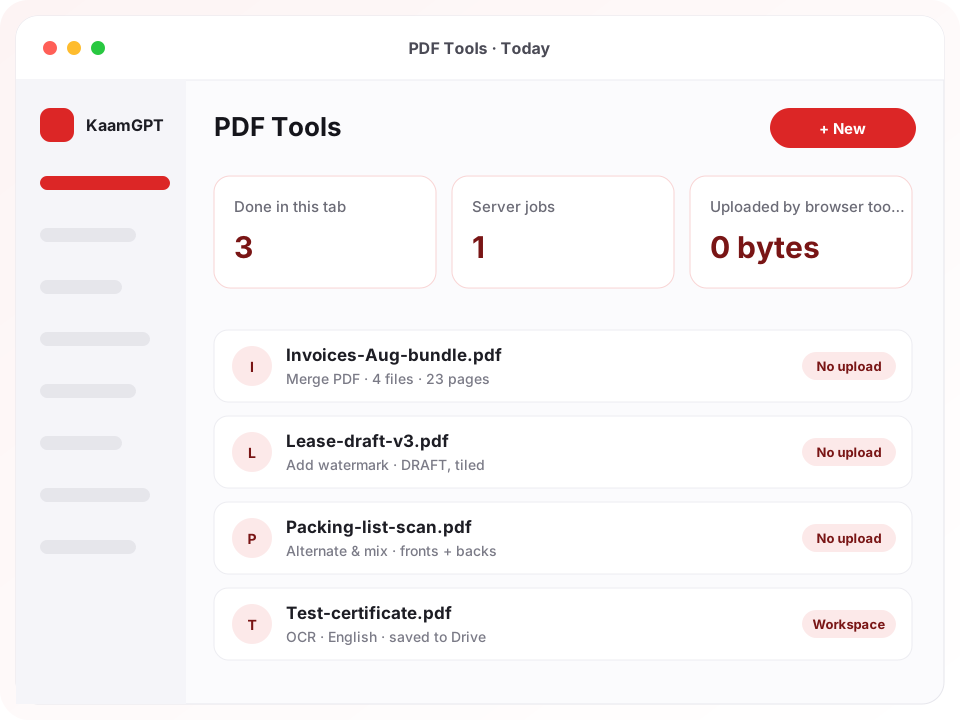
Most PDF chores in an office are small: two invoices to join, a scan that came out sideways, a lease that needs page numbers before it goes to the landlord. The best online PDF tools for businesses in Bengaluru should finish those in seconds without asking anyone to upload a client's file to a stranger's server. KaamGPT PDF Tools does 31 of its 36 jobs inside your own browser tab, with no account and no watermark on the result.
The other five, OCR, Compress, Repair, Sanitize and Password-protect, need real processing power, so they run on the KaamGPT workspace queue and file the finished copy in your company Drive. Knowing which tools stay on your device and which go to a server is the most useful thing to understand before trusting any PDF site with a contract. You can open PDF Tools and try a browser tool on a real document right now.
- 36PDF tools across organise, convert, edit, protect and inspect
- 31run entirely in your browser, with no upload and no account
- ₹0on the Free plan; PDF Tools ships with all four KaamGPT plans
- AES-256encryption when you password-protect a PDF on the server
Thirty-six PDF tools, grouped the way office paperwork actually arrives
Whether you need to merge and split PDFs, sign a lease or password-protect a PDF for a client, each tool does one job, states its limits plainly, and turns up when you type what you would say out loud, such as “combine”, “shrink” or “scan”.
Merge, split and pick pages
Merge PDF joins any number of files in the order you drag them into, with an optional bookmark for each source file. Split works by ranges, every N pages or one file per page, and several outputs arrive as one ZIP. Extract pages and Remove pages accept the print-dialog grammar: 1-3, 5, 8-, odd, even or last.
Undo what the scanner got wrong
Alternate & mix interleaves two PDFs, the fix for a scanner that reads one side only: scan the fronts, flip the stack, scan the backs, and combine with the second file reversed. Reverse page order rescues a stack fed face-down. Rotate turns every page or just the ones you name, and Insert blank pages adds spacers for double-sided printing.
Print layouts and paper sizes
Pages per sheet lays 2, 4, 6, 9 or 16 pages onto one sheet for handouts. Booklet order arranges pages so a double-sided print folds into a booklet. Resize pages fits documents onto A4, A5, A3, Letter, Legal or Tabloid without cropping or stretching, and Split into a poster tiles one page across ordinary sheets you tape together.
Page numbers, watermarks and seals
Add page numbers in six positions using a pattern such as “Page {n} of {total}”, skipping the cover if you like. Add watermark stamps DRAFT or CONFIDENTIAL once or tiled, in your choice of colour, opacity and angle. Stamp an image places a logo, company seal or scanned signature, keeping a transparent PNG's cut-out edges clean.
Convert images, text and pages
Images to PDF turns JPG and PNG photos into pages sized to each image or to A4 and other standard sheets. PDF to images exports pages as PNG or JPG between 72 and 300 dpi. PDF to text pulls plain text or Markdown, Text to PDF paginates pasted notes, and Extract images returns embedded pictures at their original resolution.
Signatures, forms and review marks
Sign PDF lets you draw with a mouse, trackpad or finger, or type your name, then places the signature on the last page unless you pick others. Fill a form types into a PDF's own fields without a desktop editor, Flatten form makes the answers permanent, and Remove comments strips highlights and sticky notes before a reviewed file goes out.
Passwords, permissions and clean files
Remove password opens a file you already hold the password for and saves an unlocked copy; the password never leaves the tab. Password-protect encrypts with AES-256 and sets whether readers may print, copy or comment. Sanitize PDF strips JavaScript, embedded attachments and actions that fire on opening from a file that arrived from outside.
OCR, compression and repair
OCR reads scanned pages in English, Hindi or both and adds an invisible text layer, so you can make a scanned PDF searchable without changing how it looks. Compress offers Lossless, Balanced and Strong settings with an image resolution slider. Repair rebuilds the internal structure of a file that one reader opens and another refuses.
What PDF Tools costs, from the Free plan to Business
PDF Tools carries no separate charge, and no tool is held back for a higher plan, which is worth noting when you shortlist the best online PDF tools for businesses in Bengaluru. For PDF work, plans differ in team size and in the storage that server results write into. All amounts are in rupees (INR), and the payment screen states the exact total before anything is charged; current plan prices list monthly, quarterly and yearly rates.
Free
₹0forever
No card needed
Costs ₹0 and covers five employees: all 36 tools, with server results counted against 512 MB of storage, which suits a founder and a small team merging, signing and protecting everyday paperwork.
- Up to 5 employees
- 1,000 emails / month
- 200 WhatsApp messages / month
- 512 MB storage
- Community support
Starter
₹999/month
or ₹9,590 billed yearly — 20% less
₹999 monthly covers 25 employees with 5 GB of storage, enough room to OCR and compress scans every week, with a 14-day trial first.
- Up to 25 employees
- 25,000 emails / month
- 5,000 WhatsApp messages / month
- 5 GB storage
- Email support
Growth
Recommended₹2,999/month
or ₹28,790 billed yearly — 20% less
₹2,999 monthly stretches to 100 employees with 25 GB, plus priority email support, for firms where several teams archive scanned records.
- Up to 100 employees
- 1,50,000 emails / month
- 30,000 WhatsApp messages / month
- 25 GB storage
- API access
- Priority email support
Business
₹7,999/month
or ₹76,790 billed yearly — 20% less
₹7,999 monthly allows 500 employees, a 100 GB storage allowance, priority support and onboarding, for document-heavy operations spread across many departments.
- Up to 500 employees
- 7,50,000 emails / month
- 1,50,000 WhatsApp messages / month
- 100 GB storage
- API access
- Priority support + onboarding
- Browser tools never touch your storage quota; only OCR, Compress, Repair, Sanitize and Password-protect store files in the workspace.
- Each server job takes one PDF of up to 1 GB, and ten jobs can be running or waiting per workspace at once.
- Paying for three, six or twelve months up front trims 10%, 15% or 20% respectively off what monthly billing would total.
Why does a two-minute PDF job end with a client file on someone else's server?
Ask around any office and the routine is familiar. Someone searches for a free PDF site, uploads the file, waits, downloads the result and moves on. It works, which is why nobody questions it. But that file might be a bank statement, a candidate's PAN card or an unsigned sale agreement, and it has just been copied to a server nobody in the company chose, under terms nobody read.
The second cost is fragmentation. One site merges, another compresses, a third converts photos, and each often comes with its own daily limit, sign-up prompt or stamp on the output. Staff learn five tools badly instead of one well. The best online PDF tools for businesses in Bengaluru fix both problems together: routine work stays on the employee's own device, and the heavy jobs go somewhere the company already controls.
- Confidential scans, from salary slips to property papers, get uploaded to free sites because nobody offered a safer default.
- A single-sided office scanner produces fronts and backs as two separate files, and someone re-sorts the pages by hand.
- Portals and mail servers reject a large scanned PDF, and the only fix people know is to print it and scan again at lower quality.
- A scanned agreement cannot be searched, so finding one clause means scrolling through forty page images.
- A PDF with printing switched off is sent out as if it were locked, when that flag only asks the reader software to comply.
How does a PDF job travel from your file drop to the finished download?
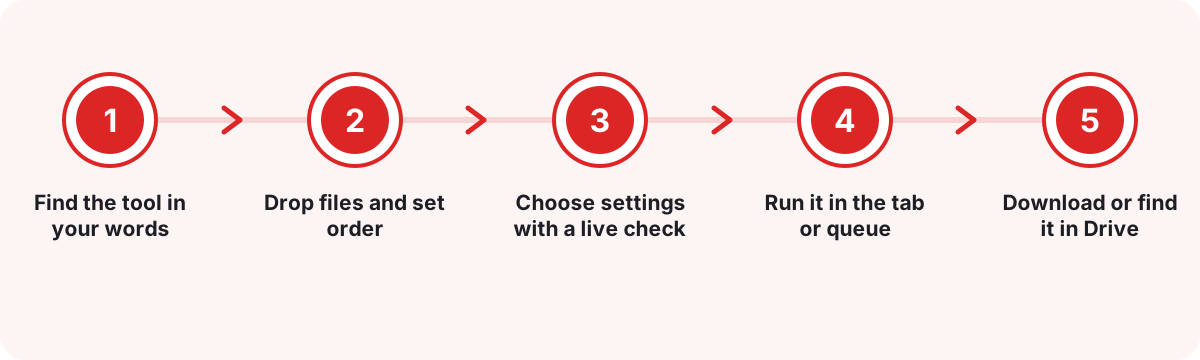
Find the tool in your words
Open PDF Tools from the KaamGPT website or your workspace launcher. The front page groups tools under Organise, Convert, Edit & sign, Protect and Inspect, and the search box understands everyday phrases, so “make smaller” finds Compress and “put together” finds Merge.
Drop files and set order
Drag PDFs or photos onto the drop area. Files the tool cannot take are skipped with a note explaining why. The list can always be reordered by dragging, which matters most for Merge, where the order you set becomes the order of pages in the result.
Choose settings with a live check
Page ranges are checked against the real page count as you type, so asking for page nine of a seven-page file is flagged before anything runs. Each settings panel also explains its trade-off, for example that Strong compression resamples images and cannot be undone.
Run it in the tab or queue
Browser tools finish on your own machine with a progress bar and a Cancel button. Server tools upload the PDF straight to your workspace storage, join a queue, and report progress while OCR or compression works through the pages one by one.
Download or find it in Drive
One result downloads as itself; several arrive as a single ZIP, with clashing names numbered rather than overwritten. Server results are also saved as private files in the workspace Drive, so the finished copy is on record instead of sitting in one person's Downloads folder.
Where do the best online PDF tools for businesses in Bengaluru differ from upload sites and desktop editors?
Most offices already use one of two things: free upload-and-convert websites, or a paid desktop PDF editor on a few machines. Each is good at something, so the fair comparison goes capability by capability.
| What matters | KaamGPT PDF Tools | Free upload-based PDF websites | Paid desktop PDF editor |
|---|---|---|---|
| Where routine jobs run | In your browser tab for 31 of 36 tools; nothing uploaded | On the site's servers after you upload | On the computer it is installed on |
| Account needed | None for browser tools; a workspace for the five server tools | Often none for small files; sign-up for larger ones | A licence per user or machine |
| Merge, split, rotate, number, watermark | Yes, all in the browser | Yes, usually one task per visit | Yes |
| Editing words already on the page | No; it is not a text editor | Some sites offer it | Yes; the main reason to buy one |
| OCR for scanned pages | English, Hindi or both, on the workspace server | Varies by site and language | Usually included; languages vary |
| Password protection | AES-256 with print, copy and comment permissions | Varies; file and password pass through their server | Yes |
| Where results are kept | Your download, plus Drive for server jobs | Your download; retention depends on the site | Wherever the user saves them |
| Cost for a team | Comes with all four KaamGPT plans, Free at ₹0 | Free tiers with limits; paid tiers vary | Per-seat subscription or licence |
The honest verdict. Pick KaamGPT when most of your PDF work is assembling, tidying, signing and protecting documents, and keeping client files off third-party servers matters. Keep a desktop editor licence for the one or two people who rewrite text inside PDFs, redact, or apply certificate-based signatures. Upload sites remain fine for public brochures; for anything carrying a PAN, a salary or a signature, the best online PDF tools for businesses in Bengaluru should not need the upload at all.
Four Bengaluru offices and the PDF routines they settle into
These scenarios are illustrative, drawn from the paperwork such offices commonly handle rather than from any named client.
A six-partner CA practice in Jayanagar
- The situation
- Clients send month-end paperwork as phone photos, password-locked bank statements and oversized scans. Juniors had been uploading all of it to free converter sites to stitch one tidy file per client, which sat badly with the practice's confidentiality promises.
- How KaamGPT fits
- Photos go through Images to PDF, statements through Remove password using the password the client shared, and everything is joined with Merge PDF with one bookmark per source file. Only the occasional file too heavy for a portal is sent to Compress on the server.
- What changes
- Client documents stay on office laptops for the routine steps, and every client ends up with one navigable file instead of a folder of loose images.
A 30-person export unit in Peenya
- The situation
- The office scanner reads one side only, so double-sided shipping invoices and certificates came out as two separate files. Buyers abroad also asked for searchable copies, and nobody could search a scanned document for an invoice number.
- How KaamGPT fits
- Staff scan the fronts, then the backs, and run Alternate & mix to interleave them. The combined file goes through OCR in English, Add page numbers stamps “Page {n} of {total}”, and Password-protect locks the copy that goes to the buyer.
- What changes
- Nobody re-sorts double-sided stacks by hand any more, and a buyer can search the shared PDF for a line item instead of asking for it to be retyped.
A property consultancy in Koramangala
- The situation
- Rental and sale agreements go through several drafts between owner, tenant and lawyer. Staff struggled to spot what had changed between versions, and early drafts sometimes circulated with nothing marking them as unfinished.
- How KaamGPT fits
- Every working draft gets a tiled DRAFT watermark. Before signing, Compare two PDFs shows the changes visually or as a line-by-line text list. The agreed version is signed with Sign PDF, flattened if it arrived as a form, and cleared of review comments before filing.
- What changes
- Changed clauses are caught before anyone signs, and a draft is never mistaken for the final agreement by either party.
A stationery wholesaler on Avenue Road
- The situation
- Supplier catalogues arrive as long PDFs in US Letter size covering hundreds of products. The counter team needed only a few ranges printed on A4 for retailers, plus product photos to send in reply to shop owners' enquiries.
- How KaamGPT fits
- Extract pages pulls the relevant ranges into a new file without touching the original. Resize pages moves them onto A4, Pages per sheet prints four to a sheet for the counter, and Extract images saves product photos at full resolution.
- What changes
- Retailers get a short, printable price list and clear product pictures, while the full catalogue stays intact for next season.
PDF paperwork across Bengaluru, from Peenya sheds to Whitefield campuses
Bengaluru's paperwork looks different in each part of the city. In Peenya and the industrial belts around it, units juggle tender bundles, test certificates and export documents, often scanned on single-sided office machines. Tax practices in Jayanagar and Basavanagudi handle bank statements and GST paperwork for many clients in the days before each return is due. For both, the best online PDF tools for businesses in Bengaluru must finish on the office PC without a slow upload.
In the tech parks of Whitefield and Electronic City, HR and admin teams move offer letters, vendor agreements and onboarding packs, often from laptops on guest Wi-Fi between buildings. Koramangala's startups and property consultancies trade agreement drafts all week, and traders on Avenue Road work from supplier catalogues and price lists. KaamGPT is used by over a hundred companies in cities around India, and PDF Tools behaves the same in each of these settings: in a browser, on the device in hand.
One Karnataka-specific caution. OCR currently reads English and Hindi, not Kannada, and the built-in fonts for watermarks and page numbers cover Latin characters only. For a Kannada seal or line of text, save it as an image and place it with Stamp an image. A drawn signature works in any script, because it is ink rather than type.
Which PDF jobs can stay on your laptop, and which genuinely need a server?
Anything that only rearranges pages or draws onto them can run in the browser. Merging, splitting, rotating, cropping, numbering, watermarking, signing, filling forms and converting to or from images all fall in that group. KaamGPT loads Mozilla's open-source PDF.js and a PDF-writing library into the tab only when you press a button, so the tool list stays light and your own device reads the file.
The remaining five need machinery the browser libraries KaamGPT uses do not offer. Writing AES-256 encryption, stripping embedded scripts, rebuilding a damaged file's structure, resampling images and running Tesseract OCR at 300 dpi all happen on the server, built on qpdf, Tesseract and related open-source libraries. These tools upload the PDF straight to workspace storage, accept files up to 1 GB, and allow ten jobs running or waiting per workspace at once.
The split also shapes permissions. Every employee can use the browser half by default, because it costs the workspace nothing. The server half is a separate permission that admins and managers hold and that an admin can grant to anyone else, so a busy OCR queue reflects decisions rather than accidents. That separation is one practical test for the best online PDF tools for businesses in Bengaluru: who can send company files where.
- Browser, no account: merge, split, extract, remove, rotate, crop, resize, page numbers, watermark, sign, stamp, forms, conversions, compare, document info and remove password.
- Server, signed-in workspace: OCR, Compress, Repair, Sanitize and Password-protect.
- Server results are saved to Drive and count towards the plan's storage quota.
What do offices get wrong when they try to secure a PDF?
The most common mistake is trusting a crop. Crop pages sets the visible box and deletes nothing, so an account number trimmed out of view is still inside the file and still searchable. The tool says so in its own description, and PDF Tools has no redaction feature. If a number must truly disappear, use a dedicated redaction product rather than a crop.
The second mistake is believing permission flags. Password-protect can switch off printing or copying, but those flags are a request to reader software, and the settings panel says exactly that. Real protection is the password to open, which encrypts the content with AES-256. Send that password through a different channel from the file: the PDF by email, the password by phone.
The third is treating a drawn signature as a digital signature. Sign PDF places a visible signature that shows intent, but it does not certify the document or detect later edits. When a portal or counterparty asks for a Digital Signature Certificate, that certificate comes from a Certifying Authority licensed by India's Controller of Certifying Authorities, not from any PDF tool.
- Run Sanitize PDF on files from unknown senders before opening them in a desktop reader.
- Clear the title and author with Edit metadata before a document leaves the company.
- Use Remove comments so internal review notes never reach a client.
- Watermarks deter casual copying, but like any visual mark they can be removed by someone determined.
How should a small office organise PDF work so records hold up at audit time?
Pick one naming pattern and use it everywhere: client or vendor, document type, period. Merge PDF can add one bookmark per source file, so a year-end bundle opens with a contents list that mirrors the pattern. Add page numbers in the “Page {n} of {total}” format before anything is printed or sent, because a numbered bundle makes a missing page obvious at a glance.
Treat OCR as part of archiving rather than a rescue job. A scan that has been through OCR once can be searched for a GSTIN or an invoice number years later; one that has not is a stack of pictures. Leave the option to re-read pages that already have text switched off, since a real text layer beats anything recognition would replace it with.
For uploads to tax, tender or court portals, start Compress on Lossless, which only reorganises the file. If it is still too large, try Balanced at 150 dpi, and keep Strong or grey conversion for scans that only need to be readable. Extract pages never modifies the original, so keep the untouched source in Drive and send the trimmed copy.
- Keep originals, send derivatives, and never overwrite a signed copy.
- OCR before archiving, not on the day an auditor asks for a clause.
Which kinds of Bengaluru businesses lean on PDF Tools most?
- Chartered accountants & tax consultantsMerge client statements with bookmarks, unlock bank PDFs you hold the password for, and compress bundles for portal uploads.
- Law offices & property consultantsWatermark drafts, compare versions of an agreement, sign the final copy and strip review comments before it reaches the other side.
- Manufacturers & exportersInterleave single-sided scans, OCR shipping paperwork in English, and number the pages of tender bundles so nothing goes missing.
- HR & staffing teamsTurn candidates' document photos into one PDF per joiner, and password-protect offer letters saved from HRMS before emailing them.
- Clinics & diagnostic labsCombine report pages into one file per patient visit and protect it with a password before it is shared outside the clinic.
- Schools & coaching centresPrint question papers in booklet order, lay revision notes four pages to a sheet, and watermark material meant for enrolled students.
- Wholesale & distributionPull a few ranges from a long supplier catalogue, resize them to A4, and extract product photos for replies to retailers.
What makes KaamGPT PDF Tools different for document-heavy teams?
Your file stays on your device
For 31 tools, an anonymous visitor's browser makes no calls to the KaamGPT API at all. The PDF is read, changed and saved by your own machine, which also means no upload wait on patchy office Wi-Fi.
Limits stated inside each tool
Sign PDF says it is not a cryptographic signature. Password-protect says permission flags are only a request. Repair says it cannot recover content missing from the bytes. Staff learn the boundaries before relying on them.
One sign-in across the workspace
The same KaamGPT account opens PDF Tools, mailboxes on your company domain, Bills and HRMS, so nobody keeps a separate PDF subscription, a separate password or a separate app to remember.
Server results filed in Drive
Compressed, repaired, sanitised, protected and OCR'd files are saved as private files in the workspace Drive, under the same storage quota and trash as every other company file.
Admins decide who uses server time
Browser tools are on for every employee by default. OCR and compression sit behind a separate permission that admins and managers hold and can grant, so shared processing capacity is used deliberately.
Search that speaks office language
Each tool carries the words people actually type. “Shrink” finds Compress, “front and back” finds Alternate & mix, and “paid stamp” finds Stamp an image, so new staff find the right tool without training.
- Price
- Comes with every plan; Free plan costs ₹0
- Tools
- 36 in total: 31 in the browser, 5 on the workspace server
- Getting started
- No setup for browser tools; server tools need a workspace sign-in
- Platforms
- Any modern browser on desktop, Android or iPhone
- Integrations
- Server results saved to KaamGPT Drive automatically
- Contact
- Phone or WhatsApp for a walkthrough on your own files
Where this applies around Bengaluru, Karnataka
- Bengaluru
- Karnataka
- India
- Koramangala
- Whitefield
- Peenya
- Jayanagar
- Avenue Road
- Electronic City
Frequently asked questions
24 answersHow much do KaamGPT's PDF tools cost?
Nothing extra. PDF Tools comes with all four KaamGPT plans: Free costs ₹0 for a five-person team, Starter is ₹999 monthly, ₹2,999 buys Growth and ₹7,999 buys Business. The plan decides team size and the storage available for server results, not which PDF tools you get. Every amount is in rupees (INR), and checkout confirms the final figure.
Can I use the PDF tools without signing up?
Yes, for 31 of the 36 tools. Merge, split, rotate, crop, page numbers, watermark, sign, forms, conversions, compare and remove password all run in your browser without an account, and the result carries no KaamGPT watermark. The five server tools, OCR, Compress, Repair, Sanitize and Password-protect, need a signed-in workspace, which the Free plan provides.
Is there a free trial of the paid plans?
Every paid tier, whether Starter, Growth or Business, opens with 14 days of trial use, while the Free plan never expires. Because PDF Tools works identically on every plan, most teams can simply start on Free, run OCR and compression on real files, and move up only when they need more employees or more storage.
Are my documents uploaded when I merge or split a PDF?
No. Browser tools open the file with your own device, change it in memory, and hand the result back as a download. For a visitor who is not signed in, the app makes no calls to the KaamGPT API at all. That is why PDF tools without uploading are the sensible default for payslips, agreements and client statements.
Where do server-processed files go, and who owns them?
A server tool uploads your PDF directly to your workspace's private storage, processes it on the queue, and saves the result as a private file in your company Drive. Jobs are scoped to your workspace, download links are signed and short-lived, and your company can download or delete the files like any other Drive file.
What does a team need to do before using PDF Tools?
For browser tools there is no setup: share the link and people start merging. For server tools, create a workspace on the <a href="/signup">KaamGPT sign-up page</a>, invite colleagues, and tick the “Run server tools” permission for employees who need OCR or compression. Admins and managers already hold it, and no computer needs any software installed.
Can ordinary employees run OCR and compression?
Only if someone allows it. Every employee can use the browser tools by default. The server tools sit behind a separate “Run server tools” permission, which company admins and managers have and which an admin can grant to other roles. That keeps shared processing time and storage in the hands of people who choose to use them.
Can PDF Tools read Kannada text in scanned documents?
Not yet. OCR currently recognises English, Hindi, or both together, which covers most invoices, certificates and correspondence in Karnataka offices but not Kannada-only records. Watermark and page-number text is limited to Latin characters too. For a Kannada seal or line, save it as a PNG and place it with Stamp an image; transparent edges are preserved.
Is a signature added with Sign PDF the same as a digital signature certificate?
No. Sign PDF draws a visible signature, typed or hand-drawn, onto the page. It records intent but does not certify the document or detect later edits. When a portal or counterparty asks for a Digital Signature Certificate, that comes from a Certifying Authority licensed by India's Controller of Certifying Authorities and is applied with software built for it.
Can I remove the password from a bank statement PDF?
Yes, if you know the password. Remove password opens the file in your browser with the password you type, then saves an unprotected copy so nobody has to keep entering it. The password never leaves the tab. It cannot break the encryption on a file whose password you do not have, and no honest tool claims otherwise.
How do I shrink a scanned PDF for a government portal upload?
Use Compress in a signed-in workspace. Lossless only reorganises the file's structure and loses nothing. Balanced resamples images to the resolution you pick, 150 dpi by default, while text stays sharp. Strong and the grey-conversion option squeeze harder for scans that only need to be readable, and the result tells you how much space was saved.
Can I move one page to a different position inside a PDF?
There is no drag-a-page organiser yet. To move a page, use Extract pages to pull it into its own file, Remove pages to take it out of the original, then Merge PDF with the files dragged into the order you want. Reverse page order, Booklet order and Alternate & mix handle the common whole-document reorders in one step.
Will PDF Tools add a watermark or logo to my files?
No. Output from PDF Tools carries no KaamGPT branding on any plan, whether the job ran in your browser or on the server. The only watermark on a file is one you add yourself with Add watermark, such as DRAFT or CONFIDENTIAL, in the colour, angle and opacity you choose, on every page or only the ones you name.
Is there a file size limit?
Server tools accept one PDF of up to 1 GB per job, and a workspace can have ten jobs running or waiting together; results also count towards the plan's storage quota. Browser tools have no fixed cap but depend on your device's memory, so a very large scan is better handled on a laptop than on an older phone.
Does PDF Tools work on a mobile phone?
Yes, in the phone's browser. On a small screen the tool list moves into a slide-out menu, and the drop area, settings and result stack into one column. Sign PDF accepts a signature drawn with a finger, and Images to PDF turns photos from the gallery into one document, which suits site visits and deliveries.
How is this different from free PDF websites?
Most free sites process your file on their own servers after you upload it, and many spread features across separate pages with usage limits. KaamGPT keeps routine work in your browser and sends only five heavy jobs to your own workspace, with results in your Drive. That privacy model is why we count it among the best online PDF tools for businesses in Bengaluru.
Should we drop our desktop PDF editor licences?
Not necessarily. A desktop editor still earns its cost for people who rewrite text inside PDFs, redact, convert to Word or apply certificate-based signatures, and PDF Tools does none of those. For everyone else, who mostly merge, split, number, sign, protect and compress, KaamGPT covers the work, so you may need fewer seats than you have today.
Does PDF Tools connect to Drive, Bills or HRMS?
Drive is the direct link: every server result is saved there automatically. Invoices from <a href="/best-gst-invoicing-and-billing-software-in-bengaluru">KaamGPT Bills</a> and letters or payslips from <a href="/best-hrms-and-payroll-software-in-bengaluru">HRMS and payroll</a> save as PDF through the browser's print dialog, ready to merge, number or protect here. Company email then sends the finished file from a mailbox on your own domain.
Who is KaamGPT PDF Tools not a good fit for?
Teams whose main PDF task is editing existing text, converting to Word or Excel, true redaction, or Kannada OCR should look elsewhere or keep a specialised tool alongside. Print shops handling colour-managed press files need prepress software. PDF Tools is built for offices assembling, signing, protecting and archiving everyday business documents.
We already use another PDF tool. How do we switch?
There is nothing to migrate: PDF Tools works on the PDFs you already have, and nothing needs importing. Start by moving one routine, such as month-end merges, and keep the old tool for anything PDF Tools does not do. Archived scans can be passed through OCR gradually, with the searchable copies saved to Drive.
Where do we turn when a PDF job fails?
Help depends on your tier: community help on Free, email on Starter, priority email on Growth, and priority support plus onboarding on Business. Each tool also explains its settings and errors in plain language, and a failed server job tells you what to try next, for example running Repair PDF before retrying.
Who can I speak to about PDF Tools before we commit?
Phone +91 79767 82366, or send a WhatsApp message to the same number. Tell us what documents you handle and how they arrive, whether as scans, phone photos or system exports, and we will show you the tools that fit, including OCR and password protection running in a live workspace.
Can I compare two versions of a contract?
Yes. Compare two PDFs runs in your browser and offers two modes. Visual comparison renders both files and marks every pixel that changed, catching a moved signature or a swapped image. Text comparison lists the lines added or removed, which reads faster when the change is in the wording. A sensitivity setting stops anti-aliasing being reported as a change.
Which PDF tools suit a Bengaluru office that handles client documents?
Look for three things: routine jobs that run without uploading, heavier jobs that run somewhere your company controls, and clearly stated limits. Those are the tests the best online PDF tools for businesses in Bengaluru should pass, whether the office is a CA practice in Jayanagar or an exporter in Peenya shipping a large tender scan.